Setting up a mail image trap
For a recent engagement I had to check if an e-mail was opened (or viewed) by a user. The idea was to get a notification if an e-mail was read, without having access to the e-mail infrastructure.
There are different ways and tools to do this. The available time was limited and because the target environment has HTML e-mail set as default I choose a very straightforward approach : “include a 1 pixel image with a call to a remote server”. This is fairly easy to detect for security conscious users but works fairly well with “average” users.
The goal was not to uniquely identify the users that opened the e-mail, but merely check if the e-mail was opened.
The image trap
A very simplistic script catches the request for an image. I added a basic safety feature that requires a parameter to be set. It’s “security through obscurity” but it prevents the alert being triggered when someone (for example a web crawler) accesses the page.
You have to save the script under a name that’s meaningful to you (for example bigbrother.php) and make it available on a web server.
As a reminder : this script does not uniquely identify which user opened the e-mail (except maybe for the remote IP address included in the alert).
<?php

$mail_rcpt = "<mymail>";
$mail_subject = "Mail Trap Hit";
$run_pw = "123321";
$run_id = "id";

if ($_GET[$run_id] == $run_pw) {
    $output = date(DATE_RFC2822)."\n";
    $output .= "\nSERVER\n---------------\n";

    foreach($_SERVER as $key => $value) {
        $output .= $key . " = " . $value . "\n";
    }

    $output .= "\nREQUEST\n--------------\n";
    foreach($_REQUEST as $key => $value) {
        $output .= $key . " = " . $value . "\n";
    }

    mail( $mail_rcpt, $mail_subject, $output);
}

?>
Composing the e-mail
I used Thunderbird to send the e-mail, with “Compose messages as HTML” as default. Create a new message and then add the image.

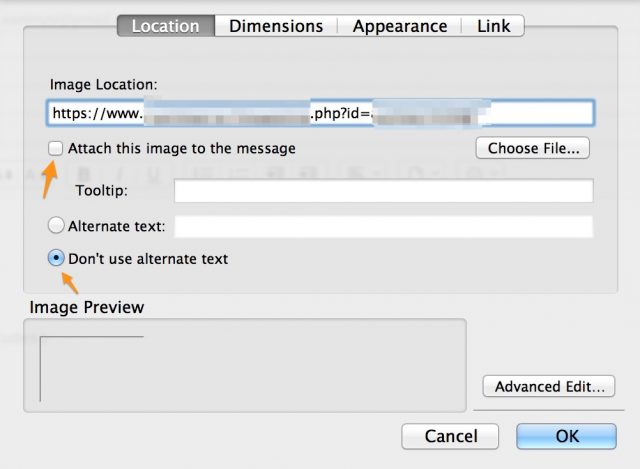
Add the URL to the script that handles the alert. Make sure you disable the option to attach the image to the message and do not provide an alt-text.
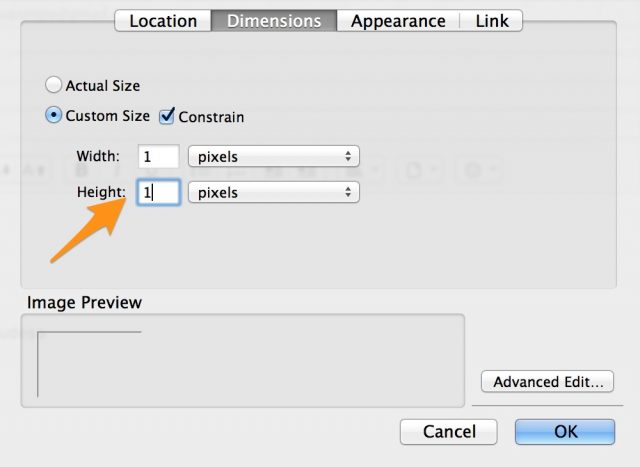
Now change the dimensions of the image to 1×1 pixel.
The next thing is to add some enticing subject, e-mail content and the recipient and click send.
Thunderbird warning
The target environment used Outlook. If you use Thunderbird to open such a message you will receive a warning message that the e-mail contains remote content.

Conclusion
This technique is not something shocking new, it’s making use of one of the features of HTML e-mail. It worked well for my goal but you might have to use something more clever for tracking unique users, like for example the The Social-Engineer Toolkit (SET).





