Jump to Update 10-Apr-2014
Jump to Update 11-Apr-2014
Jump to Update 12-Apr-2014
Jump to Update 24-Apr-2014
CVE-2014-0160

Unless you’ve been hiding under a rock you must have heard about the OpenSSL heartbleed vulnerability CVE-2014-0160.
Software using or linked against OpenSSL 1.0.1 through 1.0.1f (inclusive) is vulnerable. This post focuses on what you have to do and how you can detect it. This post is not on what the vulnerability is about.
No logging
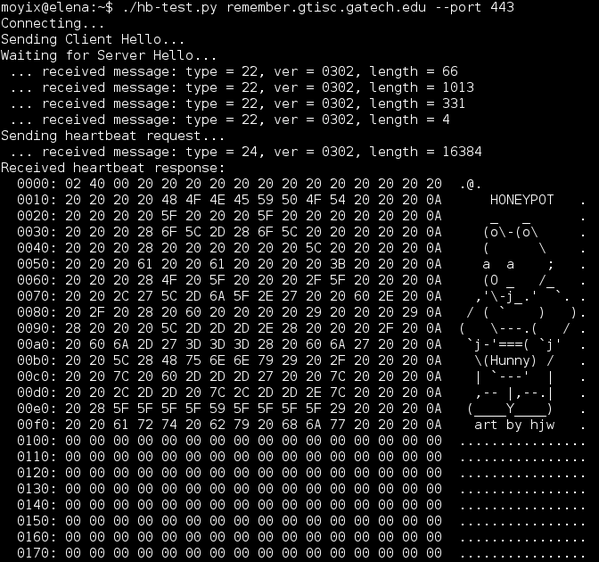
It is important to realize that exploitation of this vulnerability leaves no traces. Exploitation happens in the SSL handshake negotiation, that is BEFORE the service gets the request. Your web server will not log a faulty entry.
Am I affected?
Yes!
Everyone using a computer is affected.
I run a service with SSL, what should I do?
- Patch
- Generate new certificate
- Inform users
- Patch your system!
- If patching is not possible, you can try to recompile your software with the handshake removed from the code by using -DOPENSSL_NO_HEARTBEATS;
- Restart the affected service (reboot?);
- Do you store user data (accounts, chats, emails, banking information, …)?
- No : then you are done
- Yes :
- Request or create a new service (server) certificate and install it;
- Revoke the old certificate;
- Investigate what data might have been breached. Chat? Email?;
- Inform your users and ask them to be vigilant;
- Inform your users that their data might have been leaked;
- Reset the password of all of your users;
If you run a company you should ask (require) your users to avoid the use of public wifi networks. This makes sure that they become not the victim of a MiTM attack (the man-in-the-middle attack were someone impersonates a web site).
Also be aware of the fact that if an attacker was able to record (f.e. through malware on your host, …) your up-until-now encrypted data, that attacker can now decrypt that data / traffic (going back for about two years).
I am a user, what should I do?
- Ask your service provider if they have updated?
- Change your password
- Use a browser that checks for revoked certificates
- Check that your service provider has patched its systems;
- Check that your service provider is using a new certificate;
- How can I verify if my service provider patched and renewed the certificate? See the references in How do I know if my provider has updated it systems;
- Verify that your browser checks if a certificate is revoked;
- See how to verify this under How to verify if my browser checks for revoked certificates?
- Change your password;
- Be aware that data (chats, emails, banking information) that you considered as ‘safe’ before could have been leaked.
Potentially you have to change your passwords with all the service providers that you use. However if they have not updated their systems, changing your password will not help you. Your data will remain at risk until your provider has fixed their systems.
How do I know if my provider has updated it systems?
Ask them! A number of online tools provide checks but be aware that this information might not be completely accurate. Use at your own risk.
The test of SSLlabs shows the output of the certificate in use. Pay special attention to the “Valid From” (or similar date). If it is a new certificate and they passed the test then this means thay took the necessary actions.
How to verify if my browser checks for revoked certificates?
All major browser do some form of revoking checking, they just do it all differently. You can use the post from Spiderlabs to get some more insight.
(Large scale) patching
Patching a large set of servers can be a daunting task. The people at Pantheon describe how they patched 60,000+ Drupal & WordPress sites in 12 hours.
Part of the patching process can (should) also involve requesting a new certificate. If you are part of JaNET you can get free certificates.
Mitigation, block traffic via your firewall
If you are unable to upgrade your system or patch your code then you are left with a mitigation method.
You can block the exploit requests with a firewall rule. ECSC SOC published the set of rules below on Securityfocus.
# Log rules
iptables -t filter -A INPUT -p tcp --dport 443 -m u32 --u32 "52=0x18030000:0x1803FFFF" -j LOG --log-prefix "BLOCKED: HEARTBEAT"

# Block rules
iptables -t filter -A INPUT -p tcp --dport 443 -m u32 --u32 "52=0x18030000:0x1803FFFF" -j DROP
You can also disable Perfect Forward Secrecy (PFS). This can help minimize the damage in the case of a secret key leak.
Detection
Actual exploitation will not trigger a log entry. But you can detect exploitation attempts with a number of IDS rules.
For example Suricata published a set of rules that you can use to detect attempts.
Fox-IT released a number of Snort rules that detect attempts.
alert tcp any [!80,!445] -> any [!80,!445] (msg:"FOX-SRT - Suspicious - SSLv3 Large Heartbeat Response"; flow:established,to_client; content:"|18 03 00|"; depth: 3; byte_test:2, >, 200, 3, big; byte_test:2, <, 16385, 3, big; threshold:type limit, track by_src, count 1, seconds 600; reference:cve,2014-0160; classtype:bad-unknown; sid: 1000000; rev:4;)

alert tcp any [!80,!445] -> any [!80,!445] (msg:"FOX-SRT - Suspicious - TLSv1 Large Heartbeat Response"; flow:established,to_client; content:"|18 03 01|"; depth: 3; byte_test:2, >, 200, 3, big; byte_test:2, <, 16385, 3, big; threshold:type limit, track by_src, count 1, seconds 600; reference:cve,2014-0160; classtype:bad-unknown; sid: 1000001; rev:4;)

alert tcp any [!80,!445] -> any [!80,!445] (msg:"FOX-SRT - Suspicious - TLSv1.1 Large Heartbeat Response"; flow:established,to_client; content:"|18 03 02|"; depth: 3; byte_test:2, >, 200, 3, big; byte_test:2, <, 16385, 3, big; threshold:type limit, track by_src, count 1, seconds 600; reference:cve,2014-0160; classtype:bad-unknown; sid: 1000002; rev:4;)

alert tcp any [!80,!445] -> any [!80,!445] (msg:"FOX-SRT - Suspicious - TLSv1.2 Large Heartbeat Response"; flow:established,to_client; content:"|18 03 03|"; depth: 3; byte_test:2, >, 200, 3, big; byte_test:2, <, 16385, 3, big; threshold:type limit, track by_src, count 1, seconds 600; reference:cve,2014-0160; classtype:bad-unknown; sid: 1000003; rev:4;)
Trisul has a post describing how to use a LUA script in flowmonitor to monitor for attacks.
Verification
Qualys can detect the vulnerability with the QID 42430 check in QualysGuard VM.
The popular nmap tool has a NSE script that can detect vulnerable servers.
nmap -p 443 --script ssl-heartbleed <target>
You can scan for vulnerable sites with the Nessus Vulnerability Scanner
Besides these automated (or semi-automated) tools there are Python scripts that can do the job for you. The heartbleed-masstest script on Github is by far the easiest to use. You should clone it to your machine and then run it against your infrastructure.
git clone https://github.com/tdussa/heartbleed-masstest.git
./ssltest.py --ports "443, 993, 995" hostlist.txt
Next to this script there is the quick and dirty ssltest.py.
Github also contains a list of Top 10000 Alexa sites that were scanned for the OpenSSL vulnerability.
Running a heartbleed honeypot
You can set up a honeypot that mimics a vulnerable server with a Perl script published on Packetstormsecurity. You will have to run the script in a loop to track connections.
while :; do ./hb_honeypot.pl.txt ; sleep 1 ; done
Client software
So far most attention has been towards servers and services. The same vulnerability however also applies to client software. One of the attack vectors that comes immediately to mind is via a MiTM attack.
There is a script on Github, Pacemaker, that allows you to test if client software is vulnerable. After starting the Python server you can test your client software.
./pacemaker.py -t 3 -x 1

wget -O /dev/null https://google.com https://localhost:4433
Leaking private keys, or not
A posting on Errata Security claims that it is not immediately possible that your private key can leak. The user information, meaning credentials and session IDs, would still be at risk.
Other resources
The best resource with information that you can use to talk to your management is a powerpoint presentation from @malwarejake.
Update 10-Apr-2014
An update with new information on the Heartbleed problem.
Beware of ‘Password reset’ phishing scams
It’s no suprise that cybercriminals are abusing heartbleed to send out fake ‘password reset’ emails. A posting on the blog of Sophos, Nakesecurity, has good advice : do not include a login link. Including a link to your login page might sound convenient but it is not a good idea. From a behavioural point of view, it’s so much better if you don’t include a link, because you aren’t educating your users. You should educate them so that they do not click on the sort of links that these scammers love.
Should I change my passwords?
Mashable released a list of sites on which you have to change your password. Use this list with common sense! A far better approach is to check with the online tool of Lastpass if a site is vulnerable and if they have already updated. If they have update then it is time to patch. Changing your password on a site that has not yet updated its infrastructure is not going to help to deal with this issue (changing a password is never a bad thing but it will not help you in this case).
Are your private keys at risk?
A couple of posts claim that private keys were not at risk. These claims have been corrected. Although it is unlikely that your private keys get leaked it is not impossible. There is a bigger risk of leakage when you just reset your service. It still seems best to play on the safe side and have your keys reset.
Exploit attempts dating back to November 2013?
The EFF has a post that describes a case where Terrence Koeman has detected inbound packets dating back to November 2013 that are similar to the packets listed in the widely circulated proof-of-concept exploit. The packets originate from 193.104.110.12 and 193.104.110.20. If you have packet captures from these host (in fact, the entire 193.104.110.0/24 network) you might want to investigate and talk to your local security team.
Sourcefire VRT rules
Sourcefire released Snort rules update for heartBleed.
Enable certificate revocation checks in Chrome
A tweet from Tim Tomes shows how to check that certificate revocation checks are enabled in Chrome.

Thierry Zoller released a comparision of certificate handling in different TLS Stacks and Browsers.

Update 11-Apr-2014
Does it affect clients? – v2
Yes, it does. But not the most popular ones. For mobile devices however, if you are using Android then you should start to worry because it uses OpenSSL widely.
You can test your own clients with the online reverse heartbleed test or by setting up Pacemaker.
usage: pacemaker.py [-h] [-6] [-l LISTEN] [-p PORT]
                    [-c {tls,mysql,ftp,smtp,imap,pop3}] [-t TIMEOUT]
                    [--skip-server] [-x COUNT]

Test clients for Heartbleed (CVE-2014-0160)

optional arguments:
  -h, --help            show this help message and exit
  -6, --ipv6            Enable IPv6 addresses (implied by IPv6 listen addr.
                        such as ::)
  -l LISTEN, --listen LISTEN
                        Host to listen on (default "")
  -p PORT, --port PORT  TCP port to listen on (default 4433)
  -c {tls,mysql,ftp,smtp,imap,pop3}, --client {tls,mysql,ftp,smtp,imap,pop3}
                        Target client type (default tls)
  -t TIMEOUT, --timeout TIMEOUT
                        Timeout in seconds to wait for a Heartbeat (default 3)
  --skip-server         Skip ServerHello, immediately write Heartbeat request
  -x COUNT, --count COUNT
                        Number of Hearbeats requests to be sent (default 1)
I tested a couple of older wget versions (1.11, 1.12 and 1.13) on OSX and Linux and they *seemed* not to be vulnerable but additional tests are needed to be conclusive. According to the post of ISC on client vulnerabilities wget 1.15 is vulnerable.
The Juniper Network Connect 7.1.0 on OSX also seemed not vulnerable.
Should I patch my clients?
Yes, if there is a patch. But most probably no because there will be no patch. You might expect to receive phishing e-mails claiming to have a patch for software x, y, z. If you do install patches, make sure you get the correct, authenticated patch.
Change your password, beware with certificate checking
You should change your password. But ideally only when the site has patched its systems and has updated its certificate.
Changing the password on a still vulnerable site could make it worse. By changing the password on a vulnerable site you might be disclosing your -new- password to attackers. Verifying if a site has issued a new certificate should be straightforward by looking at the issue date (this is one of the checks that LastPass does). There have been stories about CAs not updating the issue date when creating a new certificate for this problem. So use caution if you only verify the issue date. And while you are changing passwords, get a password safe or a password manager (for example Keepass).
IDS rules
If you have an IDS and you have update the ruleset then you should still verify that it is tracking port tcp/443 (or any other SSL port that you use). Because basic IDS devices typically can not decrypt the SSL traffic a lot of system administrators have configured their IDS to not look at this traffic. Having rules without having your IDS look at the traffic is not going to help to detect the traffic. Make sure your rules work. Test them with the available test tools.
SSH
SSH, both client and server, is not vulnerable. It is not using TLS.
Metasploit module
Rapid 7 added a Metasploit module that provides a fake SSL service that is intended to leak memory from client systems as they connect.
Vulnerable vendors
Juniper released an out-of-cycle bulletin covering that ScreenOS firewalls can be exploited by remote unauthenticated attackers. When a malformed SSL/TLS protocol packet is sent to a vulnerable ScreenOS firewall, the firewall crashes. There is no patch yet, the workaround is to disable HTTPS administration.
Cisco released an advisory for its products.
VMware is investigating and determining the impact to VMware Customer Portals and web sites in relation to the OpenSSL 1.0.1 flaw.
Cloudflare Challenge
Do you like challenges? Obtain the keys from the Cloudflare Challenge server.
Extra coverage
The SANS Internet Storm Center has good coverage on vendor issues and solutions. Some of the tips and remarks in this post are based on information from SANS. Make sure you also read the comments pages.
The Register has a good detailed coverage on the heartbleed problem.
F-Secure also blogged about heartbleed.
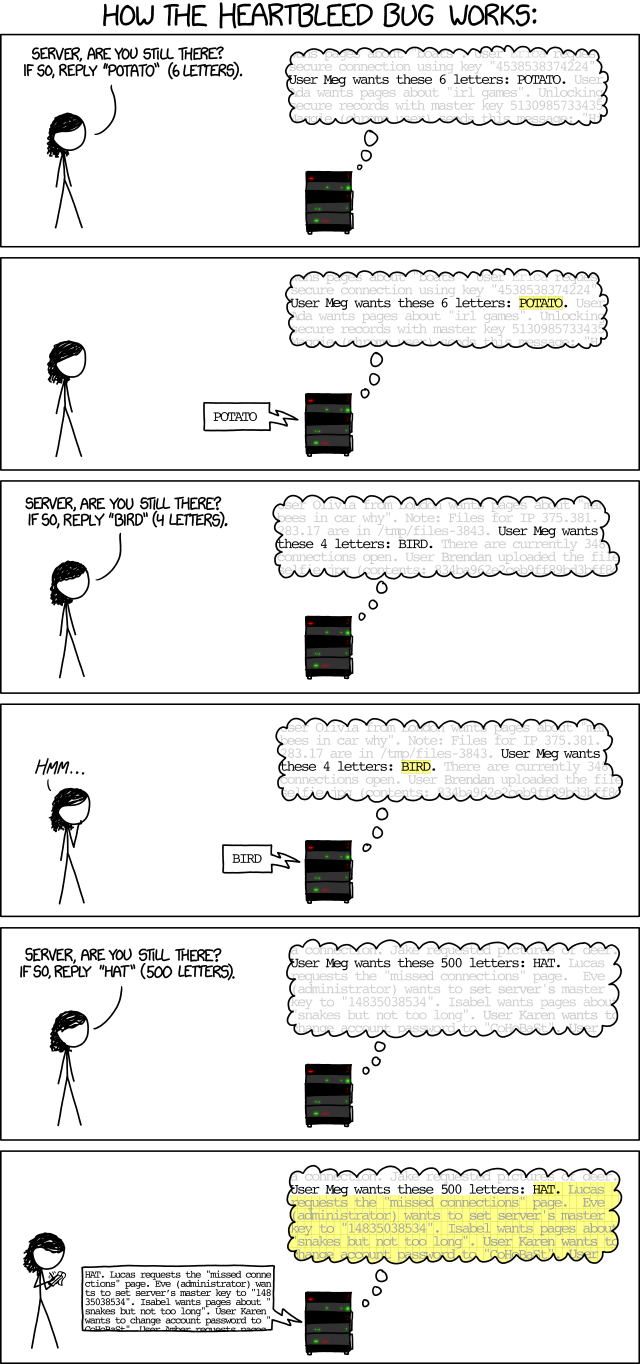
XKCD has a simple and clear explanation.
Support OpenSSL
Although so many critical infrastructure rely on OpenSSL there are little who (financially) support it. Therefore Rapid 7 published a letter from Bugcrowd for a crowdfunding initiative to raise money for a sprint bounty for OpenSSL.
NSA
According to Bloomberg the NSA knew about the heartbleed flaw. Similar reports claim that the NSA caused water to be wet.
Update 12-Apr-2014
Vulnerable Juniper VPNs
Juniper released a bulletin for the heartbleed bug in its SSL VPNs. Server side versions 7.4R1 to 7.4R9 and 8.0R1 to 8.0R3 are vulnerable. Some of the Junos Pulse and Network Connect client side applications are also vulnerable. Patch, regenerate keys, reset user and administrator credentials and delete all the active sessions!
Two factor authentication
A post on the blog of Naked Security describes how two factor authentication could have helped as a mitigation for protecting user credentials with the heartbleed bug.
Update from pfSense
pfSense released version 2.1.2 , an update with a patch for the heartbleed bug.
Detect prior heartbleed attacks
Riverbed released a python script to detect a prior OpenSSL heartbleed attack.
Update 24-Apr-2014
HP iLO devices crash
A quick check to scan your network for devices vulnerable to heartbleed would be to scan your ranges with nmap. If you have any HP iLO devices on your network this can cause problems. Older versions of iLO crash and require you to physically power reset the cards (actual removal of the power cords). This can seem a problem that you can easily deal with but if the server with the buggy iLO is an HP Bladesystem running multiple VMs then a full power reset can have a huge impact. See the HP advisory for more info.
Correlate firewall logs with web server logs
A posting on ISC Sans describes a good approach to detect -abuse- of the heartbleed bug. Filter out the requests logged by your firewall to an SSL service (the post describes a web service but this applies to any service). Then match these requests by logged entries in your service log. If you then have repeated trapped firewall entries that are not in your service log it’s worth investigating further what resources (login attempts, …) these IPs tried to access.
Bugs in the heartbleed detection scripts
If you rely on one single tool to detect vulnerable heartbleed services then you are doing it wrong. The detection tools are also software. Software contains bugs. The tools seem to struggle with specific versions of TLS. So how to deal with this? Use different detection tools and use some form of IDS to detect leakage of data.