Use CryptoLocker to train your incident response team (part 1)

Use CryptoLocker to train your incident response team

An incident response and incident investigation team needs to be able to quickly extract useful information from an incident. Instead of writing long theoretical documents I wanted to use the hands-on approach to serve as an example to train a team to quickly extract IOCs from an ongoing incident. What’s better for doing this than to analyze the behavior of CryptoLocker to train an incident response team and analyze the delivery of CryptoLocker?

IOCs or Indicators of Compromise is a set of data that allows your abuse team to defend against computer intrusions.

The information found through this analysis is not new. It’s mostly meant as a demonstration of a thought process for analyzing a real world computer security incident.

I picked a random mail from the work mailbox with an “interesting” attachment. It’s only after running the attachment in a sandbox that I knew it was a version of CryptoLocker.

The message containing the CryptoLocker was received on 4-February 2015. The analysis was done between the 20th and 22nd February 2015.

I first start with analyzing the e-mail. Not everything is relevant for incident response but it does provide the necessary information for setting the scope.

The second part of this analysis will focus on how the CryptoLocker virus behaves and how to extract additional IOCs.

The virus arrives as an attachment to an e-mail

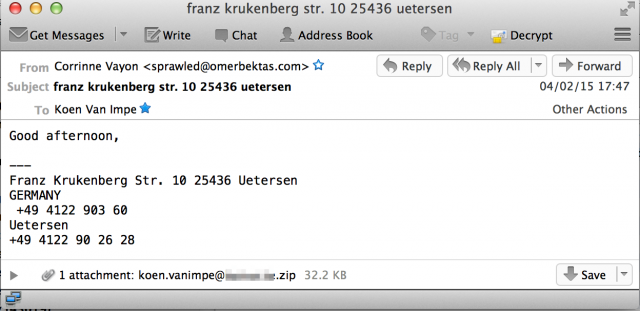
I got a message with subject franz krukenberg str. 10 25436 uetersen coming from “Corrinne Vayon” <sprawled@omerbektas.com>. Below are some of the more interesting e-mail headers. I replaced the e-mail domain with c.d and the receiving host with a.b. The host a.b.c.d is the last receiving e-mail server.

Return-Path: <sprawled@omerbektas.com>
...
Received: from mgtravelpanama.com ([132.248.193.220])
        by a.b.c.d. (8.14.4/8.14.4/Debian-4) with SMTP id t14GkkfG007031
        for <koen.vanimpe@c.d>; Wed, 4 Feb 2015 17:46:48 +0100
...
Message-ID: <ug1v7h5yt@omerbektas.com>
Date: Wed, 04 Feb 2015 10:47:00 -0600
From: "Corrinne Vayon" <sprawled@omerbektas.com>
X-Mailer: Encumbered v2.94
...
Subject: franz krukenberg str. 10 25436 uetersen

The message pretended to be from someone in Germany and contained one attachment, a zipfile with as name my e-mail address (the koen.vanimpe@c.d.zip)


mail-msg

Content-Type: application/zip;
 name="koen.vanimpe@c.d.zip"
Content-transfer-encoding: base64
Content-Disposition: attachment;
 filename="koen.vanimpe@c.d.zip"

Mail relay information

If we take a closer look at the e-mail headers we notice that the last mail relay before we (a.b.c.d) receive the mail is mgtravelpanama.com ([132.248.193.220]. The IP address is the only thing that we can fully trust, the domain name is what is set as the HELO of the relaying server. The level of trust you can put in a HELO message depends on the configuration of the receiving mailserver. Some mailservers check if the HELO or EHLO hostname has an A or MX record, other mailservers do not do this check.

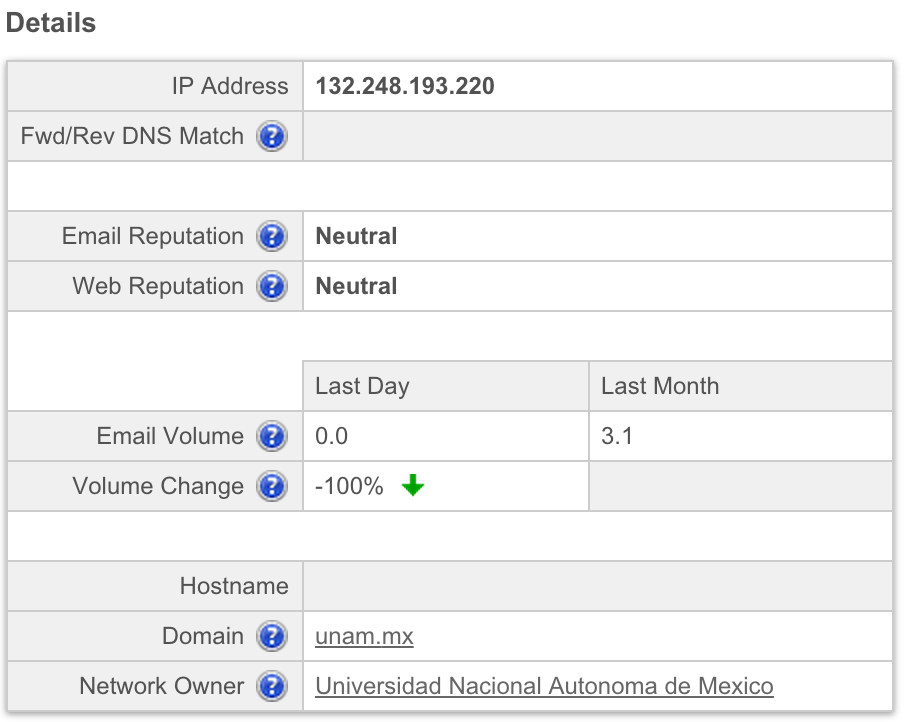
The IP 132.248.193.220 belongs to Universidad Nacional Autonoma de Mexico in Mexico.

inetnum:     132.248/16
...
owner:       Universidad Nacional Autonoma de Mexico

According to Cisco SenderBase this IP does not have a bad reputation. It was also not listed in Spamhaus and Spamcop.


senderbase

The domain used in the HELO of the relay server is mgtravelpanama.com. Although the HELO message should not be fully trusted, it’s still worth having a look at the registration details. This domain is registered in Panama to Sair Sanmartin. It resolves to 199.79.62.54 which is an IP assigned to Confluence Networks Inc in the Texas, US.

Domain Name: MGTRAVELPANAMA.COM
...
Registrant Name: Sair Sanmartin
Registrant Organization: neutralcargo
Registrant Street: rio abajo av la pulida edf rio plaza
Registrant Postal Code: 507
Registrant Country: PA
...
Net Range   199.79.62.0 - 199.79.63.255
Origin AS   AS32787 AS40034
Customer    Confluence Networks Inc. (C03095996)
Comments    Co-located at Data Foundry Austin TX.

The domain was hacked in 2014-05-14 09:12:37 according to Zone-H.

The sender belongs to the domain omerbektas.com. This domain has been registered in Turkey.

Domain Name: OMERBEKTAS.COM
Updated Date: 2015-01-05T13:12:49Z
Creation Date: 2013-12-08T19:19:03Z
Registrant Name: Domain Borsasi
Registrant Country: TR

According to the screenshots this domain has undergone a number of changes. The domain was set in 2006 as a placeholder and having a basic site for a fine arts and architecture faculty in 2007. The site seemed to have been renewed in 2009 and was available until 2011. The screenshots show us the domain became available again in 2014. The current registration “Domain Borsasi” means it’s available for purchase (according to Google Translate this is Turkish for ‘Domain Stock Exchange’). One thing to notice is that the last whois update was done early 2015.

The domain now resolves to 78.135.79.27, a Turkish IP assigned to Sadecehosting.

There are a number of references to an Mr. Omer BEKTAS (+ 90 532 4058339) at wakoweb covering something that has to do with kickboxing.

Correspondent information

The From name is Corrinne Vayon. A Google search returns three hits, all in the US with two of them in Florida. There’s nothing useful to learn from this.

Mail Encumbered

The e-mailer is Encumbered v2.94. I could not find anything worth noting for this mailer.

Message body information

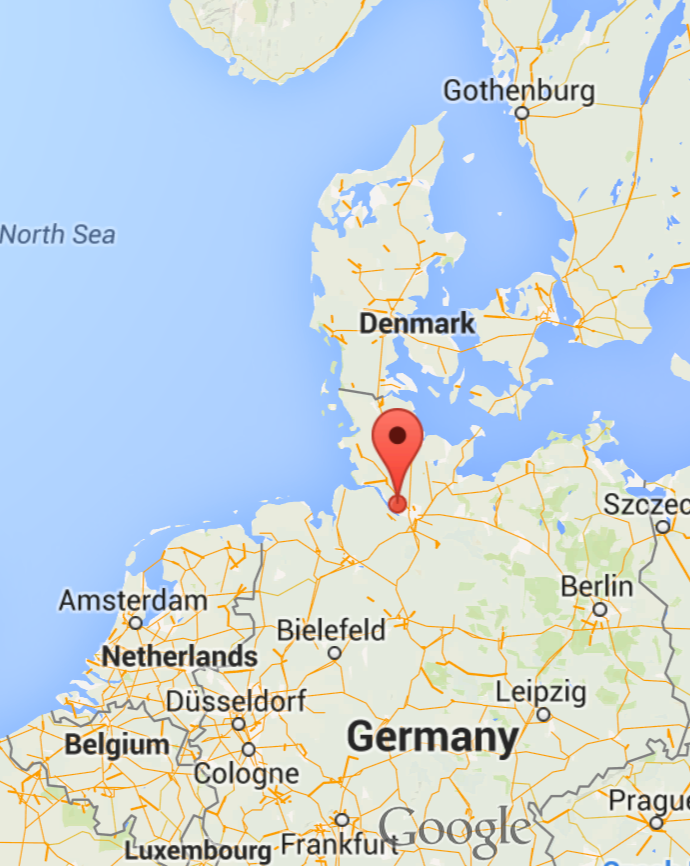
The last thing we can look at it is the content of the mail itself. It pretends to come from Germany, from a town called Uetersen, somewhere in the north of Germany.


gmap-overview

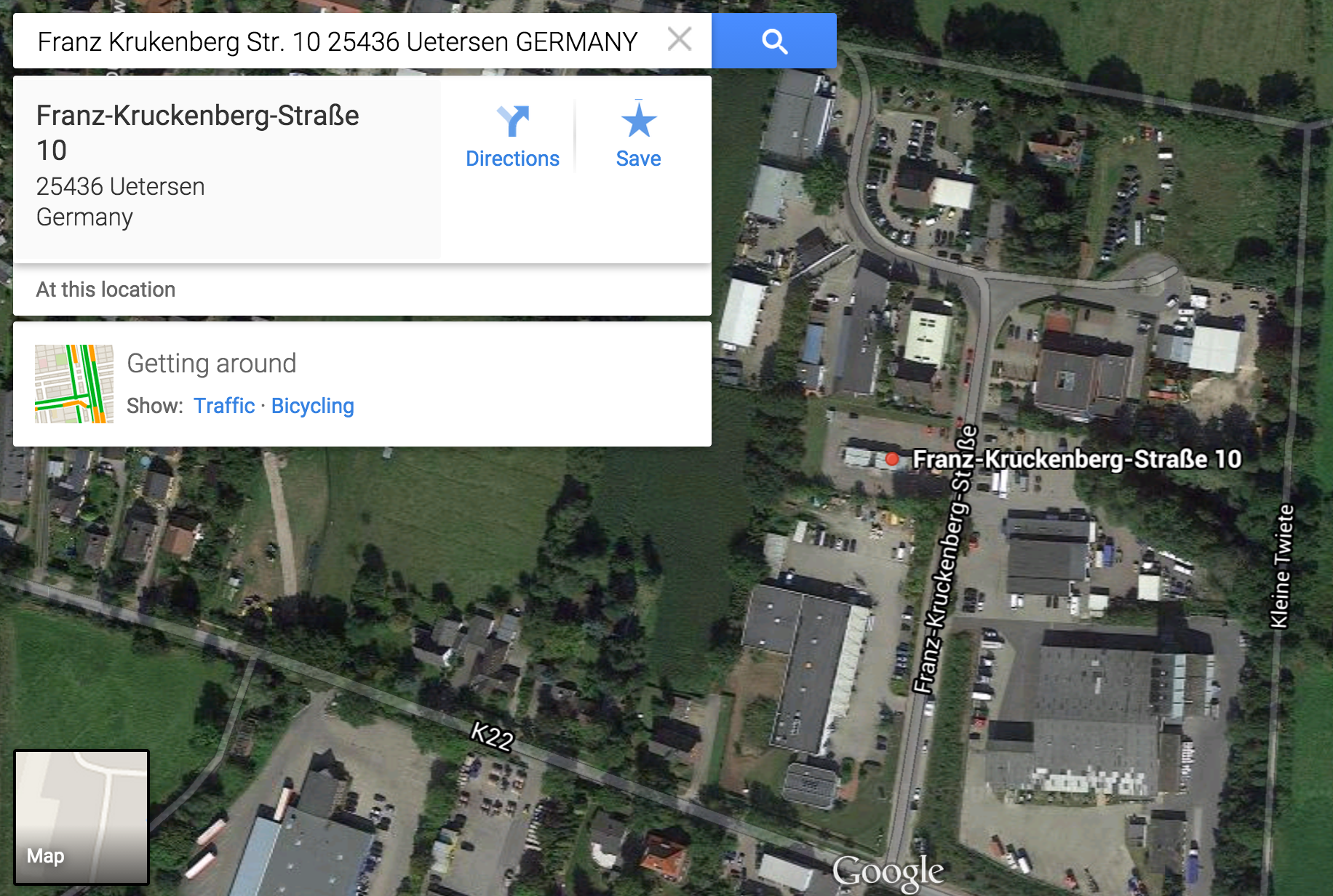
The full address is Franz Krukenberg Str. 10 25436 Uetersen. This address belongs to a metal processing company, Metallbau Breutigam GmbH. They have a website that is hosted in Germany at Strato Rechenzentrum, Berlin.


gmap1

breutigam.de has address 81.169.145.150
...
inetnum:        81.169.144.0 - 81.169.148.255
netname:        STRATO-RZG-KA
org:            ORG-SRA1-RIPE
descr:          Strato Rechenzentrum, Berlin
country:        DE

Similar to the From name, this address seems to be randomly chosen and there’s nothing really useful we can learn from this.

Findings

The data in the e-mail header returned some interesting results. There are no country boundries on the Internet. I’m well aware that some of the information has been spoofed but only looking at the e-mail headers shows that Mexico, Panama, United States, Turkey and Germany are involved. It’s not difficult to image that incidents that cover different countries are a nightmare for law enforcement agencies.

Sender IP address 132.248.193.220 Mexico Universidad Nacional Autonoma de Mexico
 
Sender HELO mgtravelpanama.com Panama Sair Sanmartin ; neutralcargo
 
Sender HELO resolve 199.79.62.54 United States Confluence Networks Inc
 
Sender From omerbektas.com Turkey Domain Borsasi
 
Sender From Mr. Omer BEKTAS Turkey http://www.wakoweb.com/Pdf/10614.pdf
 
Sender From IP 78.135.79.27 Turkey Sadecehosting
 
Postal address sender Franz Krukenberg Str. 10 25436 Uetersen Germany

The use of the domain omerbektas.com shows us that attackers reuse abandoned domains, probably hoping that a good (mail-)reputation of these domains allow them easier access to your mailbox.

Peculiar things to notice

The analysis of the e-mail headers learns us that we should block (or at least look closely) at e-mails coming from 132.248.193.220 or having the HELO mgtravelpanama.com or having the FROM set to @omerbektas.com.

mgtravelpanama.com Hacked in 2014-05-14 09:12:37
 
omerbektas.com No longer used after 2014-02-09
 
omerbektas.com Last change at 2015-01-05
attachment The attachment has a name that corresponds to the receiving e-mail adddress

Analysis of the attachment

The second part of this post will cover the analysis of the attachment and his behavior.

Pipal analyses Ten Million Passwords

Password sets

Mark Burnett recently released a set of passwords with an announcement on his blog in the post Today I Am Releasing Ten Million Passwords.

I used Pipal in the past to analyze WordPress login attempts so I decided to run it against this set.

Pipal analyses Ten Million Passwords

It is no surprise to see that the top password is 123456. The top two words used to build passwords are password and qwerty.

The average password length is between 6 and 8 characters long.

Out of all the passwords, 68% use lower case characters or lower case characters with numbers.

Basic Results

Total entries = 9997958
Total unique entries = 5189397

Top 10 passwords
123456 = 55893 (0.56%)
password = 19580 (0.2%)
12345678 = 13582 (0.14%)
qwerty = 13137 (0.13%)
123456789 = 11696 (0.12%)
12345 = 10938 (0.11%)
1234 = 6432 (0.06%)
111111 = 5682 (0.06%)
1234567 = 4796 (0.05%)
dragon = 3927 (0.04%)

Top 10 base words
password = 23717 (0.24%)
qwerty = 19301 (0.19%)
dragon = 6359 (0.06%)
alex = 5187 (0.05%)
love = 5022 (0.05%)
monkey = 4869 (0.05%)
master = 4736 (0.05%)
shadow = 4560 (0.05%)
football = 4338 (0.04%)
michael = 4275 (0.04%)

Password length (length ordered)
3 = 5914 (0.06%)
4 = 345137 (3.45%)
5 = 494992 (4.95%)
6 = 2543974 (25.44%)
7 = 1662849 (16.63%)
8 = 2980862 (29.81%)
9 = 680815 (6.81%)
10 = 471289 (4.71%)
11 = 263466 (2.64%)
12 = 190996 (1.91%)
13 = 135587 (1.36%)
14 = 76975 (0.77%)
15 = 54237 (0.54%)
16 = 40230 (0.4%)
17 = 15294 (0.15%)
18 = 11985 (0.12%)
19 = 7520 (0.08%)
20 = 6232 (0.06%)
21 = 3100 (0.03%)
22 = 2218 (0.02%)
23 = 1297 (0.01%)
24 = 1045 (0.01%)
25 = 574 (0.01%)
26 = 467 (0.0%)
27 = 269 (0.0%)
28 = 263 (0.0%)
29 = 114 (0.0%)
30 = 110 (0.0%)
31 = 41 (0.0%)
32 = 9 (0.0%)
33 = 19 (0.0%)
34 = 15 (0.0%)
35 = 12 (0.0%)
36 = 16 (0.0%)
37 = 11 (0.0%)
38 = 13 (0.0%)
39 = 6 (0.0%)
40 = 3 (0.0%)
41 = 1 (0.0%)
42 = 1 (0.0%)

Password length (count ordered)
8 = 2980862 (29.81%)
6 = 2543974 (25.44%)
7 = 1662849 (16.63%)
9 = 680815 (6.81%)
5 = 494992 (4.95%)
10 = 471289 (4.71%)
4 = 345137 (3.45%)
11 = 263466 (2.64%)
12 = 190996 (1.91%)
13 = 135587 (1.36%)
14 = 76975 (0.77%)
15 = 54237 (0.54%)
16 = 40230 (0.4%)
17 = 15294 (0.15%)
18 = 11985 (0.12%)
19 = 7520 (0.08%)
20 = 6232 (0.06%)
3 = 5914 (0.06%)
21 = 3100 (0.03%)
22 = 2218 (0.02%)
23 = 1297 (0.01%)
24 = 1045 (0.01%)
25 = 574 (0.01%)
26 = 467 (0.0%)
27 = 269 (0.0%)
28 = 263 (0.0%)
29 = 114 (0.0%)
30 = 110 (0.0%)
31 = 41 (0.0%)
33 = 19 (0.0%)
36 = 16 (0.0%)
34 = 15 (0.0%)
38 = 13 (0.0%)
35 = 12 (0.0%)
37 = 11 (0.0%)
32 = 9 (0.0%)
39 = 6 (0.0%)
40 = 3 (0.0%)
41 = 1 (0.0%)
42 = 1 (0.0%)

        |                                                               
        |                                                               
      | |                                                               
      | |                                                               
      | |                                                               
      | |                                                               
      | |                                                               
      |||                                                               
      |||                                                               
      |||                                                               
      |||                                                               
      |||                                                               
      ||||                                                              
     ||||||                                                             
    |||||||||                                                           
|||||||||||||||||||||||||||||||||||||||||||                             
0000000000111111111122222222223333333333444
0123456789012345678901234567890123456789012

One to six characters = 3390017 (33.91%)
One to eight characters = 8033728 (80.35'%)
More than eight characters = 1964230 (19.65%)

Only lowercase alpha = 3824547 (38.25%)
Only uppercase alpha = 109258 (1.09%)
Only alpha = 3933805 (39.35%)
Only numeric = 2035160 (20.36%)

First capital last symbol = 3575 (0.04%)
First capital last number = 280357 (2.8%)

Single digit on the end = 726687 (7.27%)
Two digits on the end = 710256 (7.1%)
Three digits on the end = 386494 (3.87%)

Last number
0 = 448299 (4.48%)
1 = 759475 (7.6%)
2 = 486742 (4.87%)
3 = 482103 (4.82%)
4 = 368685 (3.69%)
5 = 397570 (3.98%)
6 = 426426 (4.27%)
7 = 392823 (3.93%)
8 = 373087 (3.73%)
9 = 414844 (4.15%)

 |                                                                      
 |                                                                      
 |                                                                      
 |                                                                      
 |                                                                      
 |||                                                                    
||||                                                                    
|||| ||| |                                                              
||||||||||                                                              
||||||||||                                                              
||||||||||                                                              
||||||||||                                                              
||||||||||                                                              
||||||||||                                                              
||||||||||                                                              
||||||||||                                                              
0123456789

Last digit
1 = 759475 (7.6%)
2 = 486742 (4.87%)
3 = 482103 (4.82%)
0 = 448299 (4.48%)
6 = 426426 (4.27%)
9 = 414844 (4.15%)
5 = 397570 (3.98%)
7 = 392823 (3.93%)
8 = 373087 (3.73%)
4 = 368685 (3.69%)

Last 2 digits (Top 10)
23 = 131855 (1.32%)
00 = 100173 (1.0%)
56 = 94657 (0.95%)
11 = 93828 (0.94%)
12 = 90902 (0.91%)
89 = 75595 (0.76%)
88 = 73343 (0.73%)
77 = 71647 (0.72%)
01 = 69344 (0.69%)
69 = 66182 (0.66%)

Last 3 digits (Top 10)
123 = 97607 (0.98%)
456 = 69948 (0.7%)
000 = 39395 (0.39%)
987 = 32821 (0.33%)
988 = 29334 (0.29%)
986 = 29111 (0.29%)
989 = 28904 (0.29%)
990 = 28506 (0.29%)
234 = 28471 (0.28%)
985 = 28087 (0.28%)

Last 4 digits (Top 10)
3456 = 62296 (0.62%)
1987 = 28182 (0.28%)
1986 = 27292 (0.27%)
1988 = 27123 (0.27%)
1990 = 26422 (0.26%)
1985 = 26228 (0.26%)
1989 = 26203 (0.26%)
1234 = 25733 (0.26%)
1991 = 24952 (0.25%)
1984 = 24253 (0.24%)

Last 5 digits (Top 10)
23456 = 61754 (0.62%)
12345 = 20859 (0.21%)
45678 = 14820 (0.15%)
56789 = 14497 (0.14%)
11111 = 11012 (0.11%)
54321 = 8546 (0.09%)
34567 = 6429 (0.06%)
77777 = 5706 (0.06%)
23123 = 5664 (0.06%)
00000 = 5002 (0.05%)

Character sets
loweralpha: 3824547 (38.25%)
loweralphanum: 2985686 (29.86%)
numeric: 2035160 (20.36%)
mixedalphanum: 570968 (5.71%)
mixedalpha: 251578 (2.52%)
upperalphanum: 110227 (1.1%)
upperalpha: 109258 (1.09%)
loweralphaspecial: 39249 (0.39%)
loweralphaspecialnum: 35475 (0.35%)
mixedalphaspecialnum: 13417 (0.13%)
specialnum: 8167 (0.08%)
mixedalphaspecial: 6641 (0.07%)
upperalphaspecialnum: 1457 (0.01%)
upperalphaspecial: 771 (0.01%)
special: 573 (0.01%)

Character set ordering
allstring: 4185383 (41.86%)
stringdigit: 2173421 (21.74%)
alldigit: 2035160 (20.36%)
digitstring: 549645 (5.5%)
othermask: 524398 (5.25%)
stringdigitstring: 363760 (3.64%)
digitstringdigit: 107776 (1.08%)
stringspecialstring: 33429 (0.33%)
stringspecialdigit: 14935 (0.15%)
stringspecial: 7104 (0.07%)
specialstring: 1766 (0.02%)
specialstringspecial: 608 (0.01%)
allspecial: 573 (0.01%)

How can I monitor my accounts to know if they have been leaked?

The post Ten Million Passwords FAQ provides some background information and a few suggestions on how to monitor your own accounts :

  • Create a Google alert for your email address, username, and domain if you have one.
  • Create a Pastebin account and set alerts for your email address, username, and domain if you have one.
  • Sign up for account monitoring at haveibeenpwned.com, pwnedlist.com, breachalarm.com, canary.pw, or a similar site;
  • You can use the online checks of LastPass to verify if your account was in one of the larger database hacks.

TrueCrypt alternatives for Windows, Encrypted Container Systems

TrueCrypt alternatives for Windows, Encrypted Container Systems

A colleague recently asked me “what encryption solution should I now use instead of TrueCrypt?”. After a couple of questions back-and-forth we defined the request to :

have a simple to use, reliable encryption system for individual containers on Windows platforms in a corporate environment

Easy sharing

The containers have to be easy shareable with multiple users, preferably via a cloud storage provider.

Typically users share encrypted containers by emailing them or copying them to removable media. With the popularity of free cloud storage providers users started to share these containers via the cloud. There’s a problem with that. Most of the cloud storage providers have some sort of utility that syncs a users’ folder with the cloud storage. This works fine for individual files inside a folder.

A change in a file causes that single file to be synced to the cloud storage. With encryption however the sync utility can not differentiate between the different files, it can not look “inside” the container and considers the container as one solid file. So the slightest change to any file in the container causes a full sync of that container. This becomes problematic once you start using larger containers.

Ideally the solution has to have support for cloud storage but this feature-request is not considered as a show stopper though.

No Java

The request was extended with not allowing Java based solutions. There are a number of java based encryption solutions that provide the requested features.

However, using Java in a corporate environment (especially for a ‘security solution’) is a very bad idea. Java has a catastrophic security track record and should be avoided in corporate environments.

Test method, crypto strength and reliability

The timeframe of the request was to short to do a profound check of the implemented cryptographic systems. I also did not verify if the application logic or implementation had vulnerabilities.

The comparison focused on “ease of use for end-users”.

The applications were installed on an up to date Windows 7 and 8, various crypto containers were created and small and large files were copied to and removed from the containers.

Solutions

There are a number of different solutions on the market that position themselves as the perfect replacement for TrueCrypt. Besides the solutions already provided in Microsoft Windows you also have a number of free and non-free solutions.

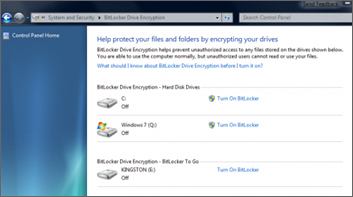
BitLocker

http://windows.microsoft.com/en-US/windows7/products/features/bitlocker

BitLocker is a Windows integrated drive encryption solution but does not provide container support.

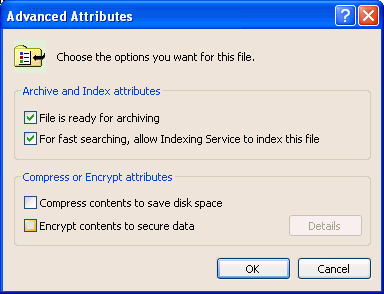
EFS

http://windows.microsoft.com/en-us/windows/what-is-encrypting-file-system

Encrypting File System (EFS) is a feature of Windows that you can use to store information on your hard disk in an encrypted format.

EFS uses the Windows logon credentials to encrypt and decrypt. This means that once you are logged in, whether or not you want access to the encrypted locations, they get decrypted.

The protection of the encrypted files depends on the strength of your password, if you use weak passwords then it’s easy to bypass the protection layer.

There is also no easy way for sharing the encrypted files with other users.

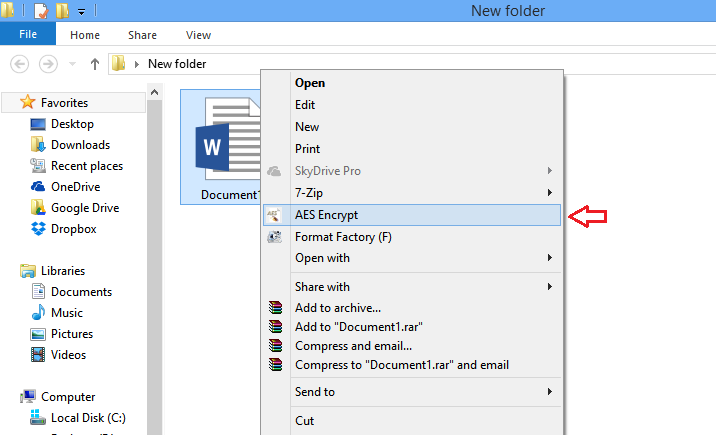
AES Crypt

https://www.aescrypt.com/

“AES Crypt is a file encryption software available on several operating systems that uses the industry standard Advanced Encryption Standard (AES) to easily and securely encrypt files.”

AES Crypt is free and is multi platform but it only allows for single file encryption. The filename of the encrypted file is still visible. This might be considered as an information leak.

AES Crypt supports AES-256.

It is intuitive (right-click and encrypt) to use but the limit to single file encryption only and no filename encryption makes it not suitable for the requested purposes.

Boxcryptor

https://www.boxcryptor.com/

“Boxcryptor is an easy-to-use encryption software optimized for the cloud.”


boxcrypto_overview

Boxcryptor is a cross platform solution that is free for personal use (but with limited features). It can use a local account where you do not have shared permission management and you have to manage the security and integrity of the keys yourself. With a “Boxcryptor account” you can grant other users access and the keys are stored remotely.

Boxcryptor support AES-256, AES-192, AES-128 and RSA for keys. The non-free version supports filename encryption.

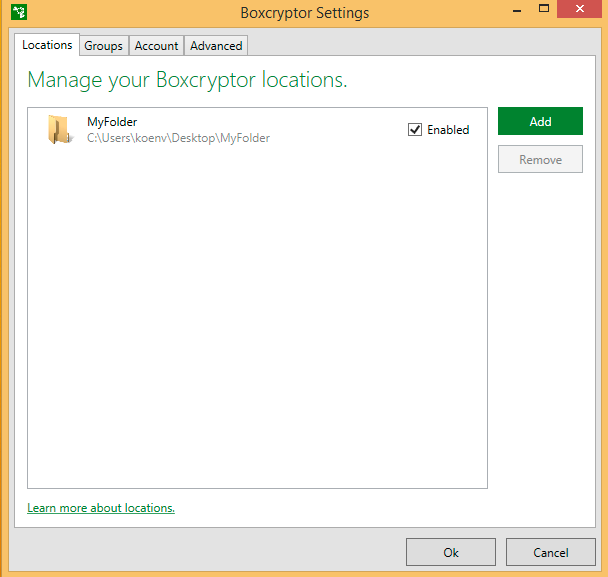
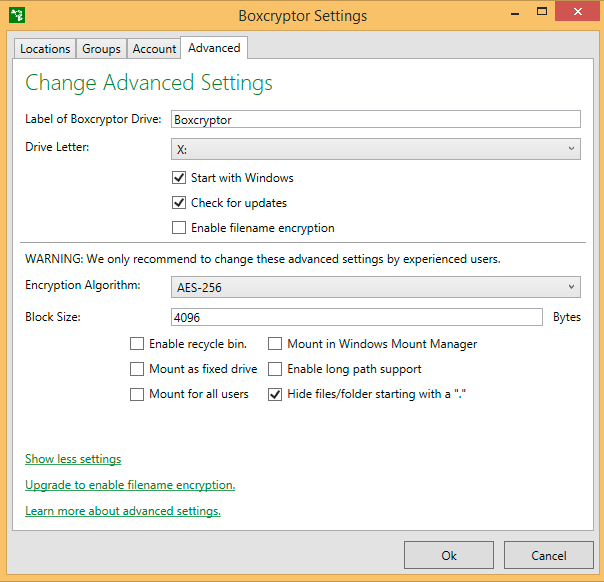
boxcrypto_settings

Although it’s meant to be used on a top of a cloud storage provider, you can also use it to encrypt local containers. On Windows the containers can be assigned a separate drive letter.

The Boxcryptor interface integrates smoothly into windows (tray and explorer). It does not require you to set the size of the container prior to creating the encrypted volume.

Boxcryptor has a company package with LDAP integration, policies and tracking user activities. Especially the later can be important in company environments.

BestCrypt

http://www.jetico.com

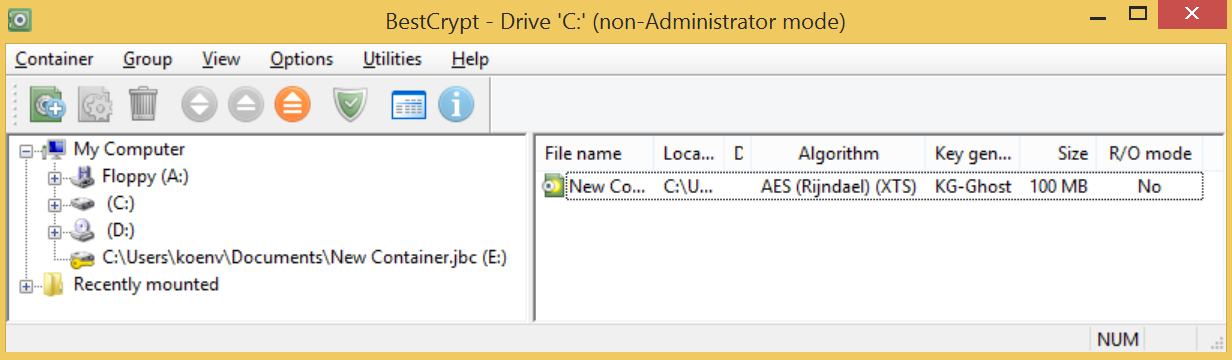
bestcrypto_overview

“Use BestCrypt Container Encryption to securely store selected files or folders on an active computer, shared workstation or network storage.”

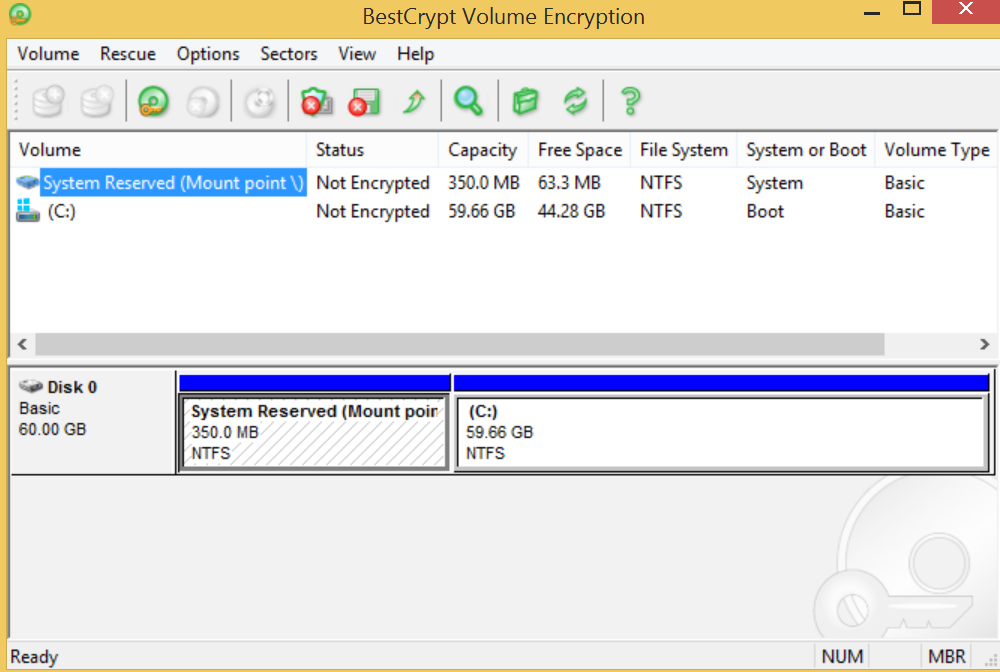
bestcrypto_volume

BestCrypt is a cross platform solution that is available for trial for a limited numbers of days. It supports both containers and volumes and also supports integrated swap file encryption. BestCrypt also supports hidden containers. On Windows the containers can be assigned a separate drive letter.

BestCrypt supports 3-DES, CAST, IDEA, RC6, AES, Serpent and others. The key management can be password based and public key based.


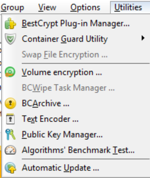
bestcrypto_utils

The interface is straightforward and quite similar to TrueCrypt. The interface has a couple of interesting extras like a text encoder utility (so you can quickly encode / decode texts, this might be useful if you can not use f.e. GPG to transmit messages), an “anti-keylogger feature” (to verify that your password to unlock the volumes is not captured by malware) and an algorithm benchmark test.

BestCrypt requires you to define the size of the container prior to the creation.

VeraCrypt

https://veracrypt.codeplex.com/

“VeraCrypt is a free disk encryption software brought to you by IDRIX (https://www.idrix.fr) and that is based on TrueCrypt.”

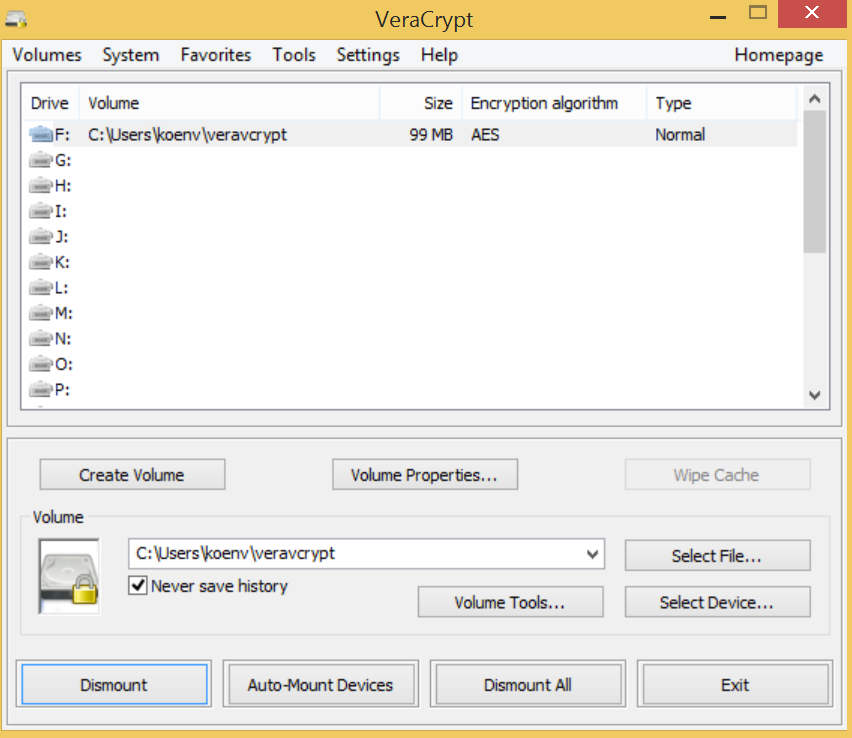
veracrypt_overview

VeraCrypt supports encryption for containers and full system drive encryption and it has all the features you can find in the old TrueCrypt.


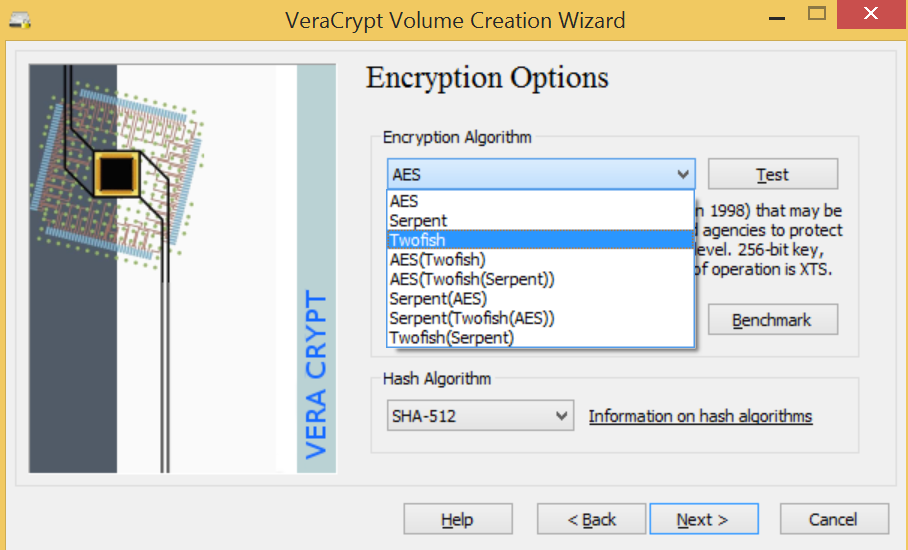
veracrypt_crypto

VeraCrypt supports AES, Twofish and Serpent and different hashing algorithms.

VeraCrypt requires you to define the size of the container prior to the creation.

The interface of VeraCrypt is almost identical to the interface of the old TrueCrypt.

Source code reviews and crypto strength

There has been a lot of discussion whether TrueCrypt was “truly” open source. You could review the code but there were doubts if the binary was indeed compiled from that same source code. This compilation process has been examined at https://madiba.encs.concordia.ca/~x_decarn/truecrypt-binaries-analysis/.

If free available source code is important for you then VeraCrypt (full open source) and BestCrypt (with the development kit) are the best choices.

Having the source code available does not mean that the code has been audited though neither does it mean that people who looked at the code fully understood how the different features worked.

Boxcrypto has not open sourced its code but provides an extensive technical overview at
https://www.boxcryptor.com/en/technical-overview

There’s not a lot of difference in cryptographic strength between the three solutions in their default setup. BestCrypt and VeraCrypt provide more tunable options but the settings of Boxcrypto are acceptable.

Conclusion

The two build-in solutions for Windows, EFS and BitLocker are not a good choice. They either do not cover the needs (BitLocker) are have a questionable security setup (EFS).

AES Crypt is a very simple solution for ad-hoc encryption of individual files but it is to limited for the intended use.

This leaves three possible candidates : Boxcryptor, BestCrypt and VeraCrypt. The latter two mimic the behavior and interface of TrueCrypt. Boxcryptor and Veracrypt have the capability to hide the original filename (I could not find a similar setting in BestCrypt). As far as I could check, only Boxcryptor allows you to have dynamically sized containers. The other two solutions require you to set the size before creating the container.

  Boxcryptor BestCrypt VeraCrypt
Container encryption      
Volume encryption      
Mobile / Traveller kit      
TrueCrypt mimic      
Filename encryption      
Cloud support      
Dynamic container length      
Open Source      
Free license      

Do you want to store the encrypted volumes on a cloud storage provider?

Use Boxcrypto. It provides integrated syncing with Dropbox, Google Drive and WebDAV enabled storage. Boxcrypto is not limited to cloud storage solutions only, you can also use it with local containers.

In need of a free solution that mimics TrueCrypt?

Use VeraCrypt. Although BestCrypt provides a set of extra features, there’s no real compatibility with TrueCrypt. The migration path from TrueCrypt to BestCrypt involves opening the old container, copying the files to a new container and closing the container. That can hardly be called “compatibility”.

Boxcrypto

The Boxcrypto solution seems the most flexible solution for having encrypted, shareable containers on Windows. The choice for the Company Package with policies, centralised management, Active Directory support and support for a master key is advised in a corporate environment.

Espionage for OSX

Although the scope of the request was limited to tools that are available on Windows (all proposed solutions are cross platform though) I’d like to draw the attention to a Mac OSX tool called “Espionage“.

Espionage is an encryption tool that also provides plausible deniability for your data. If you run OSX it’s worth checking out.

Bind DNS Sinkhole, Elasticsearch and Logstash

Sinkhole DNS

I wanted to track DNS queries that get send to nameservers that do not serve a particular domain or network. I used a Bind DNS server that logged the query and returned a fixed response. The logs get parsed by Logstash and stored in Elasticsearch for analysis.

Install bind

Installing bind is easy via the bind9 package :

sudo apt-get install bind9

This will add a new user ‘bind’ and store the configuration files in /etc/bind.

For this setup I want bind to behave as an authoritative nameserver for every possible domain and always reply with the same result.

The core bind configuration file is /etc/bind/named.conf. I commented the default zones and added a custom ‘catch-all’ DNS zone.

include "/etc/bind/named.conf.options";
include "/etc/bind/named.conf.local";
#include "/etc/bind/named.conf.default-zones";

zone "." {
    type master;
    //type hint;
    file "/etc/bind/db.root.honeypot";
};

The zone file, /etc/bind/db.root.honeypot, has the minimal configuration to reply with 127.0.0.1 (change this to another IP if you want to track what happens after the DNS query).

$TTL    10
@       IN      SOA     localhost. root.localhost. (
                              1         ; Serial
                             10         ; Refresh
                             10         ; Retry
                             10         ; Expire
                             10 )       ; Negative Cache TTL
;

        IN  NS  localhost   
*       IN  A   127.0.0.1

You also have to configure some of the options of bind in /etc/bind/named.conf.options.

options {
    directory "/var/cache/bind";

    // forwarders {
    //  8.8.8.8;    
    // };

    dnssec-validation auto;
    recursion no;
    allow-transfer { none; };

    auth-nxdomain no;    # conform to RFC1035
    // listen-on-v6 { any; };
    statistics-file         "/var/log/named/named_stats.txt";
    memstatistics-file      "/var/log/named/named_mem_stats.txt";
    version "9.9.1-P2";
};

logging{

  channel query_log {
    file "/var/log/named/query.log";
    severity info;
    print-time yes;
    print-severity yes;
    print-category yes;
  };

  category queries {
    query_log;
  };
};

The options above disable recursion, return a custom version number and enable logging.

  • recursion no : disable recursive lookups;
  • allow-transfer { none; } : no zone transfers allowed;
  • statistics-file and memstatistics-file : DNS stats (via rndc);
  • version “9.9.1-P2” : return a custom server version;
  • // listen-on-v6 { any; }; : do not listen on IPv6;

If the logging directory, /var/log/named, doesn’t exist already then you have to create it and make sure it is owned by the user bind.

mkdir /var/log/named
sudo chown bind /var/log/named

Then restart bind, check the output of your syslog messages and try some lookups.

sudo /etc/init.d/bind9 restart
host www.google.com 127.0.0.1

Apparmor.d and bind

It’s possible that you get a permission denied on the log directory when restarting bind on Ubuntu.

named[11625]: isc_stdio_open '/var/log/named/query.log' failed: permission denied

This is caused by AppArmor. You can allow write access to these files by changing the AppArmor profile /etc/apparmor.d/usr.sbin.named and check that it contains

/var/log/named/** rw,
/var/log/named/ rw,

Logstash configuration for Bind

Now that bind is logging properly to a text file we can configure Logstash to parse the Bind log files. The Logstash configuration file is the one that I previously used for Using ELK as a dashboard for honeypots. I only list the relevant changes below. You can get all of the configuration from Github.

############################################################
# DNS honeypot
#
  if [type] == "dnshpot" {
    grok {
       match => [ "message", "%{MONTHDAY:day}-%{MONTH:month}-%{YEAR:year} %{TIME:time} queries: info: client %{IP:srcip}#%{DATA:srcport}%{SPACE}\(%{DATA:hostname}\): query: %{DATA:hostname2} %{DATA:querytpe3} %{DATA:querytype} %{DATA:querytype2} \(%{IP:dstip}\)" ]
    }
    mutate {
      add_field => [ "dstport", "53" ]
    }
    mutate {
      strip => [ "srcip", "dstip", "hostname", "srcport" , "hostname2", "querytype", "querytype2" ]
    }
    mutate {
      add_field => [ "timestamp", "%{day}-%{month}-%{year} %{time}" ]
    }
    date {
      match => [ "timestamp", "dd-MMM-YYYY HH:mm:ss.SSS" ]
    }
  }

Logrotating

Do not forget to rotate the query log file.

/var/log/named/query.log {
        monthly
        rotate 12
        compress
        delaycompress
        missingok
        notifempty
        create 644 root root
}

Simple TCP and UDP network server in Python

Something ‘netcat’

One of the things that I find lacking in netcat is a timestamp feature. You can log the requests but you can not easy log the exact timestamps. Instead of writing a wrapper around netcat I wrote a small python script that can act as a simple TCP or UDP network server.

A lot of the code is inspired on code at http://ilab.cs.byu.edu/python/select/echoserver.html and http://www.binarytides.com/udp-socket-programming-in-winsock/

Github

All of the code can be found on Github together with a basic UDP client and server script. You can download the scripts easily

svn export https://github.com/cudeso/tools/trunk/network-servers

Feel free to contribute.

simple-server.py

The script requires a couple of parameters

  1. -p –port : the network port;
  2. -t –protocol : the network protocol;
  3. -l –logfile : where to log the requests;
  4. -i –ip : the ip of the server, only used for logging (can be free text);
  5. -e –echo (not mandatory) : reply the request (default ‘echo’);
  6. -s –single (not mandatory) : stop after one single request;

The request size in the script is limited to 1024. No other sanity checks are done.

Start it with

./simple-server.py -p 9898 -t udp -l 9898.udp.log -i 192.168.1.1

Because of the lack of security checks it’s best to run this simple server in a disposable virtual server.

Analyzing WordPress login attempts with Pipal

WordPress login form and Pipal

I manage a number of WordPress sites. These sites get a lot of login attempts. Instead of dropping these attempts I decided to log them and build some stats.

I also wanted “something” that I could use to play with Pipal. Pipal is a password analyzer that provides useful statistics on a list of passwords. Note that it is NOT a password cracker.

I created a fake WordPress login form (wp-login.php) and installed this on a number of un-used domains. These domains all point to the same template location. Every connection to any of these domains is suspicious (or at least unusual) because there’s nothing to be found at these URLs.

You can easily recreate a version of wp-login.php on your own. Go to a normal WordPress login page and save the HTML. Then strip the calls for external files (CSS, Javascript, …) and include the necessary CSS inline.

I added one hidden HTML form field (called ‘testcookie’).

<p class="submit">
    <input type="submit" name="wp-submit" id="wp-submit" class="button button-primary button-large" value="Log In" />
    <input type="hidden" name="redirect_to" value="wp-login.php" />
    <input type="hidden" name="testcookie" value="1" />
</p>

I then extract timestamp, source IP, browser identification, username and password from the POST submit.

$record = $time . " - " . $ip . " - log: " . $log . " - pwd: " . $pwd . " - testcookie: " . $testcookie . " - browser: " . $browser;

Submitted credentials

Between 31-Oct-2014 and 12-Dec-2014 there were 36163 submits.

Network sources

75% percent of the requests came from one AS in the United Kingdom.

Form test cookie or not?

Out of the 36163 requests, 782 requests had the form test cookie set. These requests came from different sources but all had the same browser identification (see below for the browser id with 782 requests). The timing makes it very unlikely that these were manual requests (multiple attempts per second).

Based on the timing, the different network sources and a similar request type I assume these were made with the same tool(kit). I could not find any other requests (GET or POST) from these IPs in the logs, meaning that the submit is done regardless if there’s a WordPress form or not.

Browser identification

The bulk of the requests did not had a browser identification set. The Firefox browser “USA\Miami Style” was used by different network sources.

Usernames

The list of usernames did not contain any surprises. Two types of submits (6920 and 6812 times) contained the full domain (www.domain.be or domain.be) as the username. I replaced the actual name by “domain.be” in the result below.

Password analysis with Pipal

Pipal is a password analyzer, you can get it from Github. It needs Ruby 1.9.x but requires no other dependencies.

./pipal.rb wp-login-attempts-PASSWORDS 
Generating stats, hit CTRL-C to finish early and dump stats on words already processed.
Please wait...
Processing:    100% |oooooooooooooooooooooooooooooooooooooooooooooooooooooooooooooooooooooooooooooooooooooooooooooooooooooo| Time: 00:00:02


Basic Results

Total entries = 36163
Total unique entries = 10179

Top 10 passwords
admin = 55 (0.15%)
123456 = 55 (0.15%)
12345678 = 51 (0.14%)
pass = 50 (0.14%)
123 = 49 (0.14%)
1234 = 49 (0.14%)
password = 49 (0.14%)
12345 = 48 (0.13%)
test = 46 (0.13%)
111111 = 46 (0.13%)

Top 10 base words
admin = 254 (0.7%)
qwerty = 161 (0.45%)
password = 153 (0.42%)
test = 98 (0.27%)
pass = 93 (0.26%)
qwer = 83 (0.23%)
qweasdzxc = 57 (0.16%)
administrator = 51 (0.14%)
qwert = 50 (0.14%)
abcd = 48 (0.13%)

Password length (length ordered)
1 = 108 (0.3%)
2 = 64 (0.18%)
3 = 310 (0.86%)
4 = 3107 (8.59%)
5 = 3266 (9.03%)
6 = 11588 (32.04%)
7 = 6754 (18.68%)
8 = 7729 (21.37%)
9 = 1417 (3.92%)
10 = 724 (2.0%)
11 = 290 (0.8%)
12 = 334 (0.92%)
13 = 122 (0.34%)
14 = 80 (0.22%)
15 = 107 (0.3%)
16 = 47 (0.13%)
17 = 32 (0.09%)
18 = 15 (0.04%)
19 = 13 (0.04%)
20 = 8 (0.02%)
21 = 8 (0.02%)
22 = 8 (0.02%)
23 = 8 (0.02%)
24 = 16 (0.04%)
27 = 8 (0.02%)

Password length (count ordered)
6 = 11588 (32.04%)
8 = 7729 (21.37%)
7 = 6754 (18.68%)
5 = 3266 (9.03%)
4 = 3107 (8.59%)
9 = 1417 (3.92%)
10 = 724 (2.0%)
12 = 334 (0.92%)
3 = 310 (0.86%)
11 = 290 (0.8%)
13 = 122 (0.34%)
1 = 108 (0.3%)
15 = 107 (0.3%)
14 = 80 (0.22%)
2 = 64 (0.18%)
16 = 47 (0.13%)
17 = 32 (0.09%)
24 = 16 (0.04%)
18 = 15 (0.04%)
19 = 13 (0.04%)
20 = 8 (0.02%)
21 = 8 (0.02%)
22 = 8 (0.02%)
23 = 8 (0.02%)
27 = 8 (0.02%)

      |                                                                 
      |                                                                 
      |                                                                 
      |                                                                 
      |                                                                 
      | |                                                               
      |||                                                               
      |||                                                               
      |||                                                               
      |||                                                               
      |||                                                               
    |||||                                                               
    |||||                                                               
    |||||                                                               
    ||||||                                                              
||||||||||||||||||||||||||||                                            
0000000000111111111122222222
0123456789012345678901234567

One to six characters = 18443 (51.0%)
One to eight characters = 32926 (91.05'%)
More than eight characters = 3237 (8.95%)

Only lowercase alpha = 25960 (71.79%)
Only uppercase alpha = 33 (0.09%)
Only alpha = 25993 (71.88%)
Only numeric = 4043 (11.18%)

First capital last symbol = 16 (0.04%)
First capital last number = 113 (0.31%)

Single digit on the end = 2556 (7.07%)
Two digits on the end = 441 (1.22%)
Three digits on the end = 935 (2.59%)

Last number
0 = 600 (1.66%)
1 = 2855 (7.89%)
2 = 748 (2.07%)
3 = 1394 (3.85%)
4 = 585 (1.62%)
5 = 533 (1.47%)
6 = 539 (1.49%)
7 = 425 (1.18%)
8 = 370 (1.02%)
9 = 495 (1.37%)

 |                                                                      
 |                                                                      
 |                                                                      
 |                                                                      
 |                                                                      
 |                                                                      
 |                                                                      
 |                                                                      
 | |                                                                    
 | |                                                                    
 | |                                                                    
 |||                                                                    
||||| |                                                                 
||||||||||                                                              
||||||||||                                                              
||||||||||                                                              
0123456789

Last digit
1 = 2855 (7.89%)
3 = 1394 (3.85%)
2 = 748 (2.07%)
0 = 600 (1.66%)
4 = 585 (1.62%)
6 = 539 (1.49%)
5 = 533 (1.47%)
9 = 495 (1.37%)
7 = 425 (1.18%)
8 = 370 (1.02%)

Last 2 digits (Top 10)
23 = 956 (2.64%)
12 = 253 (0.7%)
34 = 250 (0.69%)
11 = 244 (0.67%)
21 = 209 (0.58%)
56 = 199 (0.55%)
00 = 170 (0.47%)
45 = 154 (0.43%)
89 = 122 (0.34%)
66 = 112 (0.31%)

Last 3 digits (Top 10)
123 = 912 (2.52%)
234 = 225 (0.62%)
456 = 174 (0.48%)
321 = 166 (0.46%)
111 = 148 (0.41%)
345 = 125 (0.35%)
000 = 112 (0.31%)
789 = 97 (0.27%)
666 = 71 (0.2%)
555 = 61 (0.17%)

Last 4 digits (Top 10)
1234 = 213 (0.59%)
3456 = 136 (0.38%)
2345 = 125 (0.35%)
1111 = 103 (0.28%)
6789 = 76 (0.21%)
4321 = 76 (0.21%)
3123 = 61 (0.17%)
5678 = 60 (0.17%)
2222 = 55 (0.15%)
7890 = 54 (0.15%)

Last 5 digits (Top 10)
23456 = 136 (0.38%)
12345 = 125 (0.35%)
11111 = 94 (0.26%)
56789 = 71 (0.2%)
54321 = 62 (0.17%)
23123 = 57 (0.16%)
45678 = 55 (0.15%)
67890 = 50 (0.14%)
23321 = 49 (0.14%)
55555 = 48 (0.13%)

Character sets
loweralpha: 25960 (71.79%)
loweralphanum: 5198 (14.37%)
numeric: 4043 (11.18%)
loweralphaspecial: 200 (0.55%)
loweralphaspecialnum: 190 (0.53%)
mixedalphanum: 144 (0.4%)
mixedalpha: 128 (0.35%)
special: 58 (0.16%)
specialnum: 46 (0.13%)
mixedalphaspecialnum: 34 (0.09%)
upperalpha: 33 (0.09%)
upperalphaspecial: 17 (0.05%)
mixedalphaspecial: 12 (0.03%)

Character set ordering
allstring: 26121 (72.23%)
alldigit: 4043 (11.18%)
stringdigit: 4041 (11.17%)
othermask: 830 (2.3%)
digitstring: 465 (1.29%)
stringdigitstring: 243 (0.67%)
stringspecialstring: 163 (0.45%)
digitstringdigit: 77 (0.21%)
stringspecialdigit: 72 (0.2%)
allspecial: 58 (0.16%)
stringspecial: 34 (0.09%)
specialstring: 12 (0.03%)
specialstringspecial: 4 (0.01%)

Using ELK as a dashboard for honeypots

ELK setup for honeypots

The Elasticsearch ELK Stack (Elasticsearch, Logstash and Kibana) is an ideal solution for a search and analytics platform on honeypot data.

There are various howto’s describing how to get ELK running (see here, here and here) so I assume you already have a working ELK system.

This post describes how to import honeypot data into ELK. The easiest way to get all the necessary scripts and configuration files is by cloning the full repository.

git clone https://github.com/cudeso/cudeso-honeypot.git

If you know your way around with git / Github it suffices to get the raw version of the individual files (the proxy scripts and the Kibana interface).

Note that not everything is tracked in this ELK setup, I only store the information that I find useful for my proper use.

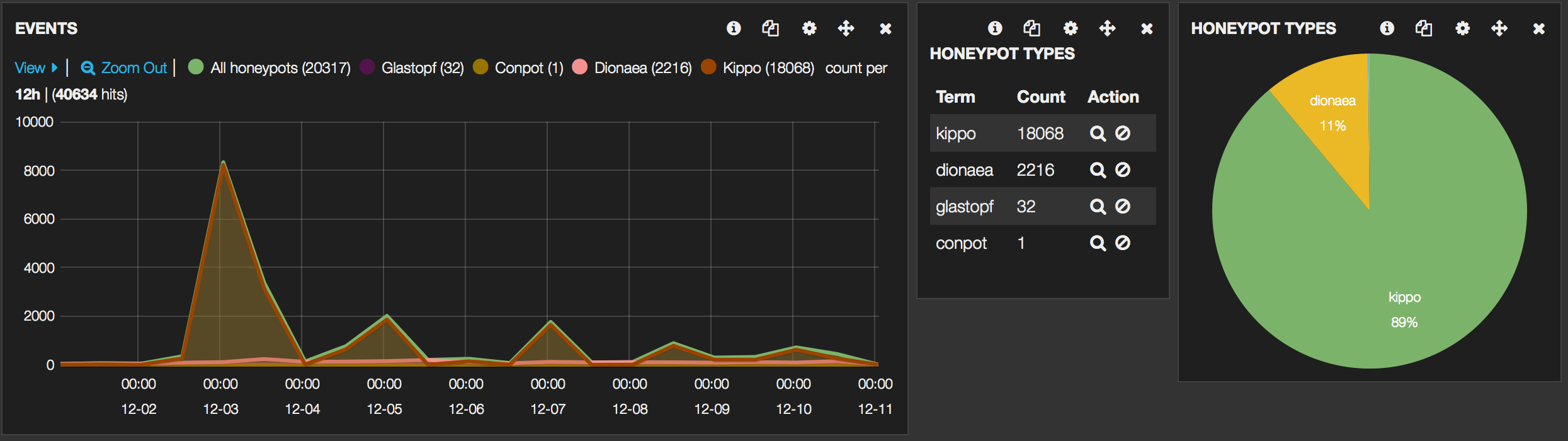
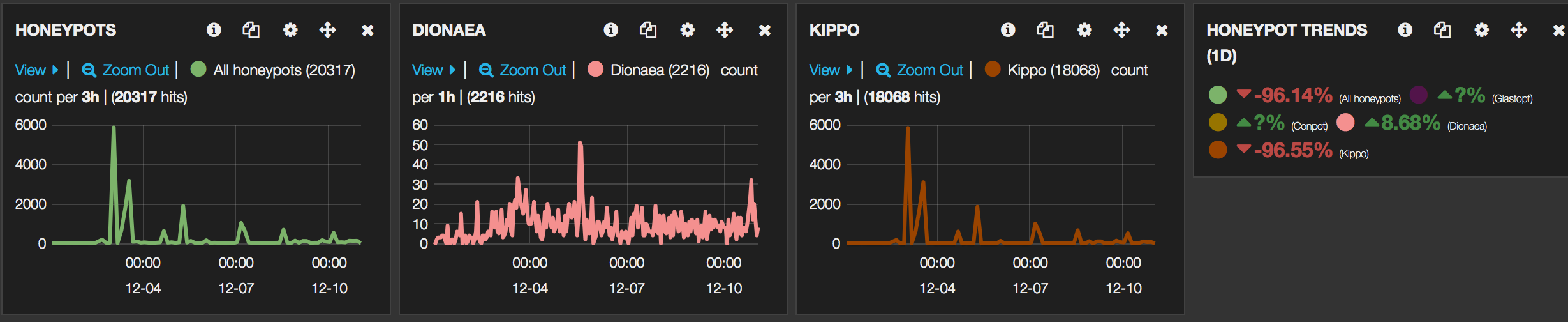
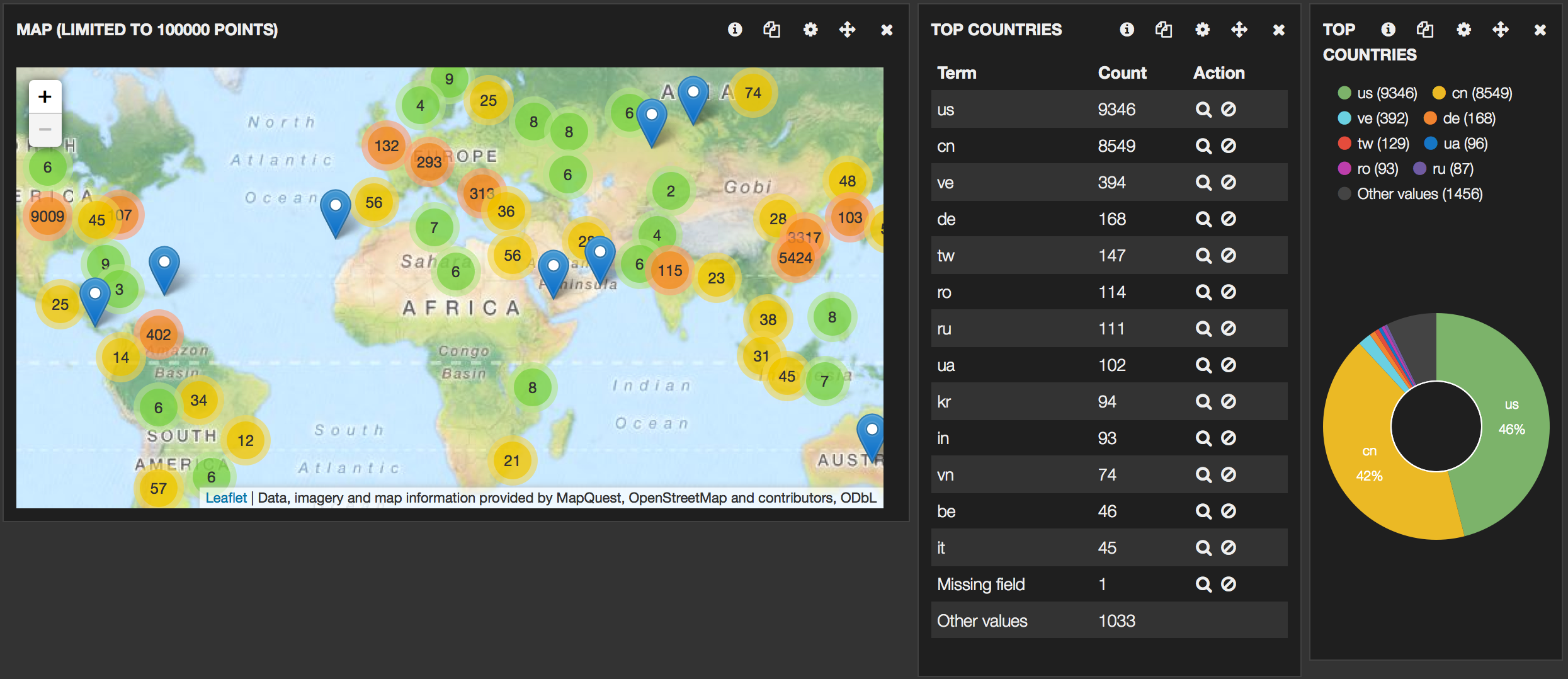
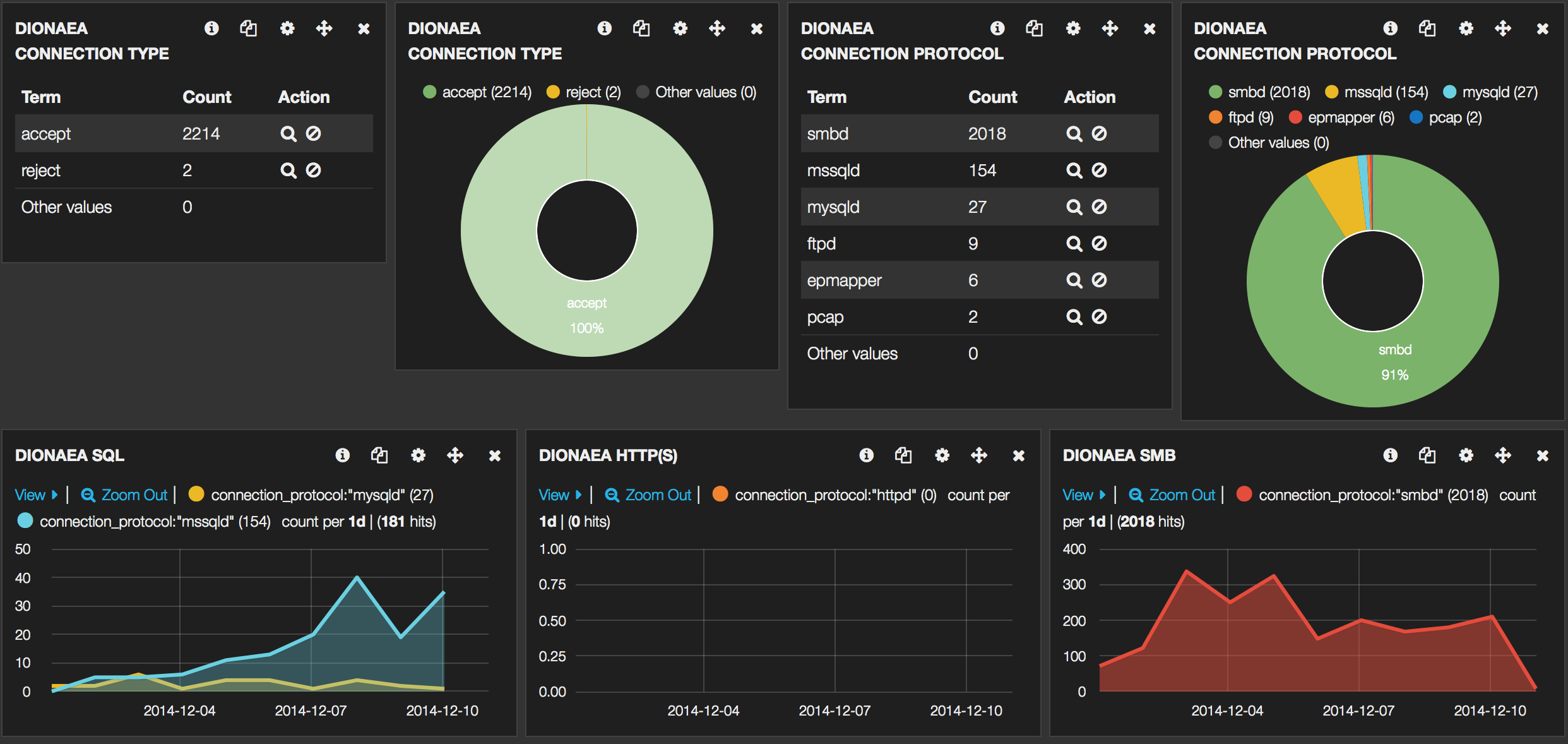
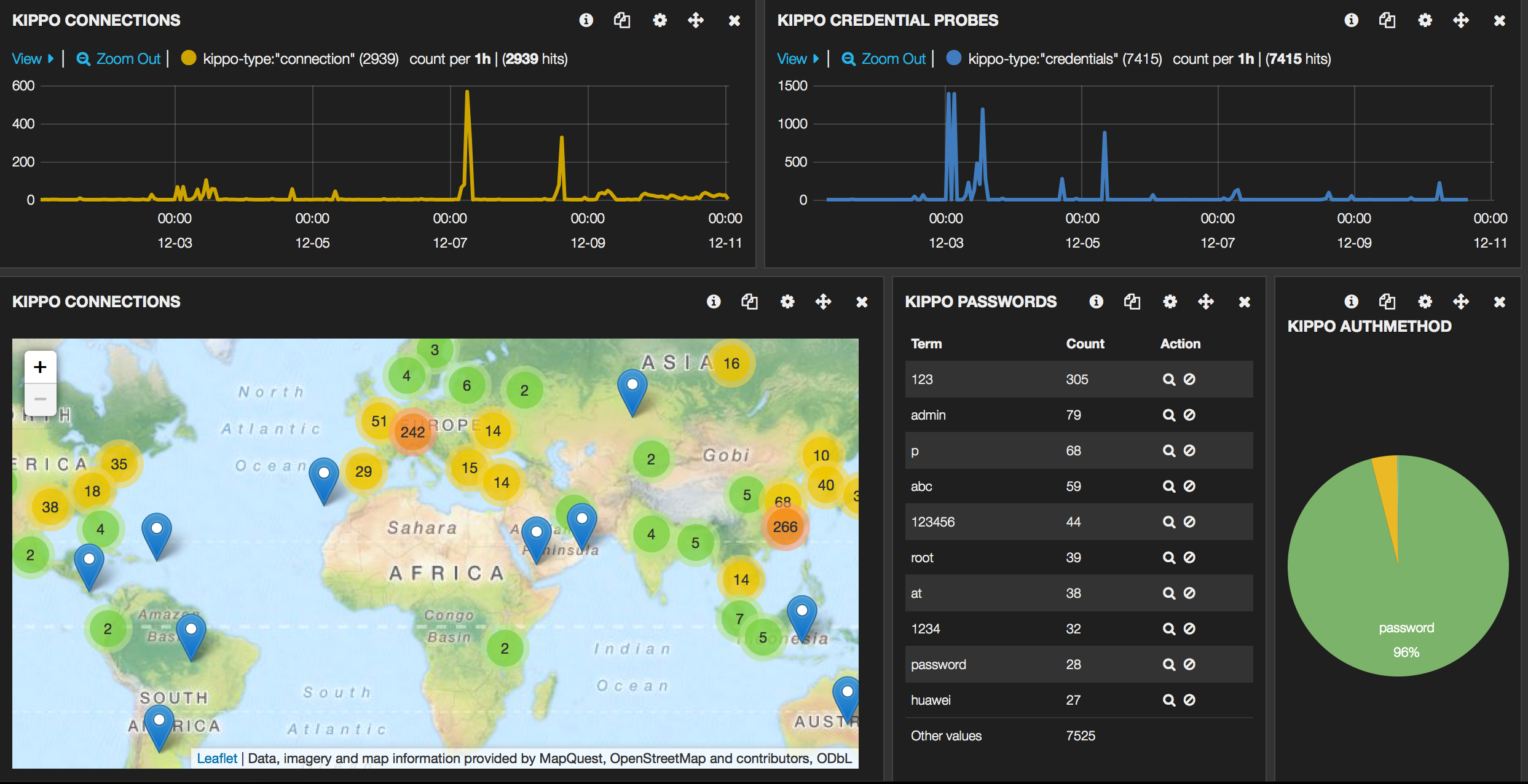
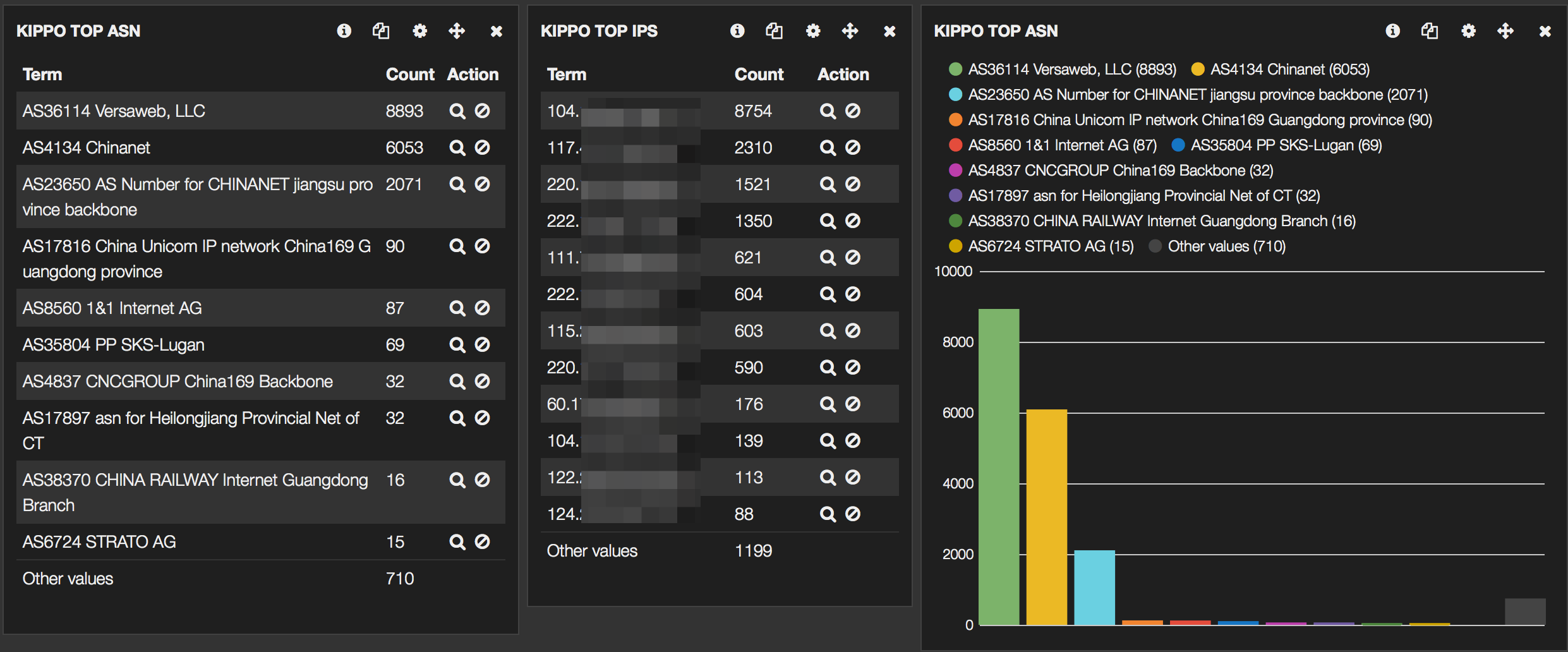
To wet your appetite, some screenshots of the final Kibana interface :


Honeypots

I’ll be using the Kippo, Dionaea, Glastopf and Conpot honeypots. There is a Github page describing how to install, configure and start these honeypots on Ubuntu.

  • Kippo (Kippo is a medium interaction SSH honeypot)
  • Dionaea (Dionaea is a low-interaction honeypot)
  • Glastopf (Glastopf Web Application Honeypot)
  • Conpot (Conpot is a low interactive server side Industrial Control Systems honeypot)

The other files referenced in this post (configuration, proxy scripts) can also be found on Github.

Getting the data

ELK primarily gets its data from logfiles. To process the data I used these methods

  • Kippo
    Kippo logs to a logfile that is fairly easy to process, no changes here;
  • Dionaea
    Dionaea can log to a logfile and a database. I found the logfile cumbersome and not at all easy to parse. So in order to get the data that I need I use some sort of proxy script. This script basically reads the database and adds the entries to a logfile. Note that for Dionaea you lose some of the useful information (like download URLs etc) that are stored in the database. However for a more detailed or ‘zoomed-in’ view to Dionaea I strongly advise to setup DionaeaFR. If you need the extra data in ELK it is fairly easy to adapt the proxy script;
  • Glastopf
    logs to a database. Similarly to Dionaea I used a proxy script to get the data;
  • Conpot
    works similarly to Glastopf so I use an almost identical proxy script to get the data. This script also has the ability to read from a mysql database (set the DB_* options) instead of a sqlite database. You can use similar code to implement the same features for the Glastopf and Dionaea script.

I do not cover any optimization of Logstash or Elasticsearch (indexes etc.).

Database proxy script

The database proxy scripts for Dionaea, Glastopf and Conpot essentially all work in the same way.

  • they use a temporary file as a marker to remember what the last read record was;
  • a SQL query is done against the database to get all records after the last read record;
  • every record is parsed and converted to the correct format;
  • the output is then either send to the screen or to a logfile;
  • upon completion, the last read record ID is stored in the temporary file.

The three different files need some minor inline configuration

  • Dionaea
    • SQLITE_DB : location of the sqlite database;
    • LAST_CONNECTION_FILE : id of the last record read;
    • LOGFILE : where to write the entries; leave this empty to get output to screen.
  • Glastopf
    • SQLITE_DB : location of the sqlite database;
    • LAST_CONNECTION_FILE : id of the last record read;
    • LOGFILE : where to write the entries; leave this empty to get output to screen;
    • DSTIP : the destination IP of the honeypot DO NOT FORGET to set this one;
    • DSTPORT : the destination port of the honeypot DO NOT FORGET to set this one;
    • PROTOCOL : the protocol used by the honeypot DO NOT FORGET to set this one.
  • Conpot
    • SQLITE_DB : location of the sqlite database;
    • LAST_CONNECTION_FILE : id of the last record read;
    • LOGFILE : where to write the entries; leave this empty to get output to screen;
    • DSTIP : the destination IP of the honeypot DO NOT FORGET to set this one;

Ideally you run these scripts from cron every 5 minutes

*/5 * * * * /opt/cudeso-honeypot/elk/dionaea-singlelogline.py
*/5 * * * * /opt/cudeso-honeypot/elk/conpot-singlelogline.py
*/5 * * * * /opt/cudeso-honeypot/elk/glastopf-singlelogline.py

but for testing purposes it’s easier to run them from a terminal and have the output set to the screen (remember to set LOGFILE = “”).

You should also rotate these logs. A sample logrotate script is included. Run the script from cron

25 7 * * * logrotate /opt/cudeso-honeypot/elk/elk-import.logrotate

Logstash configuration

The logstash.conf file in the repository contains entries for parsing the different logfiles.

The four sources in the input section describe the location of the logfiles and assign a unique type for every logfile

The filter section is where the processing is done. The beginning of the filter section contains settings for a specific honeypot type. The last part of the filter section contains general changes that are applied to all entries.

Kippo – Logstash

  • some log entries are dropped (mostly because they do not contain useful info);
  • three different types of Kippo entries are logged. Remember that you can use these types in Kibana to filter the results. kippo-type =
    1. credentials : when a combination of username / password is probed;
    2. authentication-method : what authentication method is tried;
    3. connection : an established connection to the honeypot.
credentials => kippo-session, srcip, kippo-username, kippo-password
authentication-method => kippo-session, srcip, kippo-username, kippo-authmethod
connection => srcip, srcport, dstip, dstport, kippo-session

Dionaea – Logstash

All connection entries are processed (the proxy script contains a setting to ignore certain IPs from ending up in the log). Remember that download details etc. are not logged by the proxy script.

 
connection_type, connection_protocol, protocol, srcip, srcport, dstip, dstport, hostname

Glastopf – Logstash

All connection entries are processed.

srcip, srcport, dstip, dstport, protocol, request_url, pattern, filename, request_method, request_raw

Conpot – Logstash

All connection entries are processed.

srcip, srcport, dstip, request_protocol, response_code, sensor_id, request_raw

Changes for all honeypots in Logstash

The last part of the filter section sets a basetype and enriches the data with GeoIP data. You will have to download the Maxmind GeoIP databases and save them in the correct locations.

      database =>"/var/www/db/GeoLiteCity.dat"
...
      database =>"/var/www/db/GeoIPASNum.dat"

If an IP address is found in srcip then coordinates, country codes and AS information will be added to the record.

Logstash

Logstash has to be restarted when you do a configuration change. So after adding the settings above you’ll have to restart Logstash. I use the verbose option to check for errors and warnings. Note that if you want to empty the databases (provided you are using the default logstash-* indexes) you can do (if Logstash is still running) :

curl -XDELETE 'http://localhost:9200/logstash-*'

Stop Logstash and restart it from the Logstash directory with

./bin/logstash --config logstash.conf --verbose

If you get no configuration warnings you can start testing.

Import the data

Instead of immediately starting to import the full logfiles I advise you to start with a couple of sample lines and see if Logstash processes the data properly. Check the logstash output for errors similar to _grokparsefailure.

Also, do not forget that if you run the proxy scripts they will restart from the last processed ID. If you do not delete the temporary file and no new entries are logged then there’s nothing to send to Logstash!

My test sequence often consisted of

  1. have a database with only a minimal (5 to 10) events
  2. curl -XDELETE ‘http://localhost:9200/logstash-*’
  3. stop Logstash
  4. ./bin/logstash –config logstash.conf –verbose
  5. rm /tmp/dionaea-singlelogline.id
  6. /var/honeypots/dionaea-singlelogline.py
  7. observe the output of logstash

If everything went as expected you can now switch to Kibana. You can also use Kibana to check for errors (see further).

Use the Kibana Honeypot Dashboard

The default Kibana dashboard should already list your data but it’s not very useful yet. So import the Kibana honeypot dashboard.

The first rows of the dashboard represent data for all the honeypots whereas the last rows print the data for the specific honeypots.

Do not change the (pinned or unpinned) pre-defined queries as otherwise some of the panels will no longer function. Use the Filtering to filter the results. For example if you click on one of the honeypot-types you’ll get that type as a specific filter.

You can use filtering to check for parsing errors by Logstash. Add a new filter and set the query to

tags = ("_grokparsefailure")

Extensions

Feel free to contribute to the repository.

  • Add download information from Dionaea;
  • Add LaBrea;
  • Scripts based on the Inspect to extract source IPs from the honeypots;
  • Extend conpot;
  • Import ulogd-viz;

References

Cryptography Introduction Cheatsheet – part 5 – Best Practices

Part 5 – Overview Best Practices

This is the fifth part in a list of cheatsheets based on the book Network Security: Private Communications in a Public World (2nd Edition).

Network Security: Private Communications in a Public World (2nd Edition)

This post provides an overview of some best practices. The first part, Cryptography Introduction Cheatsheet – part 1, was about cryptography, the second part, Cryptography Introduction Cheatsheet – part 2, about authentication, the third part Cryptography Introduction Cheatsheet – part 3, about standards and the fourth part Cryptography Introduction Cheatsheet – part 4 – Electronic Mail, about electronic mail.

Perfect Forward Security

PFS – Perfect Forward Security is a protocol property that prevents someone who records an encrypted conversation from being able to later decrypt the conversation, even if they gotten hold of both sides cryptographic secrets.

It can be done with a Diffie-Hellman exchange (as in IKE) and have both sides forget the D-H information after the conversation.

The other way of doing it is as in SSL/TLS where one side, Bob, generates a public/private key and the other side, Alice, sends a random number encrypted with the public key.

Change keys periodically

The more examples of ciphertext you see, the more likely it becomes someone will be able to break the encryption and find the key. So when any key has been used on a certain amount of data you should change keys, key rollover.

Multiplexing flows over a single SA

Different conversations should not be multiplexed to use the same security association (SA). Traffic belonging to different service classes should also not be using the same SA. Ideally different SAs should also use different algorithms.

Use different keys in the two directions

This avoids reflection attacks.

Use different secret keys

Use different keys for

  • encryption and integrity protection;
  • different purposes;
  • signing and encryption.

Have both sides contribute to the master key and Don’t let one side determine the key

Attackers have to learn both side’s private key and if either side has a good random number, the result will be a good random number.

Key expansion

Key expansion is the technique of using a small number of random bits as a seed and from it deriving lots of bits of keys.

Others

  • Hash in a constant when hashing a password;
  • Randomly chosen IVs;
  • Use of nonces in protocols;
  • Don’t let encrypted data begin with a constant or a predictable value;
  • Compress data before encrypting it. Compression has to happen before encryption because compression depends on the data being somewhat predictable;
  • Don’t do encryption only, also do integrity protection;
  • Avoid weak keys;
  • Put checksums at the end of data;
  • Design a protocol with forward compatibility;

Cryptography Introduction Cheatsheet – part 4 – Electronic Mail

Part 4 – Electronic Mail

This is the fourth part in a list of cheatsheets based on the book Network Security: Private Communications in a Public World (2nd Edition).
Network Security: Private Communications in a Public World (2nd Edition)

This post is about standards. The first part, Cryptography Introduction Cheatsheet – part 1, was about cryptography, the second part, Cryptography Introduction Cheatsheet – part 2, about authentication and the third part Cryptography Introduction Cheatsheet – part 3, about standards.

Electronic Mail Security

There are two types of mail distribution lists

  • The remote exploder method is where a remote site sends the message to its recipients;
  • In the local exploder method the sender gets the list of recipients from the remote site.

Mail infrastructure consists of different Message Transfer Agents – MTA that store and forward a message. The path for mail from source to destination might be intermittent.

A list of security services that can be provided for electronic mail are

  • privacy Alice wants to send a message to B, she chooses a random secret key S, encrypts the message with S, encrypts S with Bob’s key and then send both the encrypted message and the encrypted S to Bob;
  • sourceauthentication can be done with public key technology (signing the message) or secret keys (doing cryptographic computation on the message which results in a MIC or message integrity code or MAC – message authentication code);
  • message integrity is -in most cases- already provided by source authentication;
  • non-repudiation is provided with public key by signing the message (source authentication). With secret keys we can use a seal provided by a notary-N (Alice sends the message to N and does source authentication with N, then N knows the message came from Alice. N does some computation on the message and Alice’s name which generates the seal on the message);
  • a proof of submission can be done by generating a message digest on the message with any other useful information;
  • The proof of delivery can be done with a message receipt. Note that this is not a “if and only if”. If the recipient signs before the delivery it can get lost, if the recipient has to sign after delivery he might not furnish a signature at all;
  • message flow confidentiality can be established by sending encrypted messages to intermediaries and including the final message as part of the encrypted message;
  • anonymity;
  • containment;
  • audit;
  • accounting;
  • self destruct;
  • message sequence integrity;

There’s on single standard for text representation so sometimes systems have to do transformations (encode) on the message text.

PEM and S/MIME

PEM was developed as a means of adding encryption, source authentication and integrity protection to email. The design of PEM lets you base user keys on secret key or public key technology.

A mail message can contain pieces that have been processed in different ways by PEM. PEM marks a piece that it has processed with a string before and after. PEM can combine these pieces into a message (note that these pieces can also be nested inside one another)

  • ordinary, unsecured data;
  • integrity-protected unmodified data (called MIC-CLEAR);
  • integrity-protected encoded data (called MIC-ONLY);
  • encoded encrypted integrity-protected data (called ENCRYPTED).

The long-term key used by PEM is the interchange key (either the public key or the shared secret key). The interchange key is used to encrypt the per-message key.

For the PEM certificate hierarchy, RFC1422 recommends an organization of CAs. The single root CA, IRAP – Internet Policy Registration Authority certifies other CAs called PCA – Policy Certification Authorities. The different policies are

  • HA – High assurance, meant as ‘super-secure’;
  • DA – Discretionary assurance, doesn’t impose any rules on the orgs to which it grants certificates (other than being the ‘owner’);
  • NA – No assurance, no constraints except that it is not allowed to issue two certificates with the same name.

PEM users can issue a CRL-RETRIEVAL-REQUEST to the CRL service to get a list of revoked certificates.

Encryption of a message is done with a randomly chosen per-message key and a initialization vector (IV). Integrity protection is done by calculating a MIC (MD2 or MD5). Users can (usefully) forward a message if public key technology is used.

S/MIME says that its encrypted blobs are binary data so MIME takes care of encoding them. S/MIME supports different public key infrastructures

  • S/MIME with Public Certifier (like for example issued by companies as Verisign);
  • S/MIME with Organizational Certifier (easy to configure in an internal network, more difficult to have someone external have trust the issuer);
  • S/MIME with Certificates from Any Old CA, you first send me your certificate, I store it in my address book and trust it.

PGP – Pretty Good Privacy

PGP is not only for mail, it can do encryption and integrity protection on files. It uses public key cryptography for personal keys. PEM assumes a rigid hierarchy of CAs, PGP assumes anarchy. PGP allows you to specify if the handled file is text or binary. If it’s set to binary then PGP will not canonicalize it. PGP indicates whether what is being signed is a message or a certificate. It includes a file name with every message (specifies the name of the file that was read to produce the PGP object). PGP allows you to choose any name you want (no uniqueness enforced).

A PGP message contains different primitive objects. Every PGP object has a human-readable header and footer. The list of message formats are

  • Encrypted message;
  • Signed message;
  • Encrypted signed message;
  • Signed Human-Readable Message;

The key ring stored public keys and information about each key. Each key consists of the name of the human associated with the key (userid), set of certificate signatures you’ve received and the trust information about each of the pieces of information. [publickey|trust|userid|trust|signature|trust|…|signature|trust].

Cryptography Introduction Cheatsheet – part 3 – Standards

Part 3 – Standards

This is the third part in a list of cheatsheets based on the book Network Security: Private Communications in a Public World (2nd Edition).
Network Security: Private Communications in a Public World (2nd Edition)

This post is about standards. The first part, Cryptography Introduction Cheatsheet – part 1, was about cryptography and the second part, Cryptography Introduction Cheatsheet – part 2, about authentication.

Kerberos V4

Kerberos is a secret key based service for providing authentication in a network. It uses a KDC on a secure node. A login session is the period between logging in and logging out. The KDC shares a master key (secret key) with each principal (user/resource). When Alice informs the KDC that she wants to talk to Bob a session key is created and she is issued a ticket that is encrypted with the key of Bob (so Alice can not read it). The credentials are the ticket to Bob together with the session key. The KDC also sends a TGT – Ticket Granting Ticket. Because of this, the workstation to which Alice authenticates does not need to continue to remember Alice’s password, it can use the TGT to request access from the KDC to other resources. In theory the TGS Ticket Granting Server could be separate but in Kerberos they are the same thing. The KDC database is protected (encrypted) with a KDC master key. Current implementations of Kerberos use DES.

The login process is as follows

  1. Alice types account name and password;
  2. The workstation contacts the KDC (clear) with the account name;
  3. The KDC replies with credentials (a session key and a ticket granting ticket – this is encrypted with the KDC’s master key, not readable for anyone else than the KDC) for the KDC encrypted with Alice’s master key;
  4. The workstation converts the typed-in password to a DES key that is then used to decrypt the received credentials;
  5. If successful, the master key is forgotten and only the session key and TGT are remembered.

Note that the TGT is double encrypted; once with the KDC master key, then with Alice’s master key. In Kerberos V4 the user was only requested for the password once the credentials were received (minimal time storage in memory, in V5 the user has to type in the password before the request is send). Once the login process is successful and Alice wants to access a remote node (Bob) this happens

  1. The workstation sends to the KDC the TGT, the name “Bob” and an authenticator (this is the time of the day encrypted with the session key);
  2. The KDC decrypts the TGT and discovers the session (Sa) key and checks the expiration time in the TGT;
  3. The KDC constructs a ticket (a newly generated key (Kab), the name “Alice” and an expiration time) encrypted with the key of Bob. This ticket is then send to the workstation together with the name “Bob” and the new key and encrypted with the session key (Sa);
  4. The workstation sends the ticket to Bob;
  5. Bob decrypts the ticket and discovers the newly generated key (Kab), he also discovers the time via the decrypted authenticator;
  6. Bob increments the time of the authenticator, re-encrypts it with Kab and sends it back to Alice.

Because of the use of (time-based) authenticators it is important to keep workstations time synced. To protect against replays Bob should store recently received timestamps.

One single KDC becomes a single point of failure. Therefore multiple KDCs should be set up. One site holds the master key. This site gets all the updates (modify, delete, …) and other sites download periodically from this site. During the download it is import to protect the data from disclosure or modification.

Realms allows the principals in the network to be divided into “groups” so not all participants have to trust each other. In Kerberos V4 each principal consists of a name, an instance and a realm (each part is 40 chars long, case sensitive, null-terminated). In Kerberos V4 it is not possible to get access through a chain of KDCs.

Each key in Kerberos has a version number to facilitate key changes. Resources should remember several versions of their own keys.

Combined privacy and integrity checks is provided in Kerberos with a modified version of CBC, PCBC – Plaintext Cipher Block Chaining.

In Kerberos V4 the network layer address (IPv4) is put in the ticket to prevent impersonation (and interception). But because it is in the ticket and not in the authenticator it also prevents delegation.

In summary

  • A ticket is an encrypted piece of information that is given to principal Alice by the KDC and stored by Alice. It is encrypted by the KDC with Bob’s master key. Alice can not read it but can send it to Bob who can decrypt it;
  • An authenticator is a piece of information included in a message at the start of the communication between Alice and Bob which proves both participants to prove that they are who they claim to be. It is encrypted with the session key that Alice requested from the KDC.

Kerberos V5

Kerberos V5 uses ASN.1 syntax with BER – Basic Encoding Rules. ASN.1 is a data representation language standardized by ISO. ASN.1 is more flexible but it adds a lot of overhead. In V4 a principal was named by three fields name, instance and realm). In V5 there are two components : realm and name. The name contains a type and a varying number of arbitrary strings.

Delegation of rights is the ability to give someone else access to things you are authorized to access. Kerberos V5 allows delegation by allowing Alice to ask for a TGT with a network address different from hers. In the request Alice can opt for a different network address or no network address (then it can be used from everywhere). The new TGT as such requested by Alice can not be used by Alice but can be passed to Bob. There is also a possibility to limit the rights

  • Rather than giving a TGT, Alice provides Bob tickets to specific services (a TGT allows Bob to ask for every service);
  • Alice can request a field AUTHORIZATION-DATA be added to the requested ticket or TGT. This field is then interpreted by the application;

Two flags in a TGT involve delegation permission

  • forwardable : the TGT can be exchanged for a TGT with a different network layer address;
  • proxiable : the TGT can be used to request tickets for use with a different network layer address.

In V4 the maximum ticket lifetime was about 21 hours. In V5 it can be virtually unlimited. This can pose a security risk. Therefore there is the possibility to have renewable tickets where the KDC sets the RENEWABLE flag inside the ticket. A RENEW-TILL specifies the limit. Alice will have to renew the tickets before expiration (maybe with the use of a daemon). Tickets can also be created postdated with a timestamp (set with START-TIME) in the future. Initially the KDC sets the INVALID flag, when the time in START-TIME occurs Alice can present the ticket and then the KDC clears the INVALID flag.

In V5 the KDC keeps track of multiple key versions to facilitate renewable and postdated tickets. The keys are stored as a triple : key, the version number of the key and the version of number of the KDC key to sign this key (because the KDC can also change keys).

In V4 DES was used as the encryption algorithm. V5 can use different algorithms due to its modular design. For integrity checks, in V5 the MACs (message authentication codes or integrity check or checksum) are rsa-md5-des (required), des-mac (required), des-mac-k (required), rsa-md4-des (optional) and rsa-md4-des-k (optional). For encryption and integrity protection you can use des-cbc-crc, des-cbc-md4 and des-cbc-md5.

With different realms in V4 it was needed that the KDC be registered as a principal in each of them. In V5 you can go through a series of realms to authenticate.

In order to protect better against off-line password guessing when requesting a TGT for another user you must supply PREAUTHENTICATION-DATA to prove that you know the master key of that user.

Kerberos V5 allows Alice to choose a different key for multiple conversations and put that in the authenticator.

PKINIT provides a bridge between public key enabled users and servers that only know secret key technology.

The entries in the V5 KDC database consist of

  • name of the principal;
  • principal’s master key;
  • p_kvno principal’s key version number;
  • max_life defines maximum lifetime for tickets;
  • max_renewable_life maximum lifetime for renewable tickets;
  • k_kvno KDCkey version;
  • expiration time when the database entry expires;
  • mod_date modification date of entry;
  • mod_name name of the last modifier;
  • some flags indicating KDC policies;
  • password expiration defines time when password expires;
  • last_pwd_change time when user last changed password;
  • last_successtime of last successful user login.

PKI – Public Key Infrastructure

A PKI – Public Key Infrastructure consists of the components necessary to securely distribute public keys.

  • certificates;
  • a repository for retrieving certificates;
  • a method for revoking certificates;
  • a method for evaluating a chain of certificates from public keys that are known and trusted in advance (trust anchors) to the target name.
  • A certificate is a signed message vouching that a particular name goes with a particular public key;
  • The issuer signs a certificate vouching it is for a particular name and key, the subject;
  • The verifier (or relying party) evaluates a chain of certificates;
  • Anything with a public key is a principal;
  • A trust anchor is a public key that the verifier has decided through some means is trusted to sign certificates.

There are different PKI trust models.

  • In the monopoly model one organization is chosen to be the single CA for the world. This has problems because there’s not one organization trusted by everyone, a key change would require all software and hardware to reconfigure and how would they certify a remote requester?
  • The monopoly model plus registration authorities (RA) is similar except that the single CA chooses other organizations to securely check identities and obtain and vouch for public keys. It is more convenient than the first model to get certified but all the other disadvantages apply;
  • In the delegated CA the trust anchor CA can issues certificates to other CAs. Users do not have to go to a single CA;
  • The oligarchy model is commonly used in browsers. The products come configured with many trust anchors and a certificate issued by any one of them is accepted. This is even less secure than a monopoly model because instead of one organization at risk (CA) you now have multiple organizations at risk; the trust anchors are trusted by the vendor (product), not by the user; it might be easy to trick a user into adding a bogus trust anchor; there is no practical way to examine the set of trust anchors;
  • The anarchy model is used by PGP. Each user is responsible for configuring some trust anchors and anyone can sign certificates for anyone else. Some organizations provide a database where these certificates are stored. This is unworkable on large scale because the database would get unworkable large and it becomes very complicated to entirely trust the chain of trust anchors.

CAs are bound by name constraints were they can only be trusted for certifying a subset of users.

  • Top down name constraints is similar to the monopoly model. It is easy to find the path to a name (follow the namespace from the root) but it has the same issues as the monopoly model;
  • Bottom up name constraints model is not deployed although Lotus Notes is close. Every organization creates its own PKI and then link to others.

Revocation is necessary when someone realizes their key has been compromised or if someone leaves an organization. A timestamped CRL lists the revoked certificates.

  • A Delta CRL is short (often containing no certificates) containing the revoked certificates since the last full CRL was published;
  • The First Valid Certificate is a CRL where periodically users with a serial number lower than n have to reissue a new certificate;
  • An OLRS – Online Revocation Server is a system that can be queried about the revocation of individual certificates;
  • The Good-lists vs Bad lists model envisions a scheme with lists of valid certificates. The list of good certificates is likely larger so this can have a performance impact.

A PKI can be facilitated by a distributed hierarchical database like DNS or X.500. DNS has captured the low end of functionality where efficiency is needed. Names in a certificate are X.509 containing information such as version, serialnumber, signature (the algorithm used to compute the signature on this certificate), issuer, validity, subject (the X.500 name of the entity whose key is being certified), ….

An ACL – Access Control List defines if users have access to a resource. Instead of listing for each resource the users, you can also have a database containing users listing what they are allowed to do. Groups were introduced to make ACLs more scalable. A role concept defines the different privileges a user gets depending on how the user is logged in.

Real Time Communication Security

An application implemented on Layer 3 (IPSEC) causes all applications to be protected without the applications having to be modified. IPsec implementations, IP can tell the application only the IP address it is talking to, no what user is on the other end.

An application implemented on Layer 4 (SSL/TLS, SSH) is implemented as a user process, no change is needed to the operating system. It requires the application to “interface” to SSL and no to TCP. A downside of this implementation is that if malicious data is inserted into the packet stream, as long as it passes the TCP checks, it will get acknowledged by TCP and passed on to SSL. SSL will reject it. If the packet is resend then TCP will think it is a duplicate.

After the cryptographic mutual authentication it remains important to protect the data from disclosure or modification. Next to this the communication should also be protected against session hijack where someone else takes over a session (by forging one side of the communication).

A protocol has PFS – Perfect Forward Secrecy if it is impossible for an intruder to decrypt a conversation between Alice and Bob, even if the entire encrypted session is recorded and the intruder steals the long-term secret of both Alice and Bob. The trick to PFS is to generate a temporary session key that is not derivable from information stored on the nodes and where the session key is forgotten once the session ends. Protocols with PFS also have escrow-foilage which means that even if Alice and Bob are forced to give their key the conversation can not be read. Note that Kerberos does not have PFS.

A denial of service or clogging protection is the use of cookies (not web browser cookies). A stateless cookie (as in f.e. Photuris) is a cookie that is a function of the IP address and a secret known to Bob.

IPsec

An IPsec SA – security association is a cryptographically protected connection. A cryptographic key and other information (identity of other end, sequence number, cryptographic services used) are associated with the SA. An SA is unidirectional, so for a conversation between Alice and Bob there will always be two SAs. An IPsec header, SPI – Security Parameter Index, identifies the SA, allowing Alice to look up the information in her SA database. The SPI value is chosen by Bob. A IPsec Security Policy Database is a database specifying which type of packets should be dropped, forwarded or accepted without IPsec protection, …

IPsec has two modes

  • transport mode where IPsec information is added between the header and the remainder of the packet. Most often used end to end. ( [IP header|packet] -> [IP header|IPsec|packet] );
  • tunnel mode keeps the original packet and adds a new IP header and IPsec information (ESP or AH) outside. Most often for firewall to firewall or endnode to firewall. ( [IP header|packet] -> [newIPheader|IPsec|IP header|packet] ). It uses a little bit more space because there are now two IP headers. It is essential between two firewalls to preserve the original source and destination address.

An IPsec tunnel can not go through a NAT – Network Address Translation box because the NAT box wants to update the IP addresses inside the encrypted data … and it does not have the key. Even IPsec transport mode has problems because the IP address is included in the TCP/UDP checksums.

The IPv4 header has a protocol field (tcp=6, udp=17, IP=4). IPsec defines two new values: ESP=50 and AH=51. The IPv6 header equivalent field is next header (with the same values as in IPv4).

There are two types of IPsec headers

  • AH – Authentication Header providing integrity protection only;
    • next header (1 octet) is the same as the protocol field in IPv4;
    • payload length (1 octet) size of AH header in 32-bit chunks, not counting first 8 octets;
    • 2 unused octets;
    • SPI (4 octets);
    • sequence number (4 octets), has nothing to do with a TCP sequence number but prevents replayed packets in AH;
    • authentication data that provides a cryptographic integrity check on the data.

    Some fields in an IP header get modified by routers etc. so they can not be included in AH integrity check. These fields are type of service, flags, fragment offset, time to live and header checksum.

  • ESP – Encapsulating Security Payload providing encryption and / or integrity protection.
    • SPI (4 octets);
    • sequence number (4 octets), has nothing to do with a TCP sequence number but prevents replayed packets in AH;
    • an IV (initialization vector);
    • the (protected data;
    • some padding;
    • padding length (1 octet);
    • next header / protocol type (1 octet);
    • authentication data is the cryptographic integrity check.

Why would you use AH? AH provides integrity protection for some of the fields in the IP header.

IPsec : IKE

IKE is a protocol for doing mutual authentication and establishing a shared secret key to create an IPsec SA. It’s intent is to do mutual authentication using some sort of long term key (pre shared key, public signature-only key or public encryption key) and establish a session key. The specification of IKE is in three pieces

  • ISAKMP – Internet Security Association and Key Management Protocol, RFC 2408
  • IKE, RFC 2409;
  • DOI – Domain of Interpretation, RFC 2407

Photuris was one of the main candidates for this piece of IPsec. It was basically a signed Diffie-Hellman exchange with identity hiding by first doing an anonymous Diffie-Hellman and using an initial stateless cookie. SKIP – Simple Key Management for Internet Protocols was one of the other candidates.

IKE defines two phases

  • Phase 1 (known as ISAKMP SA or IKE SA) does mutual authentication and establishes session keys. It is based on identities (names, secrets such as public key pairs or pre-shared secrets). it hase two modes (the exact mode is chosen by Alice)
    • Aggressive mode uses three messages for mutual authentication and session key establishment;
    • Main mode uses six messages and has the ability to hide endpoint identifiers from eavesdroppers and has additional flexibility in negotiating the crypto algorithms.

    The Phase 1 establishes 2 session keys : an integrity key and an encryption key (integrity protecting and encrypting the last of the pase 1 IKE messages and all phase 2 IKE messages).
    IKE Phase 1 supports these protocols

    • Public Signature Keys, Main Mode;
    • Public Signature Keys, Aggressive Mode;
    • Public Encryption Key, Main Mode, Original;
    • Public Encryption Key, Aggressive Mode, Original;
    • Public Encryption Key, Main Mode, Revised;
    • Public Encryption Key, Aggressive Mode, Revised;
    • Shared Secret Key, Main Mode;
    • Shared Secret Key, Aggressive Mode.
  • In Phase 2 an ESP or AH SA is established. IPsec allows that each side of a phase 2 SA restricts the traffic sent on that SA (IP address, protocol, type and/or port). It is done by having the phase 2 initiater propose a traffic selector.

Phase 2 IKE (Quick Mode) is a 3-message protocol that negotiates parameters (cryptographic parameters, the SPI, …) for the Phase 2 SA. All messages are encrypted with Phase 1 SA’s encryption key and integrity protected with Phase 1 SA’s integrity key.

ISAKMP/IKE messages have a fixed header and then a sequence of payloads. Similar to IPv6, each payload starts with TYPE OF NEXT PAYLOAD and LENGTH OF THIS PAYLOAD. Some of the different payload types are

  • SA – Security Association, this includes the P and T payloads;
  • P – Proposal : indicates what “protocol” you’re trying to negotiate (Phase 1 IKE, ESP, AH);
  • T – Transform : indicates a complete suite of cryptographic algorithms needed by P. Each P contains a set of Ts;
  • … ;

SSL/TLS

SSL/TLS allows two parties to authenticate and establish a session key that is used to cryptographically protect the remainder of the discussion. It is designed to run in a user-level process and runs on top of TCP. A basic overview of the protocol is

  1. Alice sends Bob a list of cryptographic algorithms that she supports and sends a random number Ralice;
  2. Bob sends Alice his certificate, a random number Rbob and a selection of one of the ciphers;
  3. Alice sends to Bob a random number S (pre-master-secret) encrypted with his public key, a hash of the master secret K and the handshake messages;
  4. Bob replies with a keyed hash of all the handshake messages, encrypted and integrity protected with his keys. Since the session keys are derived from S he proves he has access to the private key because he needed it to extract S.

Often there’s no mutual authentication (Alice knows she’s talking to Bob but Bob has no clue). SSL/TLS allows session resumption (and so skipping the public key portion of the handshake) if Alice sends a session_id that Bob remembers.

A cypher suite is a complete package (encryption algorithm, key length, integrity checksum algorithm). In SSLv2 Alice decides the suite (Alice sends, Bob replies with what he supports from Alice and then Alice chooses). In SSLv3 Bob makes the choice from the list of Alice.

SSL/TLS runs on TCP so TCP will handle breaking the messages up in packets and reassembling them. SSL/TLS has two layers of chunking which operate somewhat independently

  • The unit of cryptographic protection is the record (header + body). There are four record types
    • 20=ChangeCihperSpec (is really part of the handshake). It indicates that all records following this will be protected by the agreed on ciphers;
    • 21=alert , indicating the other side something went wrong (1=warning, 2=fatal);
    • 22=handshake. This record contains handshake messages : ClientHello, ServerHello, ServerHelloDone, ClientKeyExchange, ServerKeyExchange, CertificateRequest, Certificate, CertificateVerify, HandshakeFinished;
    • 23=application data;
  • The parts of the handshake are divided into messages (header + body).