Diving into the VPNFilter C2 via EXIF

VPNFilter

Cisco Talos published an analysis on the new VPNFilter malware that targets at least 500K networking devices worldwide. The post describes how the stage 1 of the malware extracts IP coordinates from the GPS latitude and longitude fields in the EXIF information of images.

A post by Kaspersky further analysed the VPNFilter EXIF to C2 mechanism. Unfortunately all the photobucket.com galleries that were used by the malware as storage for the images have been deleted. But one hardcoded domain, toknowall[.]com, was still available and, surprisingly enough, was still serving the images that contained the GPS coordinates.

The post by Kaspersky contains pseudo code that demonstrates the extraction mechanism. I wanted to convert this code in Python to have a simple parser available in case it was needed during an incident.

Different images via toknowall[.]com

When reading the post from Kaspersky I first thought that toknowall[.]com was only serving one image. However this is not the case.

If you refresh the request http://188[.]165[.]218[.]31/manage/content/update.php you get in fact two different images. I could not detect if there is a real “sequence” how the two different images are served. It seemed that the image with the “black hair-style” seemed to be served more often than the image of “what women want”.

Note that doing a Google Image search for both images did not return a lot of useful information.
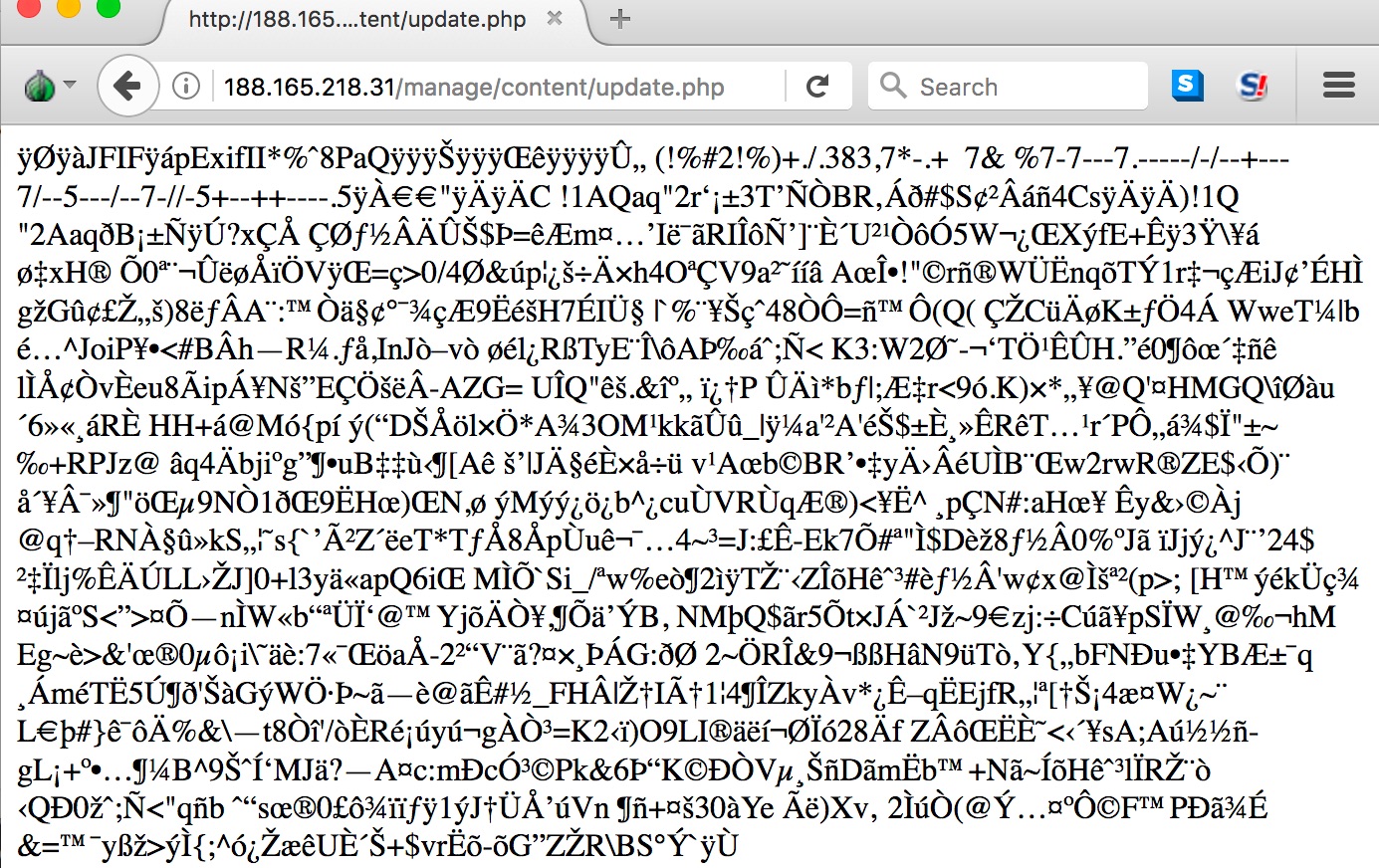
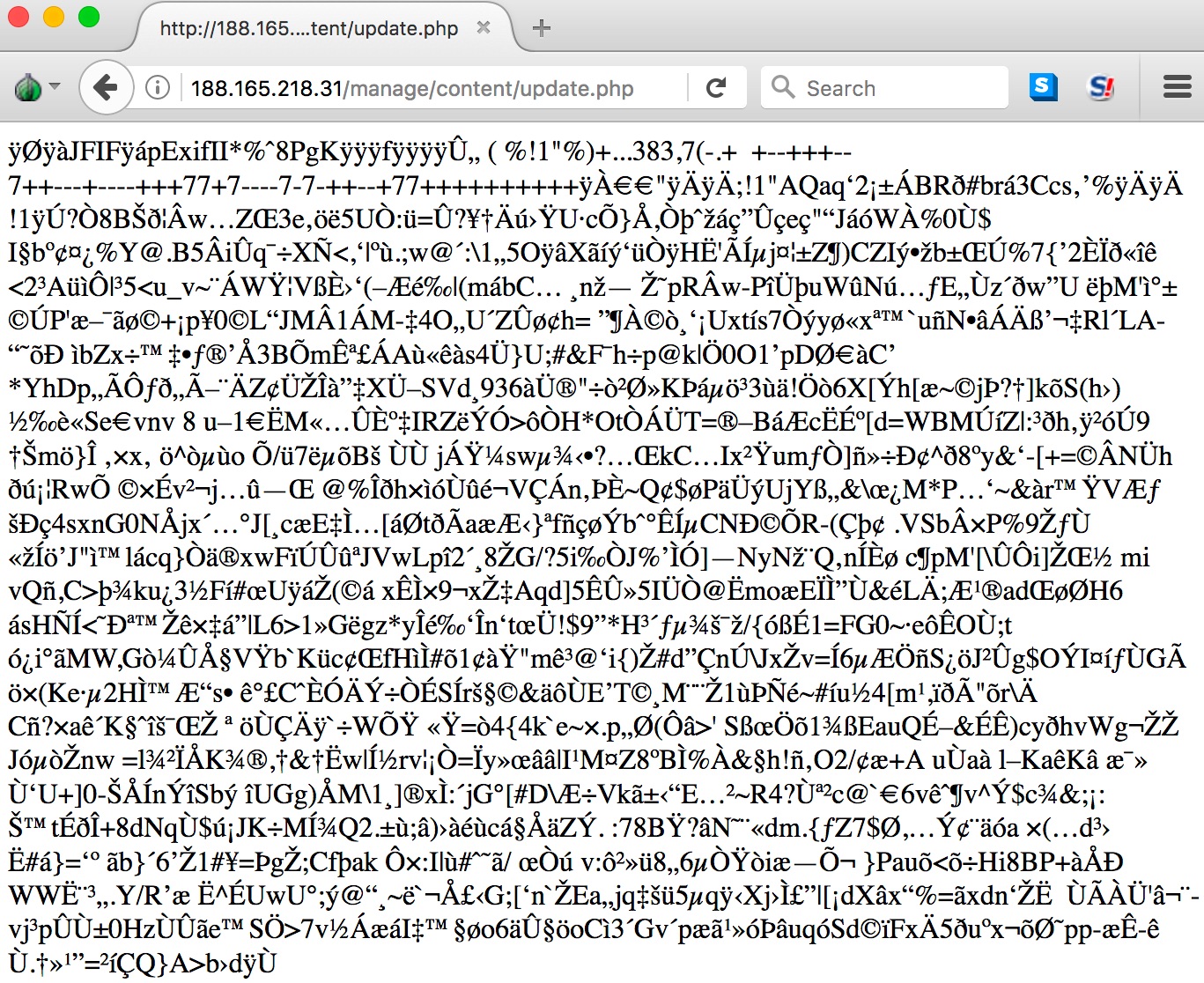




Both images contain EXIF information with GPS coordinates

Exif Byte Order                 : Little-endian (Intel, II)
GPS Latitude                    : 1193143 deg 55' 21.00"
GPS Longitude                   : 4296160226 deg 47' 54.00"

Exif Byte Order                 : Little-endian (Intel, II)
GPS Latitude                    : 1193149 deg 49' 15.00"
GPS Longitude                   : 1193060 deg 33' 42.00"

Parser for VPNfilter C2

Reading EXIF data via Python

Obviously parsing the EXIF data from Python requires us to have a module installed to read the EXIF information. There’s a Python module that can do that for you

sudo pip install exifread

Using the Python module (see further in this post for the code) to read the EXIF data results in this raw dataset.

GPS Long/Lat : [4294967178, 140, 4294967274] / [97, 30, 4294967121]
GPS Long/Lat : [14, 8, 4294967142] / [103, 24, 4294967115]

Unsigned int

The pseudo code of Kaspersky uses uint8_t. This is an unsigned integer type with a width of exactly 8 bits. You can use this in Python via ctypes, a foreign function library that provides C compatible data types.

Pseudo code to Python code

The pseudo code contains the formula that is used to convert the GPS coordinates to IP addresses. Putting the different values in a matrix provides this result
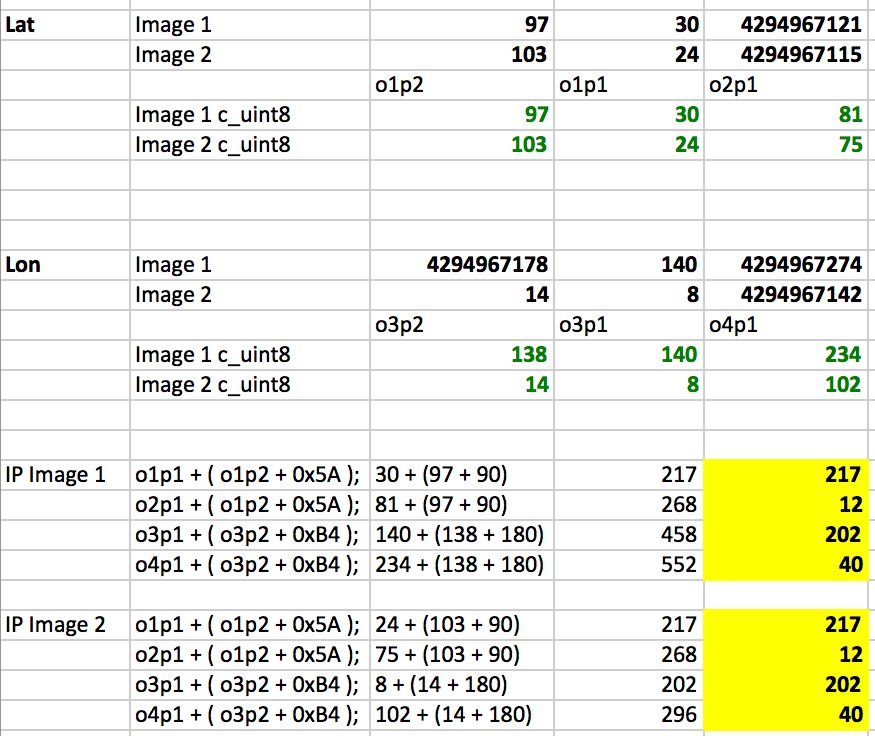

Using the above information helps us to convert the pseudo code into a Python script. The script can parse the image and is able to extract the GPS data from the EXIF information and then transform it into an IP address.

#!/usr/bin/python
# encoding: utf-8

# Extract IP coordinates from EXIF data for VPNFilter
# Koen Van Impe - 20180525
# See: https://securelist.com/vpnfilter-exif-to-c2-mechanism-analysed/85721/

from ctypes import c_uint8;
import exifread
import sys

f = open( sys.argv[1] , 'rb')
tags = exifread.process_file(f)

octet_1_2_fixed = 90  # 0x5A
octet_3_4_fixed = 180 # 0xB4

for tag in tags.keys():
  if tag == 'GPS GPSLongitude':
     gps_long = tags[tag]
     o3p2 = int(str(gps_long.__dict__["values"][0]))
     o3p1 = int(str(gps_long.__dict__["values"][1]))
     o4p1 = int(str(gps_long.__dict__["values"][2]))
  elif tag == 'GPS GPSLatitude':
     gps_lat = tags[tag]
     o1p2 = int(str(gps_lat.__dict__["values"][0]))
     o1p1 = int(str(gps_lat.__dict__["values"][1]))
     o2p1 = int(str(gps_lat.__dict__["values"][2]))

octet_1 = c_uint8( o1p1 + (o1p2 + octet_1_2_fixed) )
octet_2 = c_uint8( o2p1 + (o1p2 + octet_1_2_fixed) )
octet_3 = c_uint8( o3p1 + (o3p2 + octet_3_4_fixed) )
octet_4 = c_uint8( o4p1 + (o3p2 + octet_3_4_fixed) )

print "GPS Long/Lat : %s / %s" % (str(gps_long), str(gps_lat))
print "C2 IP: %u.%u.%u.%u" % (octet_1.value, octet_2.value, octet_3.value, octet_4.value)

This is the output

./vpnfilter-stage1-exif.py update.php.jpg
GPS Long/Lat : [4294967178, 140, 4294967274] / [97, 30, 4294967121]
C2 IP: 217.12.202.40

It is also available on Github https://github.com/cudeso/tools/tree/master/vpnfilter.
Manually deleting Time Machine backups

Time Machine Backups

I use an Apple MacBook as my primary work laptop. One of the nice features that are automatically included in OSX is Time Machine, allowing you to do automatic backups.

You can do the backups to an external disk (via USB) or to a network connected disk. I also have a Synology NAS with a volume (encrypted of course) configured for the backups. I have set a quota for this volume to prevent the backups from filling up my entire NAS.

If you do backups to a USB disk then Time Machine will automatically delete older backups. Unfortunately this didn’t happen on the network volume via the Synology disk, Time Machine did not delete the old backups. This resulted in a full backup volume. I could not find the cause for this problem. File access permissions etc. were set correctly and nothing unusual was found in the logs. So instead of relying on the auto delete by Time Machine I decided to rely on manually deleting backups.

Manually delete Time Machine backups

You can manually delete your Time Machine backups via the GUI but this quickly becomes a tedious process. I wanted to automate the deletion of the backups via a script. You can control the Time Machine backups via tmutil. Listing your backups can be done via

tmutil listbackups

Deleting is done via

tmutil delete PATH_TO_BACKUP

One warning. The Time Machine volume gets mounted on your OSX when Time Machine starts. Check with

mount|grep -i backup

This should return a list containing

/Volumes/Time Machine Backups

If you try to delete a backup without having the volume mounted then you’ll receive an error

No such file or directory (error 2)
Total deleted: 0B

The trick is to first have the volume mounted (via listbackups) and then do the delete.

Analyzing PDF and Office Documents Delivered Via Malspam

I published an article on IBM Security Intelligence on Analyzing PDF and Office Documents Delivered Via Malspam
.

The article covers analysing the static properties of malspam and further in depth analysis of malspam via for example the tools from Didier Stevens.

How to Choose the Right Malware Classification Scheme to Improve Incident Response

I published an article on IBM Security Intelligence on How to Choose the Right Malware Classification Scheme to Improve Incident Response.

The article covers malware classification in an ideal world, some of the existing classification schemes and how machine-parsable malware classification can help make incident response processes more fluent.

Doing OSINT and Twitter Analytics with Tinfoleak

Twitter Open Source Intelligence

Twitter is a great source for conducting open source intelligence. One of my favorite tools is Tweetsniff from Xavier Mertens. It will grab a Twitter user timeline for further processing, for example in Elasticsearch.

Another tool that I recently discovered is Tinfoleak. Tinfoleak is build for Twitter intelligence analysis and provides you with an HTML file output.

I wanted to use Tinfoleak to build profiles of users to tune targeted phishing campaigns (spear phishing) for a penetration test. For automated campaigns it would be easier if Tinfoleak can export to CSV but this engagement required a lot of manual labour anyway, so converting the HTML file to useful data for the campaign was not a big problem.

A big advantage of Tinfoleak is that it is easily available via a binary package in the Kali package repository.

apt-get install tinfoleak

A warning though : the package in the repository is an older (v2.1) version. The Github repository provides you version v2.4. I used the older, binary, package for this post.

Tinfoleak options

Tinfoleak comes with a lot of options to retrieve -public- information from a Twitter account. Below are the most important ones.

  -t TWEETS_NUMBER, --tweets TWEETS_NUMBER
                        analyze TWEETS_NUMBER tweets (default: 200)
  -i, --info            get general information about the user
  -s, --sources         get the client applications used to publish every
                        tweet
  -f FOLLOWERS_NUMBER, --followers FOLLOWERS_NUMBER
                        get the last FOLLOWERS_NUMBER followers for the user
  -r FRIENDS_NUMBER, --friends FRIENDS_NUMBER
                        get the last FRIENDS_NUMBER friends for the user
  -w WORDS_NUMBER, --words WORDS_NUMBER
                        get the top WORDS_NUMBER most used words
  --conv                get user conversations
  --sdate SDATE         filter the results with SDATE as start date (format:
                        yyyy-mm-dd)
  --edate EDATE         filter the results with EDATE as end date (format:
                        yyyy-mm-dd)
  --stime STIME         filter the results with STIME as start time (format:
                        HH:MM:SS)
  --etime ETIME         filter the results with ETIME as end time (format:
                        HH:MM:SS)
  --hashtags            get information about hashtags
  --mentions            get information about user mentions
  --likes LIKES_NUMBER  get information about the last LIKES_NUMBER favorites
                        tweets
  --meta                get metadata information from user images
  --media [D]           [no value]: show user images and videos, [D]: download
                        user images to "username" directory
  --social              identify user identities in social networks
  --geo FILE            get geolocation information and generates an output
                        FILE (KML format)
  --top NUMBER          get top NUMBER locations visited by the user

Use cases for Tinfoleak

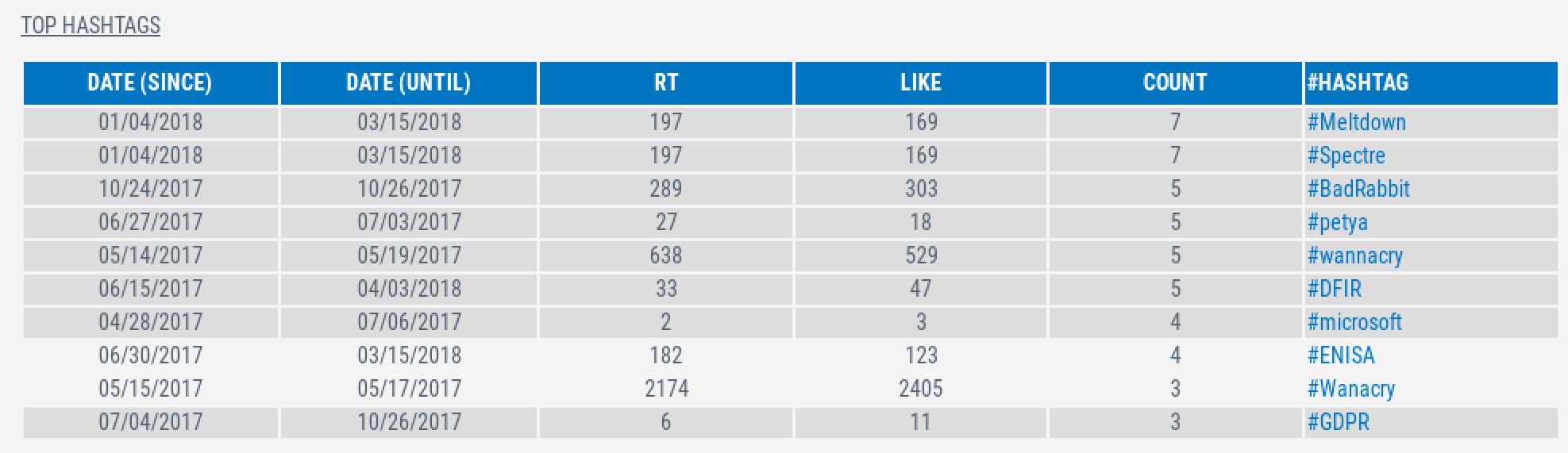
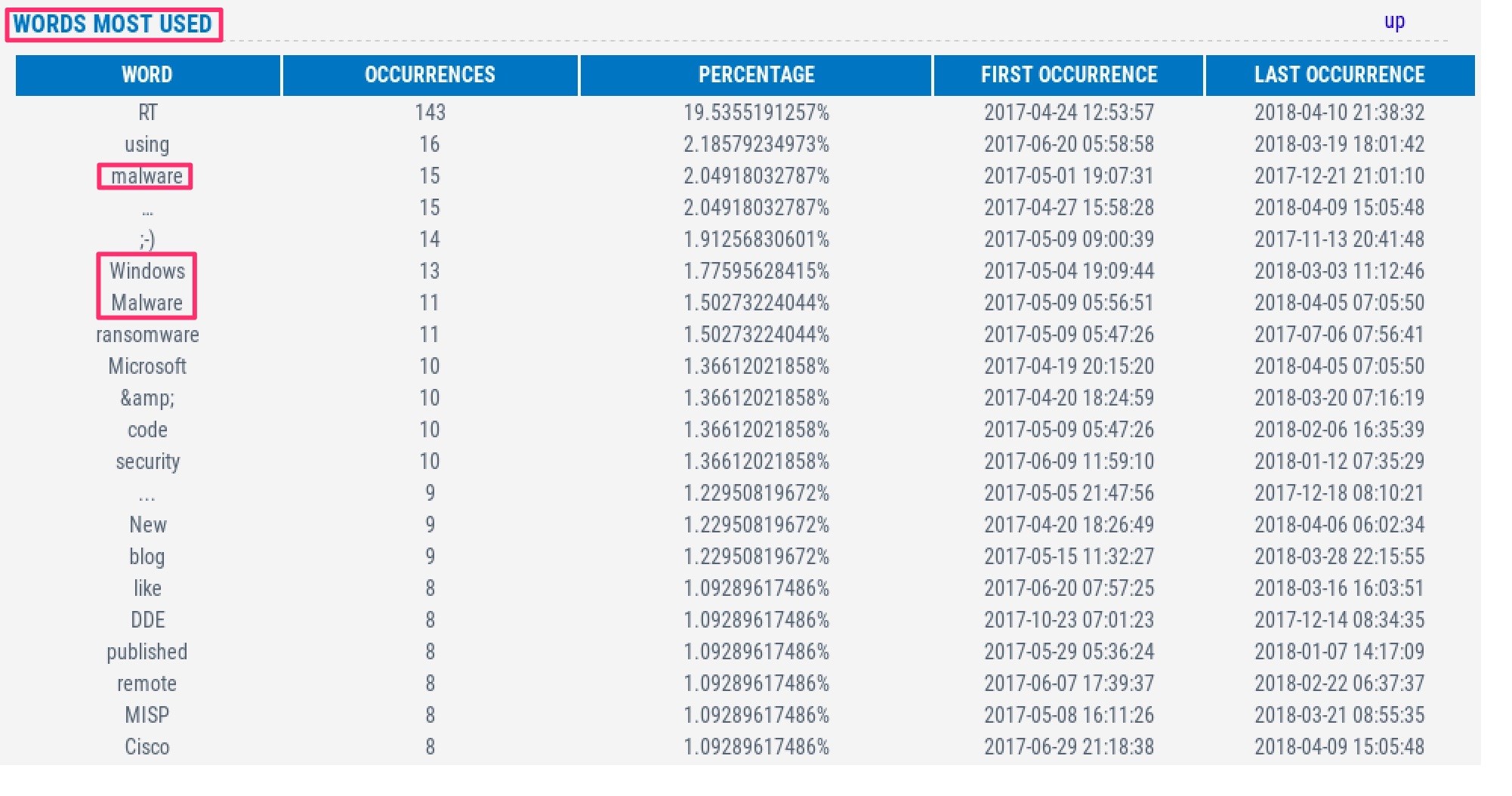
I find the options for listing the client applications used to publish tweet, the top words used and the top hashtags the most interesting information to profile a Twitter user.

For example if you see that the client application has a high percentage for “Twitter via web” then you might attempt phishing attempts to lure the user into accessing a fake site impersonating Twitter.com.

Additionally the top words and hashtags show the content that is relevant to the user, this is good information for creating targeted phishing campaigns.

Note that for properly profiling a user you can use two approaches:

  • Globally, see what’s of most interest to a user in general;
  • Specific period, see what topic is currently most trending for a user.

The latter option can be included in Tinfoleak by filtering on date but in general it’s more interesting to focus on global information and not limit yourself to specific information on one time-period.

Testing Tinfoleak

I first ran Tinfoleak on my own Twitter account with these options

tinfoleak -u cudeso --tweets 1000 --social --meta --mentions --hashtags --info --sources  -o cudeso.html --likes 100 --words 100 --friends 100 --followers 100

This will generate an HTML file. Note that the output states that the file is in /usr/share/tinfoleak/ but this is not correct. You can find the HTML file in your user home directory. The output of the file is the following

  _______ _        __      _            _
 |__   __(_)      / _|    | |          | |
    | |   _ _ __ | |_ ___ | | ___  __ _| | __
    | |  | | '_ \|  _/ _ \| |/ _ \/ _` | |/ /
    | |  | | | | | || (_) | |  __/ (_| |   <
    |_|  |_|_| |_|_| \___/|_|\___|\__,_|_|\_\

    Tinfoleak v2.1 [SHA2017 Edition] - "Get intelligence from Twitter"
    Vicente Aguilera Diaz. @VAguileraDiaz
    Internet Security Auditors
    08/07/2017

    Looking info for @cudeso:


        Getting account information...
        OK

        Executing operations...
        1000 tweets analyzed
        OK

        Getting followers...
        100/100 users analyzed

        Output file: /usr/share/tinfoleak/cudeso/followers-20180419/cudeso_followers.txt

        Getting friends...
        100/100 users analyzed

        Output file: /usr/share/tinfoleak/cudeso/friends-20180419/cudeso_friends.txt

        Getting favorites...
        33/100 tweets analyzed
        OK

        Generating report...
        OK


    Your HTML report: /usr/share/tinfoleak/Output_Reports/cudeso.html


    Elapsed time: 00:02:38

See you soon!

Output of Tinfoleak

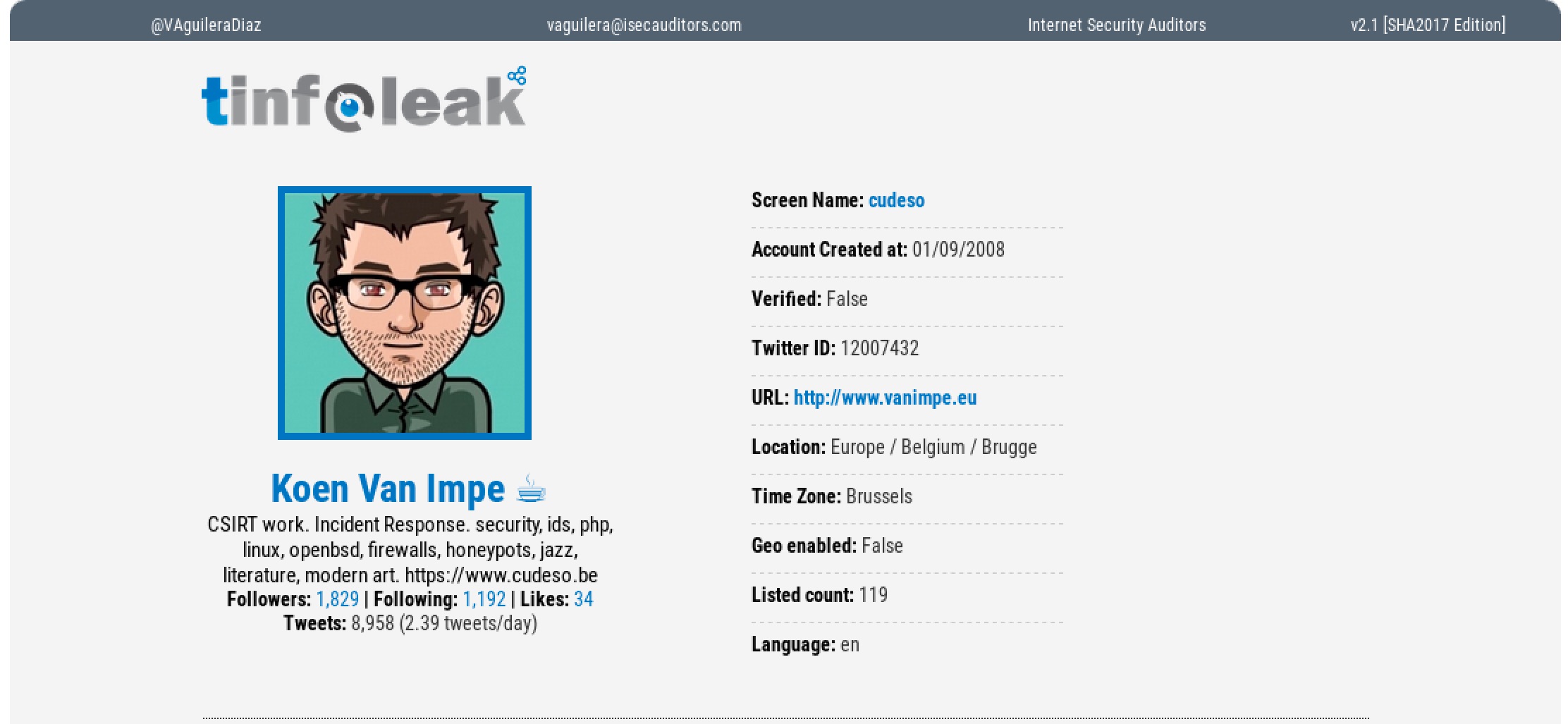
This is a sample of the information contained in the HTML file.

General account information


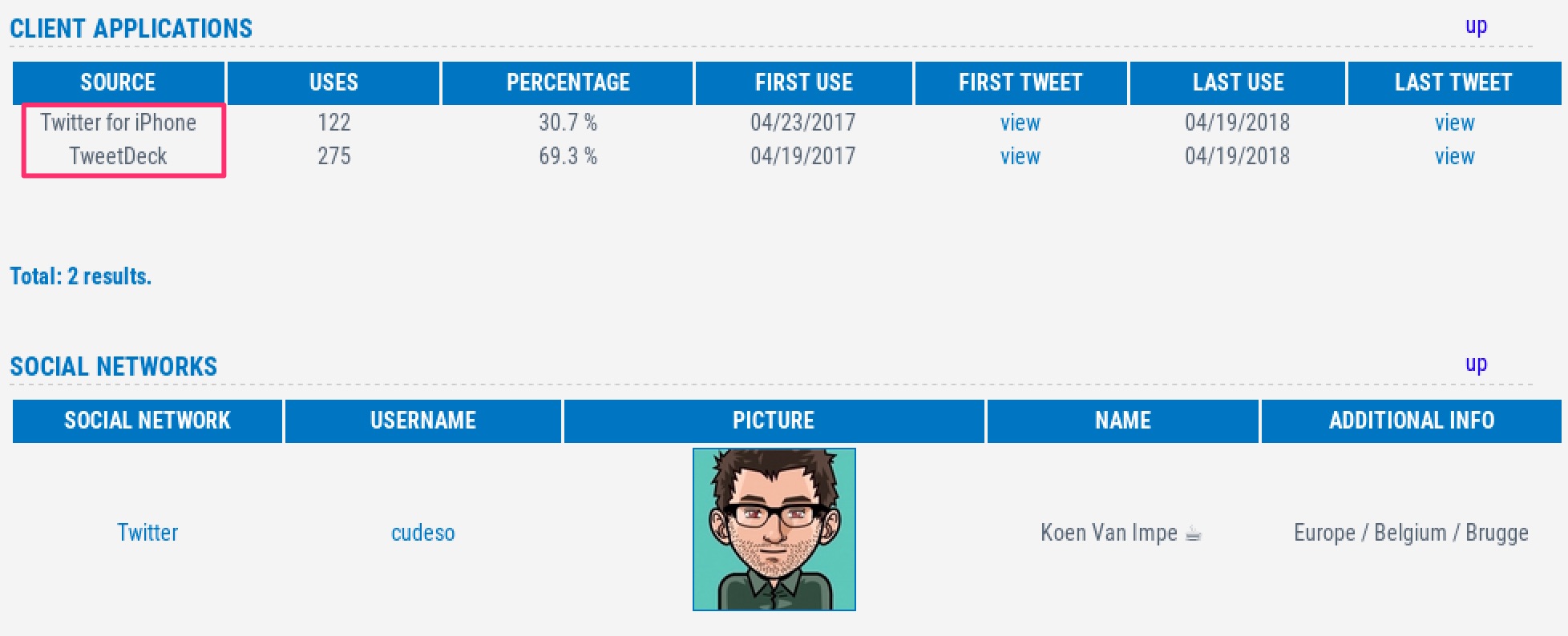
Client applications and social networks


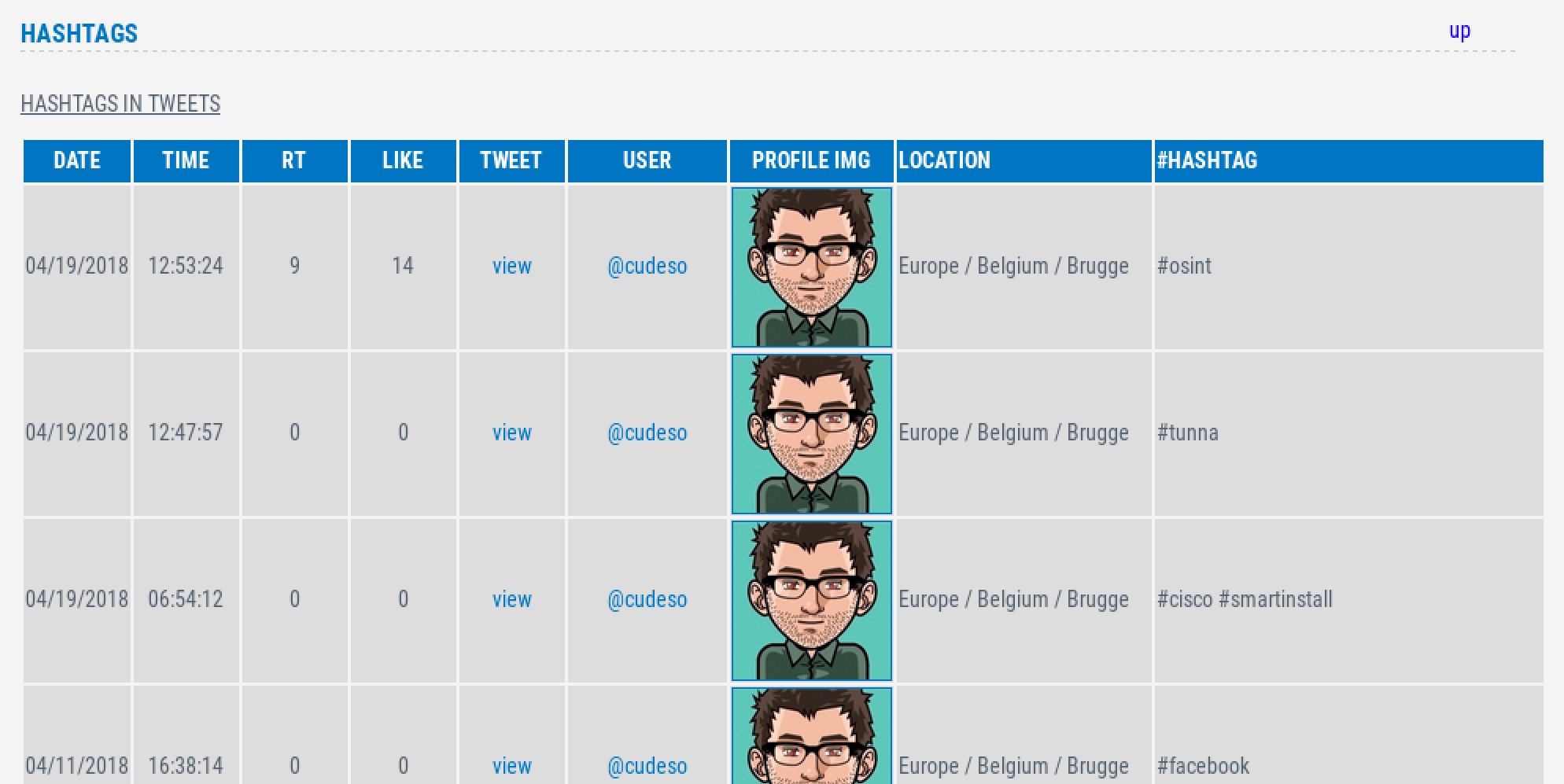
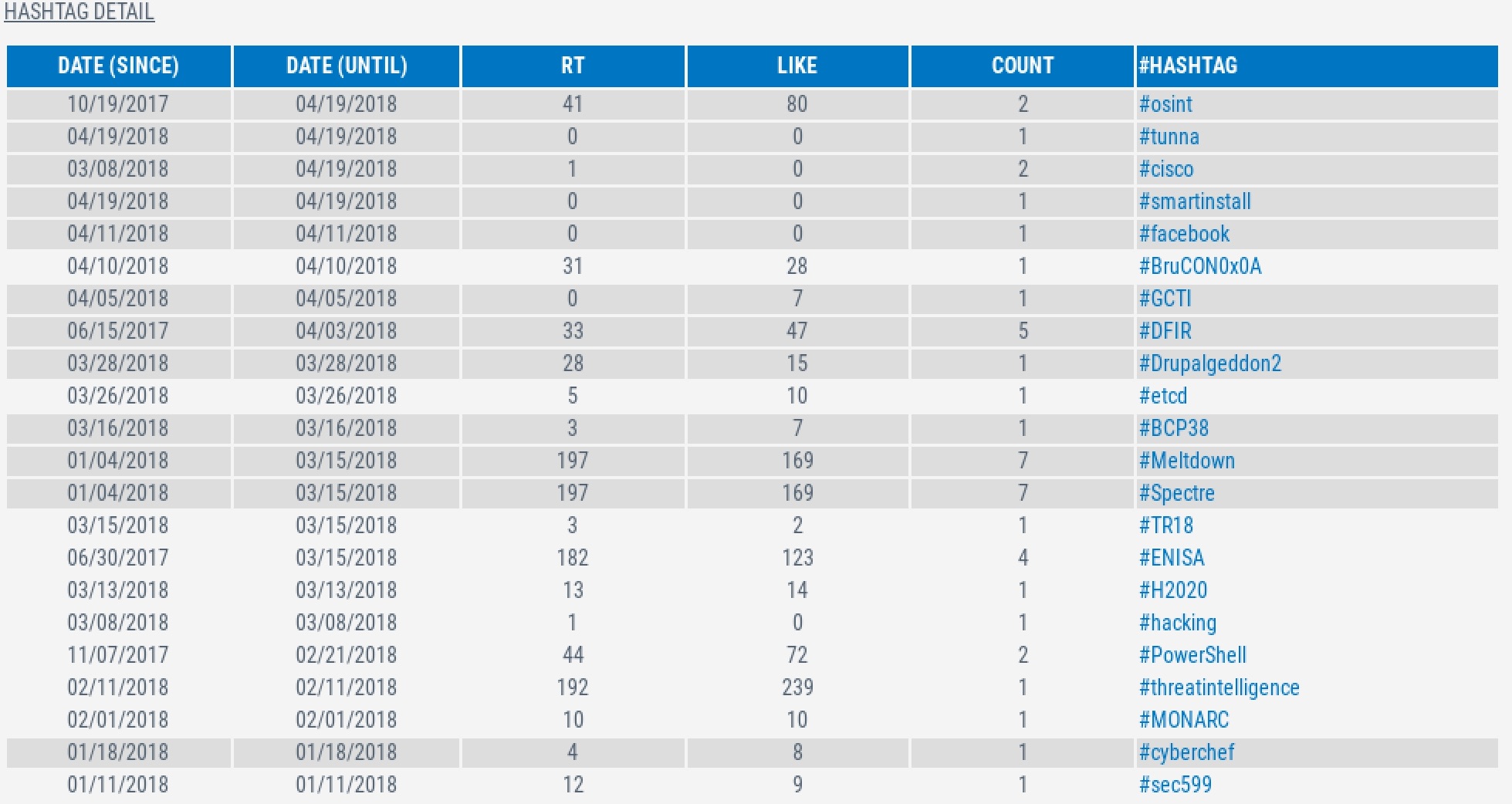
Used hashtags


Words most used


Conclusion

Similar to Facebook, people put a lot of information on Twitter that can be used in Phishing campaigns. Tinfoleak also provides the possibility to analyze the

  • Last location visited. This returns a KML file that can for example be opened with Google Earth to track the visited locations of a user. It’s not included in this post because I (try to) limit my public location visits.
  • Friends & Favorites. This is great information to kick-off a phishing campaign. Impersonating as a friend or someone the user “follows” increases the success-rate.

Reducing Dwell Time With Automated Incident Response

I published an article on IBM Security Intelligence on Reducing Dwell Time With Automated Incident Response. The article covers collecting event information, sharing intelligence data and then moving towards automated incident response together with automated digital forensic acquisition (with MIG & GRR).

The incident response orchestration process covers TheHive, MISP, LogicHub and VMRay to extend further on automation.

Drupal SA-CORE-2018-002 aka Drupalgeddon2

Drupal core update SA-CORE-2018-002

The Drupal team released a security advisory for all Drupal sites recommending all these sites to upgrade to the latest Drupal version.

The discovered vulnerability could lead to remote code execution in Drupal 7.x and 8.x.

Vulnerability

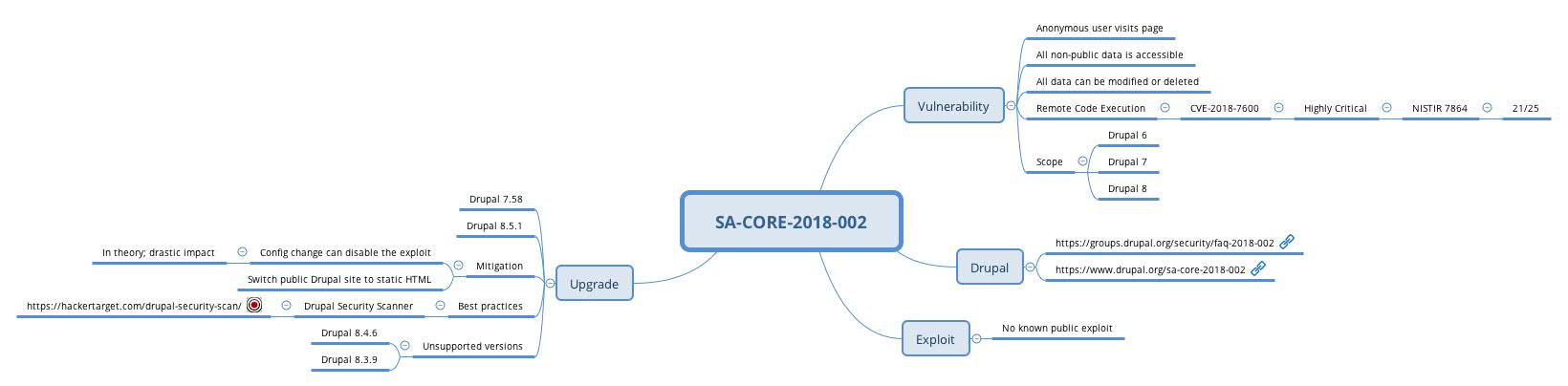
I have a mindmap on this vulnerability

Further information from Drupal can be found at

According to bojanz this vulnerability is related to PHP’s improper sanitization in the handling of arrays in parameters (in GET/POST).

Impact

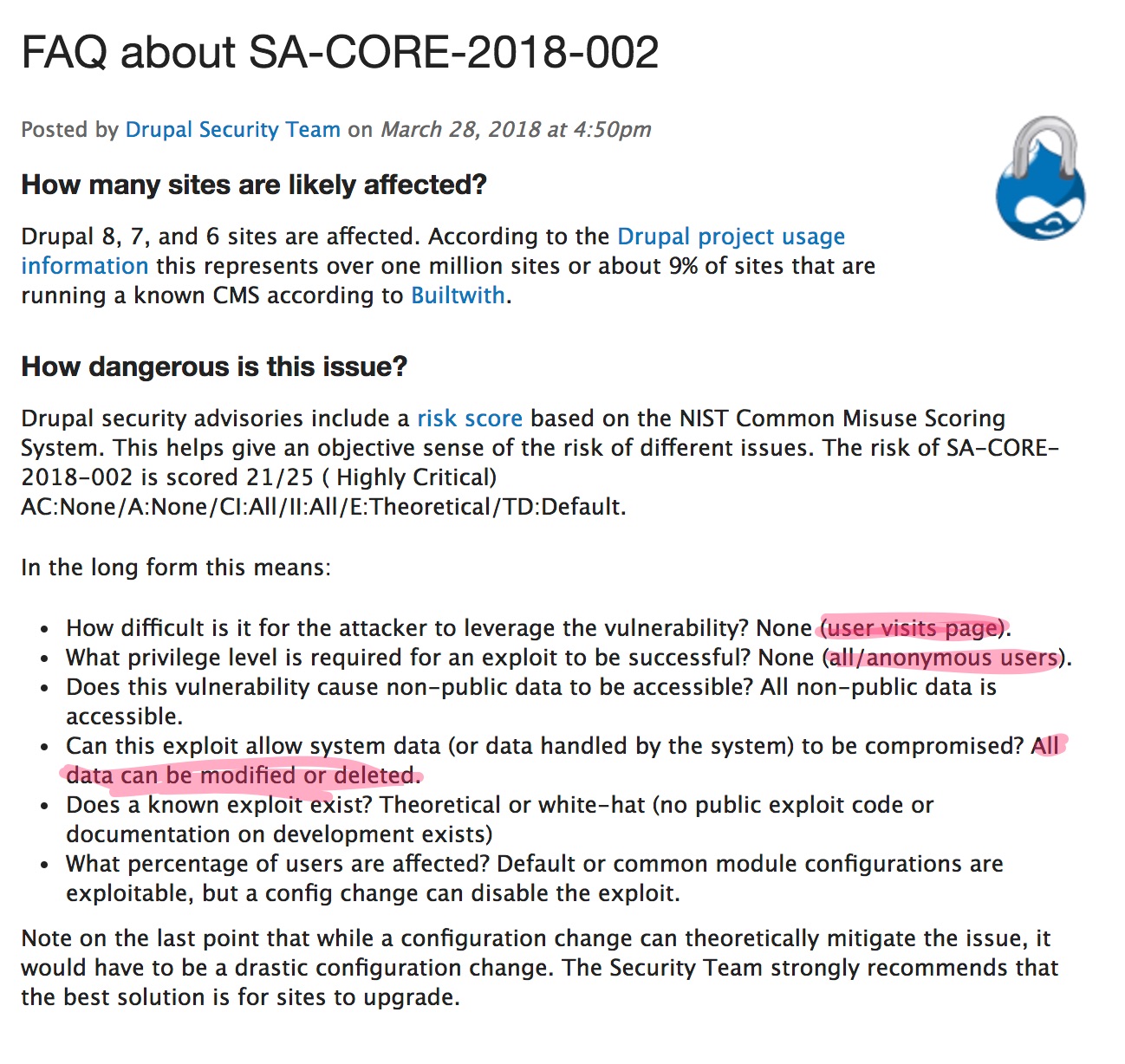
In essence the vulnerability describes a problem where

  • an anonymous user visits a page
  • exploits the vulnerability, allowing the attacker to
  • view all non-public data
  • modify or delete all the website data

This means that anyone on the internet can

  • Steal all the information, including personal data, from your website
  • Use your website to distribute malicious information
  • Use your website to attack other organizations

Drupal does not use the CVSSv3 calculator but uses the NIST Common Misuse Scoring System (NISTIR 7864). According to NIST the scoring is 21/25, Highly Critical.

A rating of anonymous access + remote code execution should result, according to risk management, in a patch immediately request!

Mitigation and Solution

There is only one workable solution to deal with this vulnerability: patch. Drupal also provides updates for non supported version.

  • 8.5.x, upgrade to Drupal 8.5.1
  • (no longer supported) 8.3.x, upgrade to Drupal 8.3.9
  • (no longer supported) 8.4.x, upgrade to Drupal 8.4.6
  • 7.x, upgrade to Drupal 7.58
  • (no longer supported) 6.x, contact a D6LTS vendor

If you are unable to upgrade immediately then converting the Drupal site to a static HTML website might be a temporarily solution. This conversion can come at a cost (required resources and degraded features). One of the modules that can take care of this is Drupal Site Generator

Upgrading Drupal versions in a crisis situation is never a good idea but there are some guidelines that you can use Make an Upgrade Plan

.

Phishing website using imgur images as background

Phishing e-mail

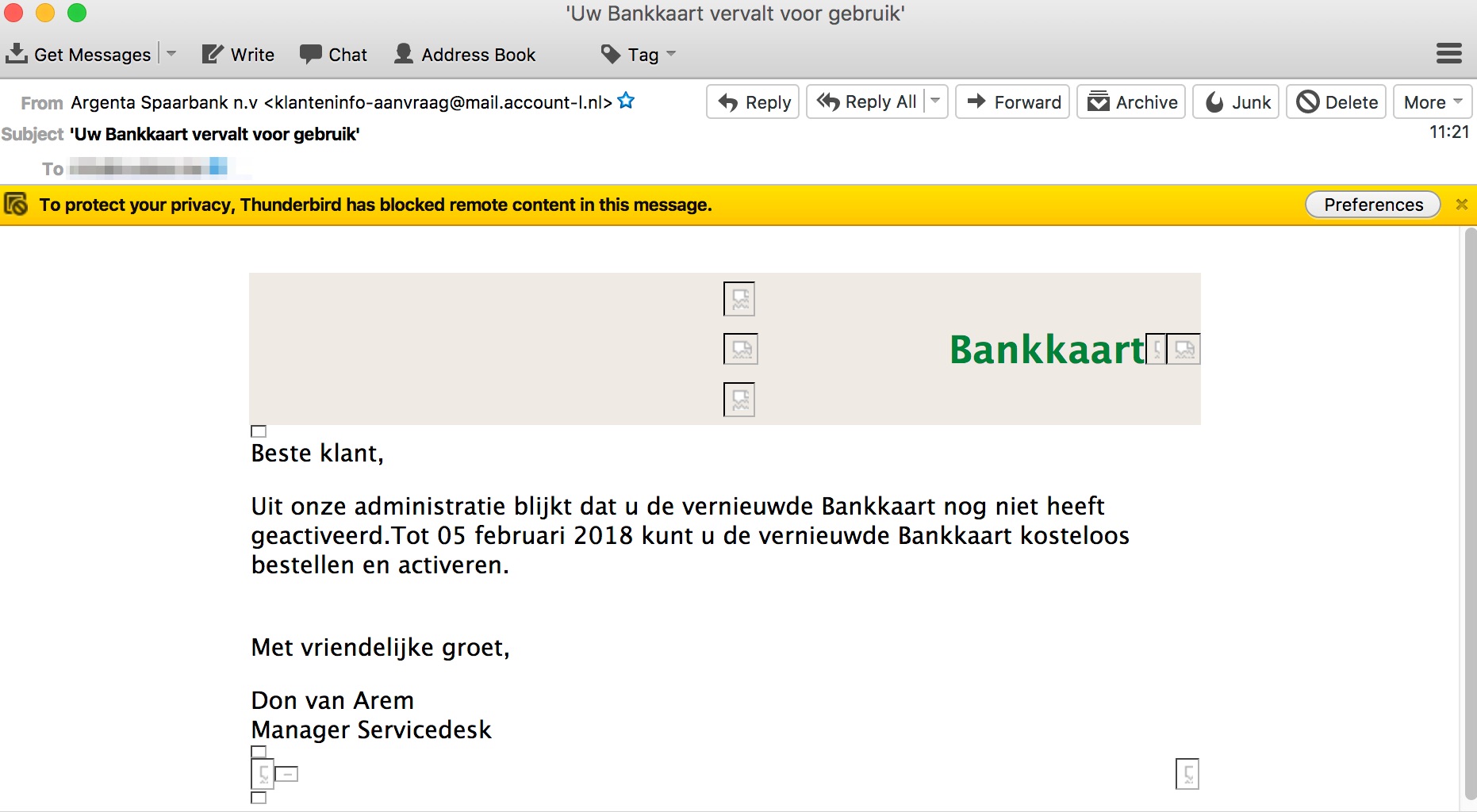
Another day, another phish. This day it concerns a phishing e-mail for a Belgian bank. The phishing e-mail looked like this


The link is only viewable if you enable HTML content in the e-mail client.

Phishing link

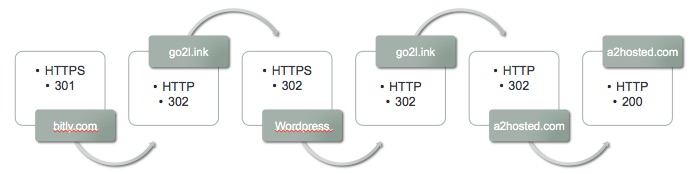
The link points to the URL shortening service Bitly and then follows a couple of redirects (including another URL shortening service).


  • bitly.com, via HTTPS, received 301 Moved Permanently;
  • go2l.ink, via HTTP, received 302 FOUND;
  • A PHP page hosted on a WordPress site, via HTTPS, received 302 Moved Temporarily;
  • go2l.ink, via HTTP, received 302 Found;
  • phishing site, via HTTP, received 301 Moved Permanently (last 302 in graph above should be 301, will update soon);
  • phishing site, via HTTP, received 200.

Notice the different redirect codes and the switching between HTTP and HTTPS.

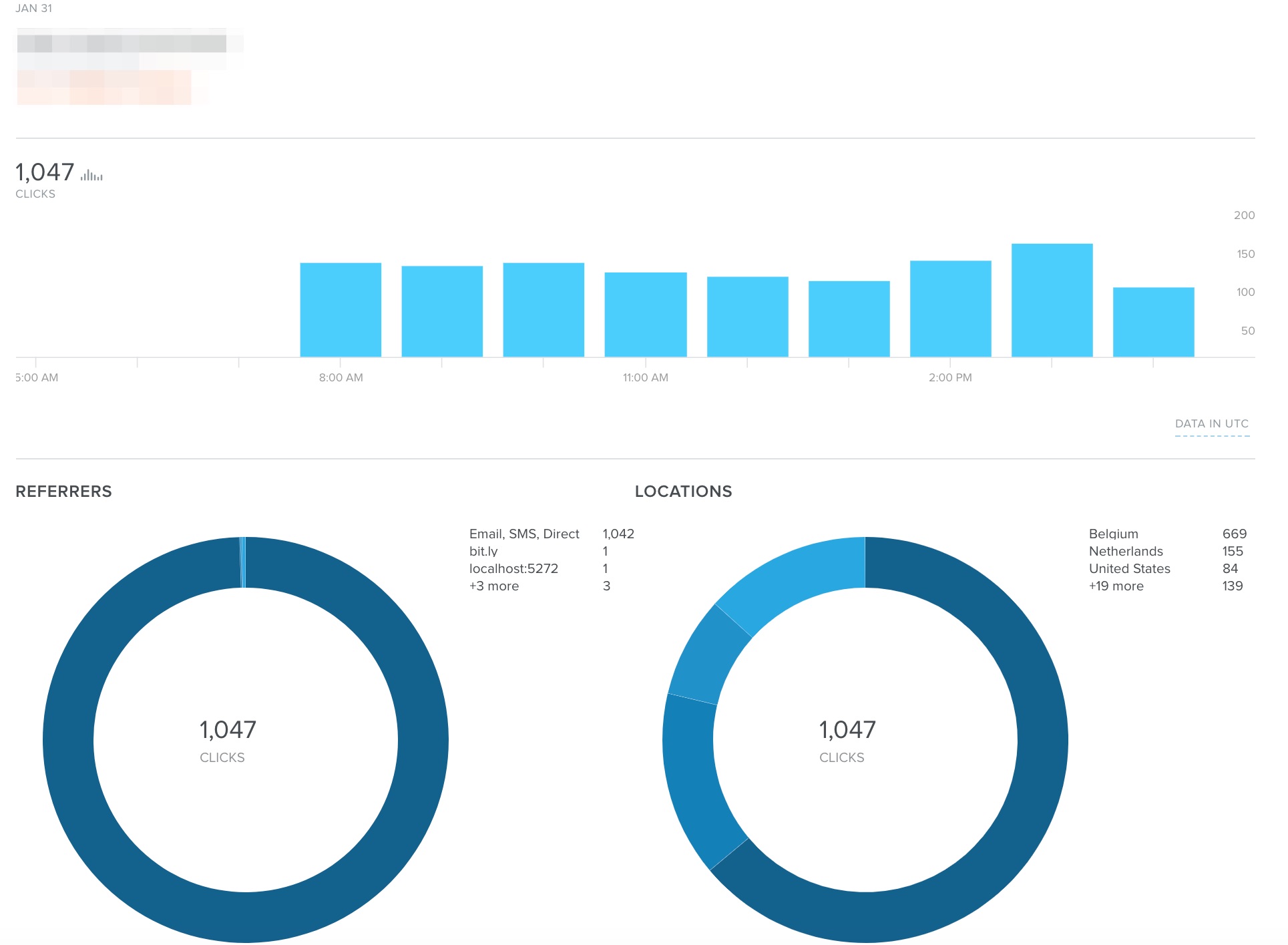
The phishing URL received well above 100 clicks per hour since it was distributed.


Phishing website

A lot of phishing sites use brand image and CSS files (or direct copies of these files) from the site targeted in the phishing campaign and then combine this with their own HTML. But essentially the phishing site is still basic HTML with some stylesheets and javascript. This method also allows opportunities for defenders to detect these phishing sites (for example direct image requests towards the target or content inspection on unusual web forms on client side).

The phishing website used in this e-mail is a bit different. Not entirely new but because there were quite a few of these messages in my spamtrap I thought it to be useful to have a closer look.

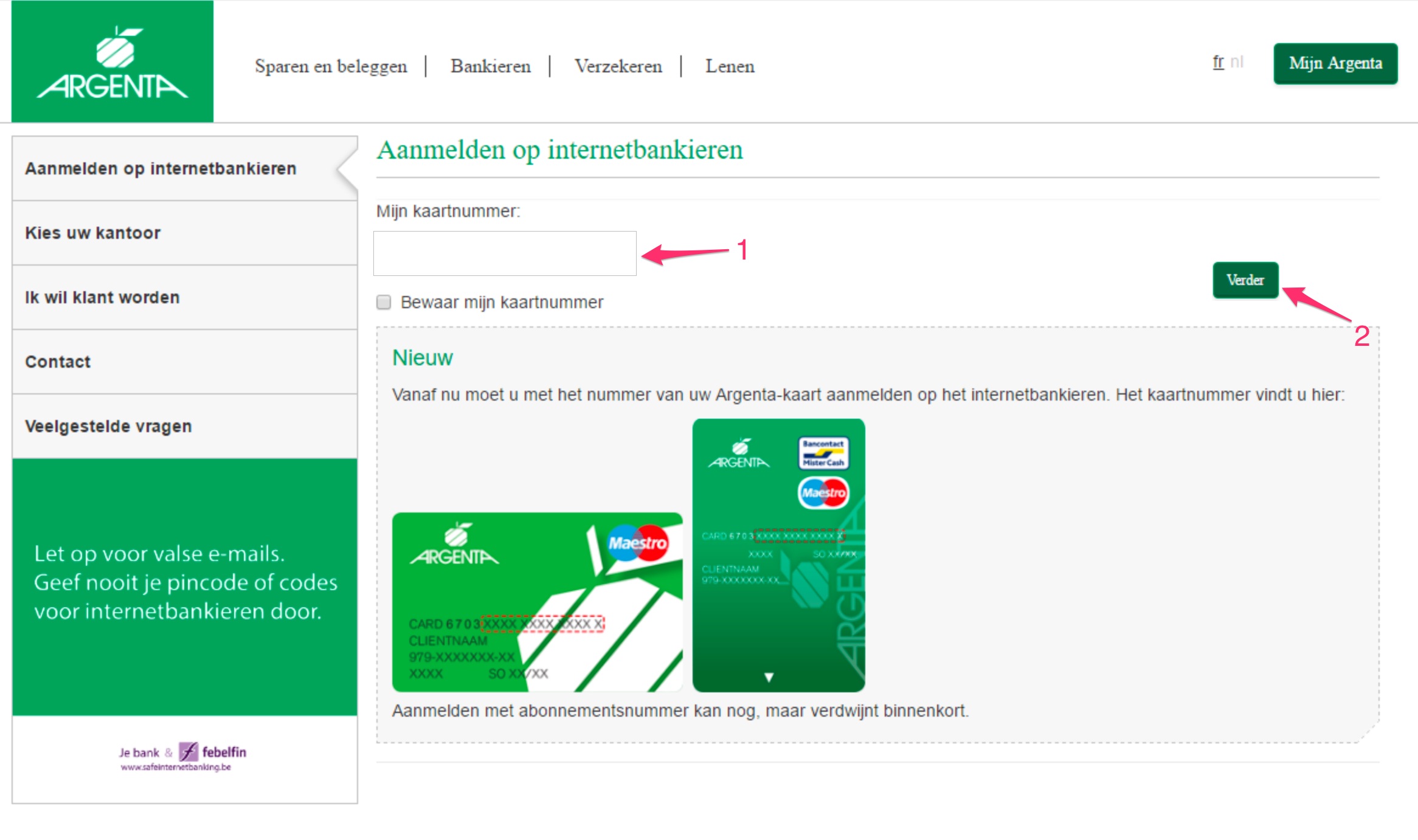
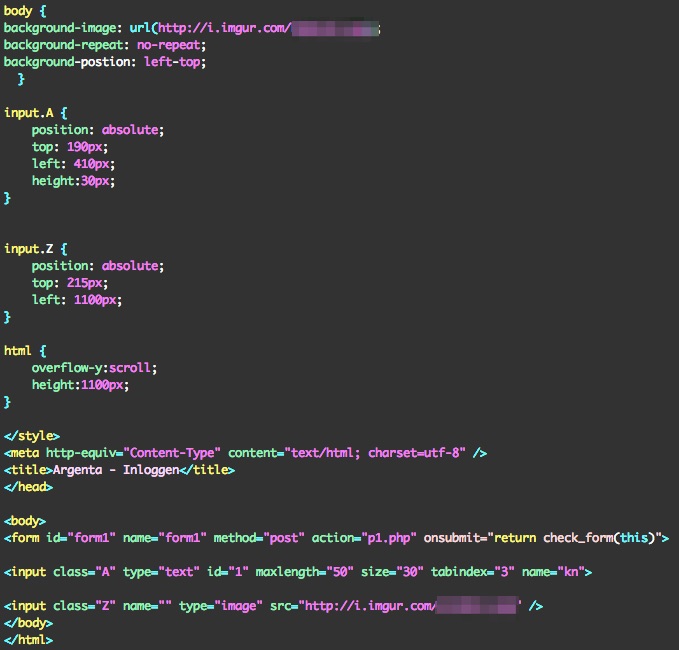
The website is in essence one big image that is set as the background of the web page together with one simple form. The form contains one input field (1) and the submit button is replaced with an image (2). All the form elements have an ‘absolute’ (position: absolute;) position. There’s not a lot of content in the source of the page as a basis for content inspection for phishing.

This is how the HTML looks like, spot the two image references to imgur (background + submit button)

The submit of the form is done via a simple Javascript function.


Detection of these type of sites is again a little bit harder.

IOCs

The site has been reported (bank + CSIRT). IOCs are available via Botvrij.eu – Free IOCs via MISP or direct via https://www.botvrij.eu/data/feed-osint/5a722b97-31d8-4e4c-b860-03a7c0a8ab16.json.

Note that Imgur itself is not a malicious website, it’s a photo/imagery website.

Understanding calling conventions during malware analysis

Malware analysis of functions

When you do analysis of malware in for example x64dbg or IDA Pro it’s important that you understand how functions are called, what arguments are passed to the function and how to recognize the local variables within that function.

Further down in this post are my notes from the SANS FOR610: Reverse-Engineering Malware: Malware Analysis Tools and Techniques course and the The IDA Pro Book.


Basic concepts of low-level analysis of functions

First some core concepts.

What is a function?

A function is a group of executable statements grouped into a unit. A function typically performs a specific task like writing data to a file or starting a network connection.

What are the building blocks for a function?

A function has three basic components

  • Input, the part that deals with the information passed to the function;
  • Body, the core statements that perform the task;
  • Return, the value that is returned by the function when all tasks are completed.

When a program executes a function it jumps to another memory location, executes the tasks and then returns to the original location from where the jump was taken.

Stack frames?

Stack frames are the blocks of memory allocated within a program’s run time stack and dedicated to a specific invocation of such a function. In other words, this is the memory space to hold for example the information passed to the function (the parameters or arguments) and the local variables used by the function to perform its tasks. It also contains the address to which the function should return after finishing its tasks.

A side effect of stack frames is that it allows recursion. Each call to a function is given its own stack frame, “isolated” from the predecessors.

Prologue and epilogue

Passing variables to the function (allocating space or setting up registers) is called the prologue of a function. Accordingly, the clean up of the space (stack) and restoring registers is called the epilogue. An prologue happens at the start of a function whereas the epilogue happens at the end of a function.

Calling conventions

It would have been to simple to have one common, shared, method to call functions, including passing data in and out of functions. That’s why they invented calling conventions. A calling convention dictates

  • Where a caller should place variables required by a function, either on the stack or in registers;
  • Who is responsible for removing them from the stack or restoring the registers.

Oh, and to make things worse, the implementation of the convention may vary by compiler.

cdecl or C Calling Convention

Cdecl is used by most C compilers for the x86 architecture.

  • Parameters to a function are placed on the stack from right-to-left;
  • The caller removes the parameters from the stack;
  • Because the caller removes the parameters, functions can have a variable number of parameters;
  • Return variable placed in EAX.

stdcall or Standard Calling Convention

The label ‘standard’ is the name used by Microsoft for its conventions and is similar to cdecl.

  • Parameters to a function are placed on the stack from right-to-left;
  • The called function (callee) is responsible to remove the parameters from the stack;
  • Because the callee removes the parameters, functions always have a fixed, determined, number of parameters;
  • Return variable placed in EAX.

Because there is no need to foresee code to cleanup the stack after every function call this can result is less code.

Microsoft uses stdcall convention for all fixed-argument functions exported from shared library (DLL) files.

Fastcall

Fastcall is a variation of stdcall and uses up to two parameters in registers instead of the stack.

  • The first two parameters are placed in the registers ECX and EDX;
  • Any remaining parameters are placed on the stack;
  • The called function (callee) is responsible to remove the parameters from the stack;
  • Because the callee removes the parameters, functions always have a fixed, determined, number of parameters;
  • Return variable placed in EAX.

Thiscall or C++ Calling Convention

In C++ objects can refer to their selves via the “this” pointer. The address of the object used to invoke the function must be supplied by the caller and is therefore provided as a parameter. Different compilers use different techniques for the implementation as there is no exact specification in the standard on how to implement this.

  • For Microsoft, “this” is passed to the ECX register;
  • For Microsoft, the function (callee) cleans up;
  • GNU behaves as if cdecl is used and places “this” as last parameter on the stack;
  • This also means that with GNU compilers the caller is responsible for cleaning up the stack.

Risky Business #480 — Uber, Kaspersky woes continue – VMRay

I did my first podcast interview for Risky Business (hosted by Patrick Gray) and described how I use VMRay for automated malware analysis. I enjoyed it a lot! You can listen to at Risky Business #480 — Uber, Kaspersky woes continue, the part on VMRay starts at 41:30.

Integrating VMRay with MISP

If you’re interested in integrating VMRay with MISP then have a look at

The VMRay module is part of the MISP modules.