Phishing notice from Deutsche Bank

A couple of days back I received an e-mail from Deutsche Bank. I’m not a customer from DB. About a year ago I applied for some information and I guess my email addresses ended up in their mailinglist.

The mailing warns customers that there is a phishing attack ongoing. According to the mail, once infected, a virus on your computer lures you to a fake page where you are asked to enter your details.

So far so good. It seems like a good practice that banks try to warn their customers.

The mail contains a couple of links that should point you to sites that allow you to check if you are infected or not. Unfortunately the links point to another website. That website seems to have nothing to do with DB. It is a website for a “relationship marketing suite”. It is understandable that DB uses an external company to handle their mailings but I don’t get it … The message to their customers is “be on your guards” and then they ask you to click on a link that has nothing to do with DB?
The Complete Guide to XSS

There is a good writeup on XSS on Security Override.

nmap XML to HTML parser

I was recently in need for a parser that would convert Nmap XML output to a HTML file. As far as I could see there was no tool available so I wrote my own. Feel free to use or adjust it.

<!--
Parse nmap XML output
	Koen Van Impe		cudeso.be
	20100303	
-->
<html>
<head><title>nmap xml file to html</title></head>
<body>
	<form method="POST" enctype="multipart/form-data" action="<?php echo $_SERVER["PHP_SELF"]; ?>">
		XML file: <input type="file" name="xmlfile"	<br />
		<input type="checkbox" checked name="open"> Open <br />
		<input type="checkbox"  name="closed"> Closed <br />
		<input type="checkbox"  name="filtered"> Filtered <br />
		<input type="submit" value="Press"> to upload the file!
	</form>
<?php

if(isset($_FILES['xmlfile'])) {

	// init
	if (trim($_POST["open"]) == "on") 	$printOpen = true;
	else   								$printOpen = false;
	if (trim($_POST["closed"]) == "on") 	$printClosed = true;
	else   								$printClosed = false;
	if (trim($_POST["filtered"]) == "on") 	$printFiltered = true;
	else   								$printFiltered = false;
	$xmlObject = simplexml_load_file($_FILES['xmlfile']['tmp_name']);

	// output the header
	echo "<h1>".(string)$xmlObject["args"]."</h1>";
	echo "<h2>Hosts up: ".(string) $xmlObject->runstats->hosts["up"]." / Hosts down: ".
			(string) $xmlObject->runstats->hosts["down"]. " / Hosts total: ".(string) $xmlObject->runstats->hosts["total"]."</h2>";

	// run through the xml and print hostinfo
	foreach($xmlObject as $host => $value) {

		// Only grab the data if it's host related info
		if ((string) $host == "host") {

			// declare portsarray
			$nmap["ports"] = array();
		
			// get the hostinfo
			echo "<h2>".(string) $value->hostnames->hostname["name"].
						" (".(string) $value->address["addr"]." / ".(string) $value->address["addrtype"].")</h2>";
			echo "<table>";
		
			// put the discovered ports in an array
			foreach ($value->ports->port as $port) {

				if (  ( ((string) $port->state["state"] == "filtered")	and	($printFiltered)) or
					  ( ((string) $port->state["state"] == "closed")	and	($printClosed)) or
					  ( ((string) $port->state["state"] == "open")	and	($printOpen)) 
					) {
					echo "<tr><td>".(string)$port["portid"]."/".(string)$port["protocol"]."</td><td>".
							(string)$port->state["state"]."(".(string)$port->state["reason"].")</td>
							<td>".$port->service["name"]."(".(string)$port->service["product"].")
								</tr>";
				}			
			}
			echo "</table>";
		}
	}

}
?>
</body>
</html>

Play .iso on mac os x

A short post as a reminder, this is how to open iso dvd files on a Mac with OS X Leopard.

Open the Finder and navigate to the .iso file, double-click to mount it. Then go to Applications and open the DVD player.

Screws removed from my jaw

About 6 months ago I had a rather unpleasant accident and broke my jaw.

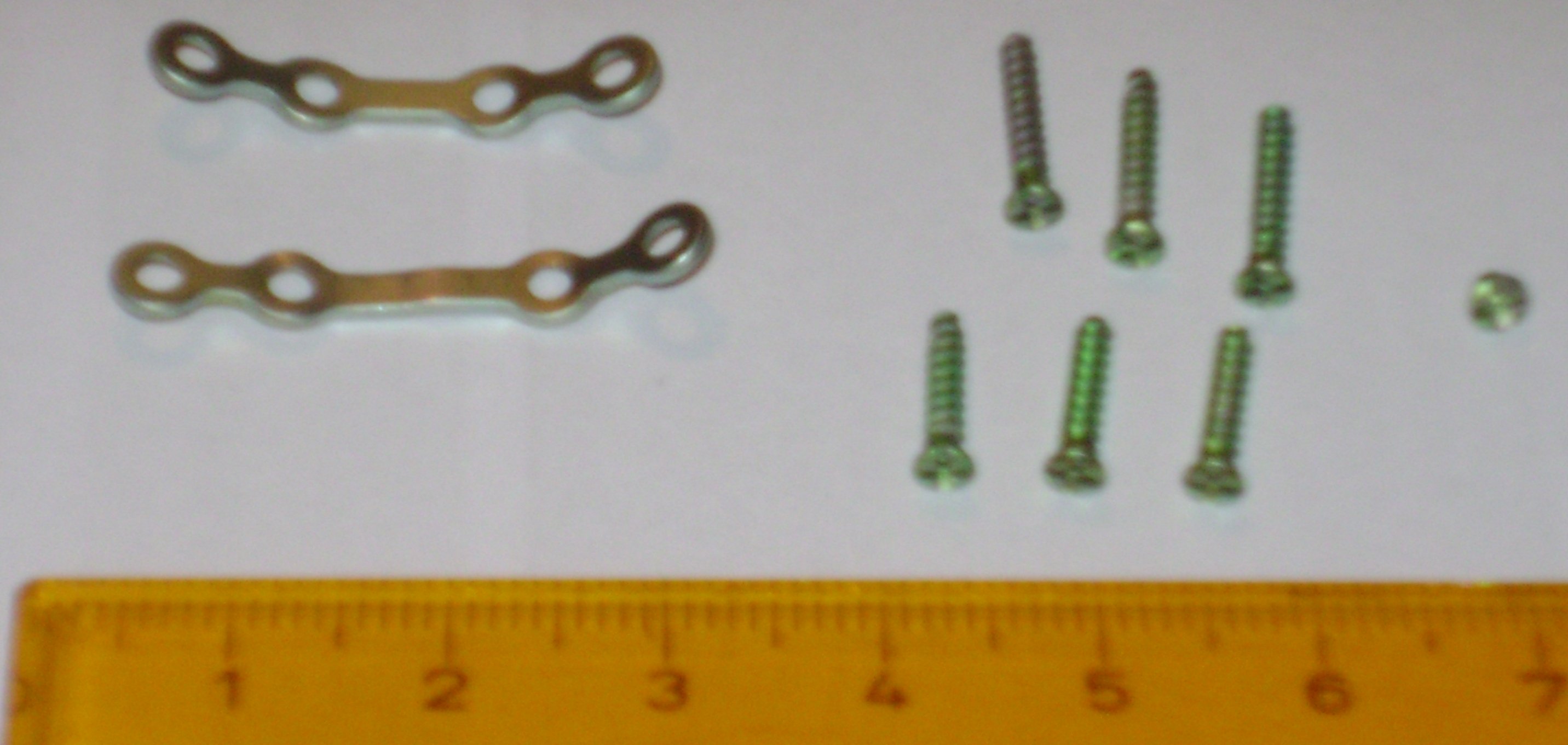
Last Thursday I had surgery to remove the metal plates that held my jaw together. I went in around 9AM, had a good sleep between 1PM and 3PM and went back home around 6PM … with the things that were inside my cheek in a small plastic back.

The doctor told me I was rather fortunate, I managed to crack two of the screws. As a precaution doctors nowadays always use two plates to attach broken jaws. Thank you doctor! Otherwise it would have been forced to have that same surgery again. Not something I would have enjoyed. Out of eight screws that were used two were broken and the base part of the screws are still in my jaw. I’m already looking forward to my next airport security check.

Oh, and from the “outside” there’s nothing you can see (besides my grumpy face but the problems with my jaw aren’t the only source for my grumpiness …)

WordPress reset

I finally managed to unlock my access to my WordPress blog. Since the last upgrade I always received the “You do not have sufficient permissions to access this page error”

I installed a fresh WordPress (new empty database, new path). Once the setup was done I copied everything from the old database to the new database except for wp_user and wp_usermeta. After logging in as an administrator everything was working as before the error. I created new users for posting content and so far I’ve not encountered any errors. I still have no clue why this error suddenly popped up.

Ubuntu numeric keypad

After the upgrade to Ubuntu 9 I was unable to use the numeric keypad on my external keyboard that’s connected to my laptop. I’ve switched every possible option in the keyboard preferences on and off and found out that you have to disable the Pointer can be controlled using the keypad option. That’s under System, Preferences, Keyboard and Mouse Keys.

Snort 3.0 Beta 3 Released

An interesting post by Martin Roesch on the new architecture in the beta release of Snort.

Upgrading Ubuntu and no longer access to my encrypted home partition

I recently upgraded my laptop to the latest Ubuntu 8. The upgrade process was easy and quick however after the reboot I was unable to access my home-directory. I have a separate partition on which /home is mounted. This partition is encrypted with cryptsetup.

When I start the cryptdisk daemon it returns an error:

/etc/init.d/cryptdisks start
* Starting remaining cryptodisks...
mount: special device /dev/mapper/cryptohome does not exist
Enter passphrase:


Checking the status with cryptdisk doesn’t show any errors:
/dev/mapper/cryptohome is active:
cipher: aes-cbc-plain
keysize: 256 bits
device: /dev/sda3
offset: 0 sectors
size: 40949685 sectors
mode: read/write

And the device is there:
ls -l /dev/mapper/
total 0
crw-rw---- 1 root root 10, 63 2008-07-12 17:20 control
brw-rw---- 1 root disk 254, 0 2008-07-12 17:47 cryptohome


Crypttab is also configured correctly:

#
cryptohome /dev/sda3 none vol_id


Mounting the /home partition on /dev/mapper/cryptohome (as root) returns :

mount: wrong fs type, bad option, bad superblock on /dev/mapper/cryptohome,
missing codepage or other error
In some cases useful info is found in syslog - try
dmesg | tail or so

with these errors in dmesg
[ 1966.915329] VFS: Can't find ext3 filesystem on dev dm-0

Creating new encrypted partitions (with similar settings) works like a charm. The partition worked perfectly for months before the upgrade and currently I don’t have any clue on how to access my encrypted data. Any help would be highly appreciated.

UPDATE

The problem was not tied to cryptsetup but to something entirely different. My passphrase contains a number of special characters. My keyboard layout was changed to something without the “µ ù ç^” characters. I didn’t notice this during the test because then I was using a rather simple passphrase.

Upgrading Ubuntu and no longer access to my encrypted home partition

I recently upgraded my laptop to the latest Ubuntu 8. The upgrade process was easy and quick however after the reboot I was unable to access my home-directory. I have a separate partition on which /home is mounted. This partition is encrypted with cryptsetup.

When I start the cryptdisk daemon it returns an error:

/etc/init.d/cryptdisks start
* Starting remaining cryptodisks...
mount: special device /dev/mapper/cryptohome does not exist
Enter passphrase:


Checking the status with cryptdisk doesn’t show any errors:
/dev/mapper/cryptohome is active:
cipher: aes-cbc-plain
keysize: 256 bits
device: /dev/sda3
offset: 0 sectors
size: 40949685 sectors
mode: read/write

And the device is there:
ls -l /dev/mapper/
total 0
crw-rw---- 1 root root 10, 63 2008-07-12 17:20 control
brw-rw---- 1 root disk 254, 0 2008-07-12 17:47 cryptohome


Crypttab is also configured correctly:

#
cryptohome /dev/sda3 none vol_id


Mounting the /home partition on /dev/mapper/cryptohome (as root) returns :

mount: wrong fs type, bad option, bad superblock on /dev/mapper/cryptohome,
missing codepage or other error
In some cases useful info is found in syslog - try
dmesg | tail or so


with these errors in dmesg
[ 1966.915329] VFS: Can't find ext3 filesystem on dev dm-0

Creating new encrypted partitions (with similar settings) works like a charm. The partition worked perfectly for months before the upgrade and currently I don’t have any clue on how to access my encrypted data. Any help would be highly appreciated.


