Logjam vulnerable websites in Belgium

Logjam

Recently a group from INRIA, Microsoft Research, Johns Hopkins, the University of Michigan, and the University of Pennsylvania published an analysis of the Diffie-Hellman algorithm as used in TLS and other protocols. They reported on a downgrade attack against the TLS protocol which would allow attackers to read and possibly alter your supposedly secure communication with a website or VPN connection.

The issue is located in the EXPORT cryptography, similar to the FREAK attack (although Logjam is a flaw in the TLS protocol whereas FREAK was an implementation vulnerability). The technical details have been covered by CloudFlare, Logjam: the latest TLS vulnerability explained.

In essence it affects any server that supports DHE_EXPORT ciphers, and affects all modern web browsers.

Logjam is by far not a “new” Heartbleed. But because the issue is to be found in SSL and people tend to consider SSL as secure, it is absolutely worthwhile to get your systems fixed.

A list of websites in Belgium

The report on Logjam was published around May 2015. I decided to test if the majority of Belgian websites were still vulnerable two weeks after the initial report.

There is no such thing as “a list of all the Belgian” websites. For an older post (Analyze HTTP headers) I used the Alexa Top 1,000,000. This time I decided to use a different approach.

Dnsenum (also included in BackTrack) allows you to do DNS enumeration. One of its features is to do Google scraping. I used this tool to get a list of Belgian websites. It queries Google for allinurl: -www site:be.

I ran the tool a couple of times, via Belgian IPs and foreign (TOR) IPs, to get a large list of Belgian hosts. Because Google results are influenced by the geographical region where the search is performed using both the TOR and Belgian IPs allowed me to get a good mix of results.

Dnsenum is available via Github

git clone https://github.com/fwaeytens/dnsenum.git

You can then run it with the scraping (and number of pages) option.

./dnsenum.pl -p 100 -s 1000 be

I pasted the output in one big file and then used awk to filter out the domain names.

cat weakdh.hosts.tmp  | awk '{print $1;}' | sort | uniq > weakdh.hosts
cat weakdh.hosts.tmp  | awk '{print $1;}' | sort | uniq | awk '{print "www."$1;}' > weakdh.hosts_withwww

This created two files. One with the domain name as it was found in the Google results. And one with www. prepended. Adding this www. can result in a number of non-existing hosts appearing on the list. This is not an issue. I’m interested in how many of the SSL hosts are vulnerable, whether or not a hosts exists doesn’t influence the final result (if the host doesn’t exist there’s no SSL to start with).

Scan for vulnerable Logjam sites

The website of WeakDH has a test that allows you to test if your site is vulnerable. The test returns a JSON object that you can parse. You can achieve the same via the Qualys SSLlabs test but the result from WeakDH is far more easier to parse.

I asked the people from WeakDH first if they agree on using their test. I wrote a small Python script that does the test for you, via WeakDH. If you run the script you are not connecting directly to the site you want to test, the test is done from WeakDH.

My script is also on Github. The configuration is inline

  • weakdh_hosts : a text file with the hosts to check
  • pause_interval : the interval to wait between a query
  • base_url : the URL from weakdh.org
  • verbose : give verbose output

I really recommend to set a sane pause_interval so you do not abuse the free service from WeakDH.

Usage of the script is straightforward

./weakdh.py 
1.2.3.4     myhost.tld.  no result from weakDH
1.2.3.4     myhost.tld. no TLS
1.2.3.4     myhost.tld. Vulnerable
...
270 hosts tested, 56 with no results, 21 sites with TLS, 4 vulnerable

Websites vulnerable to Logjam in Belgium

I started with a list of 369 .be domains, adding the www. prefix resulted in 738 domains that have been tested.

The test was done on the evening of 2-Jun-2015. Out of 738 hosts, 308 had TLS support. This means that almost 41% of the tested Belgian sites supports TLS.

Out of the 308 TLS hosts, 25 were, according to WeakDH, vulnerable to Logjam. The test against the original domains found in Google returned 17 vulnerable hosts, the test against the domains with added www. returned 8 vulnerable hosts.

This means that 8.1% of the tested Belgian sites are still vulnerable to a possible Logjam attack. The list of vulnerable sites contains a number of interesting targets :

  • 3 sites run by Belgian universities;
  • 2 proxy hosts run by a Belgian government agency;
  • 1 web interface towards a mail host for a high school (mail.X.be);
  • 1 site run by a Belgian public transport organization;

I’m vulnerable to Logjam, what should I do?

Servers

If you run a server you should disable support for export cipher suites and generate a unique 2048-bit Diffie-Hellman group.

Also note that if you follow(ed) the advice from BetterCrypto you should be safe. Their blog post describes how you can check and remediate your systems. The general recommendation is to use 4096bits wherever possible but note that some servers and clients don’t work well with DH-Parameters > 1024 bits.

The remediation is covered in detail by https://weakdh.org/.

End users

End users should upgrade their browsers.

Conclusion

The number of Belgian websites vulnerable to Logjam, 8.1%, is more or less similar to the worldwide number of sites seen vulnerable to Logjam, 8.4%, by WeakDH. Amongst the 8% .be sites there are some ‘interesting’ targets.

Although the number of tested sites is relatively low compared to the entire .be domain space I think that, because of using the Google query results as a source, it is a very representative test set.

I did not look specifically at results from sites that use one of a few commonly shared 1024-bit Diffie-Hellman groups that may be susceptible to passive eavesdropping from an attacker with nation-state resources.
Comparing Free Online Malware Analysis Sandboxes

I had a guest-posting published at IBM Security Intelligence : Comparing Free Online Malware Analysis Sandboxes.

Getting started with MISP, Malware Information Sharing Platform & Threat Sharing – part 3

MISP

In the two previous posts on MISP

I covered the basic installation, configuration and usage of MISP, Malware Information Sharing Platform & Threat Sharing.

Visit the page from CIRCL.lu to get a good overview of the possibilities of MISP and a description of a practical use case.

If you need (commercial) support you should visit http://www.misp-project.org/.

This post will list a few useful configuration quirks or remarks that I encountered when using MISP.

MISP – Configuration

Detailed MISP email subject

By default, the subject line of a MISP notification message only contains the event ID and severity. There are situations where you’d like to have more details in the subject so that you can already judge whether the information needs immediate action.

The setting MISP.extended_alert_subject allows you to have an extended subject. One word of warning though. If you’re using encryption : the subject will not be encrypted. Be aware that you might leak some sensitive information this way. Below is an example how the two subject types look like. First with the option disabled, then with the option enabled.

Event 7 - Low - TLP Amber
Event 8 - OSINT - Dissecting  XXX... - Low - TLP Amber

Restarting the workers

If for one or the other reason you have to restart the workers from the command line then you have to take special care to check the log permissions. If you restart the workers as root, then the worker log will be owned by that user. Restarting the workers is done via :

/var/www/MISP/app/Console/worker/start.sh 

Have a look at the logs. They should all be owned by www-data :

ls -l /var/www/MISP/app/tmp/logs/

If needed, you can change the ownership :

chown www-data /var/www/MISP/app/tmp/logs/*

Redirect MISP HTTP to HTTPs

The data that you store in MISP can be sensitive so ideally you only have it accessible via a secure website (HTTPs). In order to add some user convenience you should redirect the http requests to the https-site. This can all be done via the Apache configuration.

<VirtualHost *:80>
        ServerAdmin misp@misp.misp
        ServerName misp.misp.misp
        ServerAlias misp-int.misp.misp

        Redirect permanent / https://misp.misp.misp

        LogLevel warn
        ErrorLog /var/log/apache2/misp.local_error.log
        CustomLog /var/log/apache2/misp.local_access.log combined
        ServerSignature Off
</VirtualHost>

<VirtualHost *:443>
        ServerAdmin misp@misp.misp
        ServerName misp.misp.misp
        ServerAlias misp-int.misp.misp

        DocumentRoot /var/www/MISP/app/webroot
        <Directory /var/www/MISP/app/webroot>
                Options -Indexes
                AllowOverride all
                Order allow,deny
                allow from all
        </Directory>

        SSLEngine On
        SSLCertificateFile /etc/ssl/misp.misp.misp/misp.crt
        SSLCertificateKeyFile /etc/ssl/misp.misp.misp/misp.key
        SSLCertificateChainFile /etc/ssl/misp.misp.misp/mispCA.crt

        LogLevel warn
        ErrorLog /var/log/apache2/misp.local_error.log
        CustomLog /var/log/apache2/misp.local_access.log combined
        ServerSignature Off
</VirtualHost>

Define the default sharing level

MISP allows you to define the group of people with whom you want to share your threat data. If you do not set it to your preferred default then it’s likely that at one given moment you’ll make an error and share your intel with the wrong group. Defining the sharing level is done with the setting default_event_distribution in the configuration file. There are three levels

  • 0 : Your organisation only (default)
  • 1 : This community only
  • 2 : Connected communities
  • 3 : All communities

You can set a similar configuration setting for the attributes. The setting default_attribute_distribution has the same values as default_event_distribution. Additionally it has the value event which allows the attribute to get the setting from the event to which it belongs.

Unable to save a user GPG key

If you want to include the GPG keys from your users then you have to make sure that the .gnupg directory is writable and readable by the web-user.

drwx------  2 www-data www-data  4096 May 28 21:23 .gnupg

Images and MISP

MISP can be made more appealing to the eye by adding some graphics. You can set your organisation logo by adding an image (.png) that has the same name as your organisation in the directory

/var/www/MISP/app/webroot/img/orgs/

Similarly you can add a footer logo. Add an image to the directory

/var/www/MISP/app/webroot/img/custom/

and define the footer logo in the config file (config.php).

Check your site for Logjam

Logjam Attack

The Logjam Attack basically allows an attacker to downgrade a secure connection to a VPN or secure website so that the attacker is able to read or modify your communication. The issue was found in the way how Diffie-Hellman key exchange has been deployed. It has been extensively described at https://weakdh.org/.

Scan your servers for Logjam

You can test if your server is vulnerable via the Qualys SSLServer test or via a form on the weakdh.org website.

The output from weakdh.org is a JSON object that is far more easier to parse than the results from Qualys. I asked the people from weakdh.org if I could use their test to verify a list of hosts (approx. 500) with a 5 second interval to check if a host is vulnerable to Logjam. They agreed to it. You can get my small Python script from Github. If you plan on using this script to scan your environment I suggest you ask them permission first and use a sane waiting time between the different queries.

You can get the script from Github. It uses three parameters

  • weakdh_hosts : a text file with the hosts to check
  • pause_interval : the interval to wait between a query
  • base_url : the URL from weakdh.org

Note that the script only checks for really vulnerable sites. Sites that have 1024-bit Diffie-Hellman might be vulnerable to “nation-state” attackers also. This script does not raise a warning for these sites.

Protect yourself against Dridex

Dridex banking malware

The Dridex banking malware (and Bartalex) is one of the cyber security threats that organizations face today. The malware attempts to steal credentials for banking websites and acquire personal information entered into websites that are of interest to the attackers.

It uses HTML injections and changes often, making it harder for antivirus solutions to detect it.

Dridex is delivered in three stages.

  1. A spam campaign delivering an e-mail with an attachment;
  2. A Word document with a macro;
  3. The actual Dridex malware, downloaded by the macro.

How do you protect yourself against Dridex?

An antivirus solution will only partly protect you against Dridex. It’s characteristics change so often that it becomes a cat and mouse game for the attackers and antivirus-signature writers, desperately trying to catch up. Signature based detection is not suited for this type of malware. There will always be a window of opportunity for the attackers. During that window they can deliver a new slightly modified version of the malware. It will take some time before it’s picked up by antivirus provider and incorporated in their signatures.

Basically there are two measures that help you in being protected against Dridex. Don’t open an attachment you’ve not asked for. Have macro’s in Office disabled. If you’re working in an IT environment that still has Office macro’s enabled by default then you should point out that this is really not a good idea.

A detailed overview of what you can do for protecting end users against Dridex :

  1. Have Office macros disabled by default;
  2. Use attachment sandboxing;
    • Ideally you extract any type of archive file and observe its behavior;
    • Open attachments in sandboxes before they are being delivered to the end-user;
  3. Raise awareness amongst your users that they should not open attachments that they did not ask for;
  4. Educate your users to hover above the URL in e-mails and manually verify it links to the intended location (ideally you force e-mails to be displayed in text only);
  5. Use a host intrusion detection / prevention system that prevents applications from being executed in temporary folders;
  6. Have your antivirus signatures updated so that at least older versions of Dridex are detected;
  7. Only allow whitelisted executables to be run by end-users;
  8. Update your blacklists for proxies, firewalls, etc. frequently so that you detect traffic related to older versions of Dridex;

How do you protect your customers against Dridex?

As a service provider there’s not a lot that you can do to protect your customers. A couple of good practices can help though :

  1. Use your own domain in all your e-mail communication. Don’t use a third party (e-mail) domain for surveys, online help or campaigns;
  2. Educate your customers, explain them how you communicate so that they can more easily differentiate between legitimate and fake messages;
  3. Don’t create a habit of sending e-mails with PDFs or Word documents;
  4. Provide two factor authentication;
  5. Digitally sign your e-mail messages;

Who accessed your personal data in Belgium?

Belgium’s civil servants accessing your data?

In May the Belgian media reported that civil servants were accused of violating people’s right to privacy. The civil servants stand accused of consulting the state register that contains personal data on all citizens, without a proper reason to do so.

Who accessed your personal data in Belgium?

Who accessed your personal data in Belgium? You can check for yourself with an e-id and a card reader.

IBZ – mijndossier.rrn.fgov.be

  1. First close all your browser windows;
  2. Insert your card reader;
  3. Insert your e-id;
  4. Open a new browser window;
  5. Go to https://mijndossier.rrn.fgov.be;
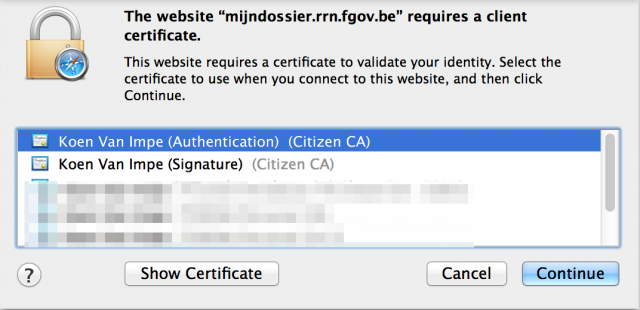
  6. You will now get a popup from your browser that looks similar to this :

    E-ID Popup, choose certificate
  7. Choose your certificate to authenticate. Do not choose your signature certificate;
  8. This will result in this popup.
    PIN code
  9. Enter your e-id PIN code.
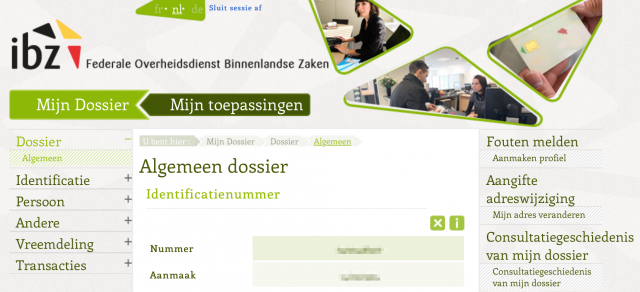
  10. Choose Mijn Dossier;
    Mijn dossier
  11. On some occasions you might get a similar popup as before, requesting you to select a certificate. Always choose the authenticate certificate.
  12. On the right you will see a button Consultatiegeschiedenis van mijn dossier. In French it is Historique des consultations me concernant;
    History

    History - FR
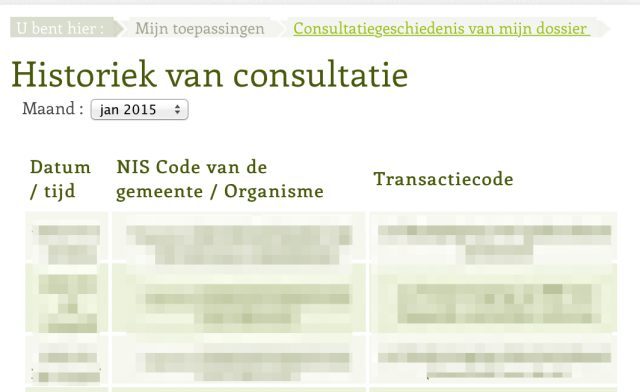
  13. This gets you to a screen with an overview per month
    Overview
  14. The page will list the timestamp, the requester and the result of the query.

Complaints

If you have complaints on the listed requests then you can go to De Privacycommissie.

Analyzing spam e-mail headers

E-mail headers

I analysed a couple of malware samples in the past that arrived via e-mail. I always found the setting of the X-Mailer header of these e-mails something unusual.

The X-Mailer header is set by the sending program and describes the mail client (mail program) that was used to send the message. Note that spammers can insert whatever value they deem necessary. There’s nothing that prevents them to insert bogus data. Also note that some applications do not use X-Mailer but rather use User-Agent (a similar header as the header used by web browsers).

My previous analysis showed the use of Encumbered v2.94 or Achromatous v2.76 as X-Mailer.

This raised my interest to know what values are most often used for the X-Mailer header in spam messages. Because I was already extracting one header (the X-Mailer) I could as well extract all the other e-mail headers from the spam messages and see if there’s useful information or statistics to learn from these headers.

So I wanted to start with analyzing spam e-mail headers. The e-mails that were analysed were samples found in Gmail spam folder or in a number of .be (Belgium) mail addresses.

Download IMAP mail via Python

I wrote a Python script that collects the e-mail information from an IMAP server, extracts useful information and stores the header information. The script is on Github.

It downloads the available e-mails and then extracts

  • Multi part or not
  • The number of headers per e-mail
  • The content type
  • The full length of the message
  • An MD5 hash of the message
  • The subject, the length of the subject and an MD5 hash of the message
  • The headers an values of the headers
  • A stripped (no trailing spaces and converted to lowercase) version of the headers and values

E-mail dataset

In total 34059 e-mails are imported resulting in 1193600 e-mail headers. On average the e-mails had 35 headers. The maximum number of headers found was 538, the minimum number of headers was 16. There were 1005 distinct headers.

The subject length was on average 127 characters, the maximum subject length was 1632 characters and some e-mails had an empty subject.

Top header

The top header that was inserted is the Received header. This is no surprise because one e-mail often contains multiple Received headers. These headers describe the e-mail routing path. They can be altered by the sender (spammer), only the headers inserted by your own equipment can be trusted. Note that the x-virus-scanned header was inserted on the receiving part.

X-Priority

Not every e-mail had the X-Priority header set. Those that had it set most often used 3.

Other headers

There were 17884 List-* headers, 92 with Authenticated-* and 1968 with X-PHP-*

Out of the 34059 e-mails, 6342 had a header set that contained the string “abuse”, that is 19%.

X-Mailer

I started this post because of my interest in the use of different X-Mailer headers. From the 34059 e-mails, 9945 had an X-Mailer. That is 29%.

There were 737 e-mails that had the User-Agent header set and 1285 with the X-User-Agent header set.

The top X-Mailer was OEM.

There are a lot of different versions of Outlook Express 6 used as X-Mailer. In total there were 1198 X-Mailer headers that started with Microsoft Outlook Express 6. There were two X-Mailers that only had a version number : 4.2.8* (160 entries) and 1.0.0* (217 entries).

Unusual X-Mailers

I started this post because I wanted to check if the headers that were used in e-mails to deliver malware returned in other e-mails. It’s important to note that the e-mails that delivered the malware were initially not marked as spam. For this post I only used the e-mails that were tagged as spam. The spam detection engine is either the one used by Google (Gmail) or by Can-It.

Unfortunately, none of the e-mails had an X-Mailer that resembled the mailers found in the malware delivery e-mails.

One unusual pattern did stand out though. A lot of e-mails had four headers with length 10. The header name was what looked like a random string.

cwmlfdjefh|visuh.info$
pzodxmsufj|3909$
papclkjzjd|57$
avnksotlqd|iOL4UdSUMG++P7nTeKL6/RdS4axVAG+9Nl9iHzyEbLk=$

This pattern returned in about 100 spam e-mails. Neither the other headers, the subject or the content returned something unusual, besides the usual spam content.

The strings used as header were for example chfnrexsxc, pnvgftrsqd, snbcgrslgh or xbcgrephjt.

I also observed a similar pattern with header strings of length 14 (pkgygghncsmprhg, otrjgnaschptjsf, vnfaproerfdnvlkg). So far I can not explain what is the source or reason of these headers.

Conclusion

I hoped to see X-Mailer header data that had some resemblances with the ones used in the malware delivery mails. This was not the case.

(spam) E-mails contain a lot of headers, on average 35.

Out of 34059 e-mails only 29% had the X-Mailer set.

Most of the e-mails did not have an “abuse” header (only 19%).

I can’t explain the use of the 10 character header with the random strings.

The question of issuing an advisory : Magento CVSS

Magento Vulnerability

Analyzing the Magento Vulnerability

Check Point recently released an analysis of a critical RCE (remote code execution) vulnerability in the Magento web e-commerce platform that can lead to the complete compromise of any Magento-based store, including credit card information as well as other financial and personal data, affecting nearly two hundred thousand online shops.

Magento Patch

Magento already released a patch (SUPEE-5344) on February 9, 2015 (you have to get an account to download the patch, I added it to the security-tools Github repository). On 16th of April, Magento e-mailed their customers urging them to apply the patch immediately.

Magento Shoplift

The bug is dubbed Magento Shoplift by Byte.nl (in Dutch). The Byte Shoplift online check allows you to verify if your website is vulnerable.

A post from Sucuri describes the use of exploit code in the wild.

Inform your constituency?

We had a discussion at work whether or not to inform our constituency. Because we have been running low on available resources and in the past we only sent advisories when it concerns an Heartbleed-ish vulnerable and because the local (.be) impact was fairly low (~500 installations) I considered this as “do not publish”.

Sometimes though it’s good to reconsider so I had a look at how vulnerabilities are measured.

The authoritative source for measuring and scoring vulnerabilities is the Common Vulnerability Scoring System, an open framework for communicating the characteristics and impacts of IT vulnerabilities. The current version is Version 2 but there is a Version 3 in development.

The first place to look for vulnerability information (and the scoring) is the CVE database. Unfortunately the last found entry for Magento is a vulnerability from 2009. This means there’s no ready to use value or metric to evaluate this vulnerability.

Update from @OSVDB and @hanno : there is CVE-2015-1397, CVE-2015-1398 and CVE-2015-1399.

FIRST Common Vulnerability Scoring System Version 3.0 Calculator

FIRST has an online calculator for defining the exact score according to version 3.

I decided to use this calculator together with the document that describes the metrics (December 2014 version).

Base Metrics


base

Attack Vector (AV)

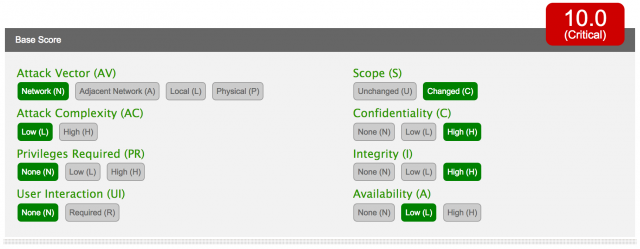
This metric reflects the context in which the vulnerability exploitation occurs. For Magento the attack is conducted via the web. This results in a value of Network (N).

Attack Complexity (AC)

This metric describes the conditions beyond the attacker’s control that must occur in order to place the system in a vulnerable state, this also excludes any user interaction requirements. According to Check Point, this attack is not limited to any particular plugin or theme. All the vulnerabilities are present in the Magento core, and affects any default installation of both Community and Enterprise Editions. This results in a value of Low (L).

Privileges Required (PR)

This metric describes the privileges an attacker requires before successfully exploiting the vulnerability, and the potential impact they could inflict on a system after exploiting it. The Magento attack can be done via an unauthenticated attacker. This results in a value of None (N).

User Interaction (UI)

This metric captures the requirement for a user (other than the attacker) to participate in the successful exploit of the target information system. No user interaction is needed for this exploit so this results in a value of None (N).

Scope (S)

This is a conceptual change in the new CVSS. Impact metrics are now scored relative to the impacted authorization scope, or simply Impact Scope. In this vulnerability the attacker can introduce an Administrator account coming from an unauthenticated user. So the resulting metric is Changed (C).

According to @SethHanford a scope “changed” should not be used when privilege escalation occurs, it’s meant to be used when crossing trust boundaries. This would reduce the final score to 9.8.

Confidentiality Impact (C)

This metric measures the impact to confidentiality of a successfully exploited vulnerability. Because the vulnerability can lead to an Administrator account, basically meaning the attacker can do whatever he wants with the Magento setup. This results in a value of High (H).

Integrity Impact (I)

This metric measures the impact to integrity of a successfully exploited vulnerability. Again, because of having an Administrator account, the attacker can change the data at will. This results in a value of High (H).

Availability Impact (A)

This metric measures the impact to the availability of the affected Impact Scope resulting from a successfully exploited vulnerability. Although the attacker can have an Administrator account this does not stop the system from working. In fact, the biggest gain for an attacker from exploiting Magento would be to keep the system running and gathering more valuable user data. I would rate this metric to the value of Low (L).

Temporal Metrics


temp

Exploitability (E)

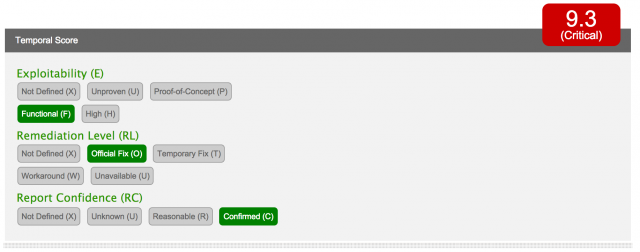
This metric measures the current state of exploit techniques or code availability. Public availability of easy-to-use exploit code increases the number of potential attackers by including those who are unskilled, thereby increasing the severity of the vulnerability. According to byte.nl there is functional exploit code as of 23rd of April. This results in a value of Functional (F).

Remediation Level (RL)

There is a patch available, meaning the metric has a value of Official Fix (O).

Report Confidence (RC)

This metric measures the degree of confidence in the existence of the vulnerability and the credibility of the known technical details. The information from Check Point is reliable and confirmed by the patch of Magenta. This results in a value of Confirmed (C).

Environmental Metrics

Security Requirements (CR, IR, AR)

These metrics enable the analyst to customize the CVSS score depending on the importance of the affected IT asset to a user’s organization, measured in terms of confidentiality, integrity, and availability. This scoring is dependent on the Mangento installation. If the shop is the sole purpose of the site then this would be rated High (H). In other cases, where site-owners sell products but it is not the only main traffic driver for a website then this would result in a value of Medium (M).

Modified Base Metrics

These metrics enable the analyst to adjust the Base metrics according to modifications that exist within the analyst’s environment. These metrics are entirely dependent on the site setup. For example, according to Check Point, their customers are already protected by Check Point IPS. I leave this metric to an undefined value.

Conclusion


score

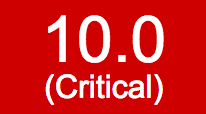
Based on the above metrics this vulnerability has a base score of 10.0 – Critical and an environmental score of 9.3 – Critical.

A score this high means Patch! but also issue an advisory!

Defining IOCs with online malware analyser tools

Use CryptoLocker to train your incident response team

A couple of weeks back I wrote a post about how to use CryptoLocker to train your incident response team. I waited for another interesting mail and malware sample to arrive to combine the ideas of that post with my post on using different public online malware analyser tools for defining IOCs with online malware analyser tools.

On Wednesday 15-April I received what looked like an interesting mail and attachment to process and analyse.


Mail sample

The idea of this exercise is to quickly extract useful IOCs from malware and the transport media (e-mail) that they use.

E-mail sample

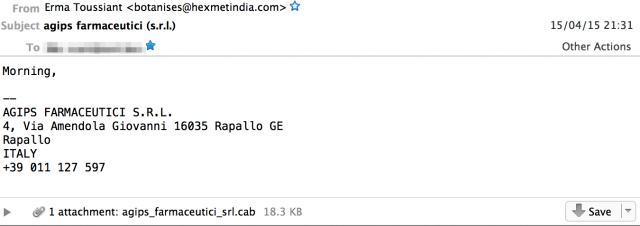
On Wed, 15 Apr 2015 21:31:31 +0200 I received an e-mail pretending to be send by “Erma Toussiant” <botanises@hexmetindia.com> with a subject agips farmaceutici (s.r.l.).

The e-mail was relayed through a Vodafone DSL connection in Italy (188.216.233.135). During the mail delivery the sender announced itself as belonging to geodeticavolpe.com.

Return-Path: <botanises@hexmetindia.com>
...
Received: from geodeticavolpe.com (net-188-216-233-135.cust.vodafonedsl.it [188.216.233.135])
    ...
Message-ID: <14o0c7kej196u4x@hexmetindia.com>
Date: Wed, 15 Apr 2015 21:31:31 +0200
From: "Erma Toussiant" <botanises@hexmetindia.com>
X-Mailer: Achromatous v2.76
MIME-Version: 1.0
Subject: agips farmaceutici (s.r.l.)

The X-Mailer was set to Achromatous v2.76. This is not a known mailer. According to The Free Dictionary this word means having little or no colour or less than is normal. I assume the mailer name is randomly picked from a dictionary.

The message had one attachment : a CAB file : agips_farmaceutici_srl.cab. The file name of the attachment corresponds with the name of the company displayed in the signature of the e-mail. This is contrary to a previous exercise.

The subject, the attachment file name and the signature displayed in the e-mail reference an Italian company Agips Farmaceutici S.R.L.. As far as I can verify this company is a randomly chosen victim.

According to Cisco SenderBase the IP 188.216.233.135 does not have a bad reputation. It was also not listed in Spamhaus and Spamcop. At first glance, nothing suspicious could be found related to geodeticavolpe.com (the mail HELO domain, registered via a contact in Italy) or hexmetindia.com (the displayed sender domain, registered via a contact in India; one hit was found for hexmetindia.net in an e-mail campaign XLS but that does not seem related).

Analysis of the attachment

The e-mail contained one attachment : agips_farmaceutici_srl.cab.

MD5 = ba914359d9a3f8391fd6165bc6ee41a2
SHA1 = 1d9264321f3f81d0b4d1e814f26904cc2a60a989

A cab file is basically an archive. You can extract these files under Linux with Cabextract. This resulted in one file: agips_farmaceutici_srl.scr.

MD5 = eaff9fe70724e75a78fc7b32553b621c
SHA1 = 287aafb8995a28d0873e7659269ef20b7f7ee6a6

The cab file was already analysed by Virustotal. The e-mail with the malware attachment was received on 2015-04-15 21:31:31 GMT+2 and was analysed a couple of hours later at 2015-04-16 05:59:47 UTC by Virustotal. That is a very short delay between arrival of the malware and having it analyzed.

The malware was recognized by 16 out of 56 anti virus products, meaning that there’s a 28% detection rate.

  • F-Secure : Trojan.Agent.BIZY
  • Sophos : Troj/Agent-AMOI
  • ESET-NOD32 : a variant of Win32/Kryptik.DFJC

Remarkable, neither Symantec, McAfee or Panda recognized the malware.

With the use of strings I detected that this malware uses these DLL’s

strings agips_farmaceutici_srl.scr |grep dll
KERNEL32.dll
CRYPT32.dll
user32.dll
ctl3d32.dll
certcli.dll

The CRYPT32.dll is often a sign for some form of ransomware.

Public online malware analyzer tools

Based on the previous information it’s almost certain that this is not targeted malware. I decided to use a number of public online malware analyzer tools to get more information about the behavior of the sample. These tools would help me to get a list of useful threat information and IOCs. I used these online tools to either submit a sample or use the report of a previously submitted sample :

Both Payload Security and Malwr.com provide screenshots of the malware in action.


screen_1

These screenshots do not reveal the necessary information that you’re after but it’s always nice to see how malware is “presented” to a victim. These screenshots can also serve in awareness campaigns to warn your constituency.

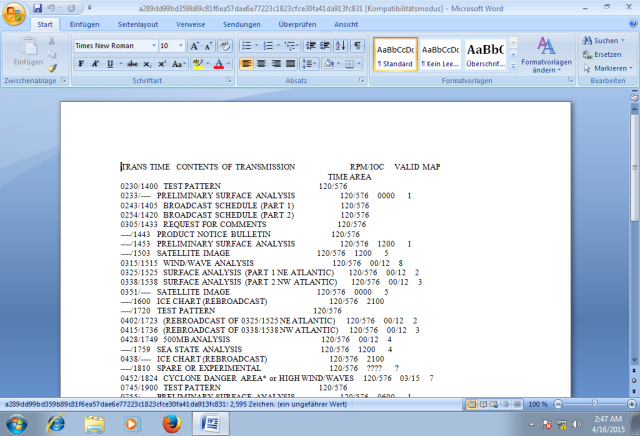
These samples show that the malware opens Word or Wordpad with a (random?) document.

Virustotal

According to the analysis of Virustotal the malware

  • drops or creates a number of files
    • C:\DOCUME~1\~1\LOCALS~1\Temp\hes.cab
    • ..\a289dd99bd359b89c81f6ea57dae6e77223c1823cfce30fa41da913fc831.rtf
  • Network connection to 191.233.81.105:123
  • The file installs an application-defined hook procedure into a hook chain. You would install a hook procedure to monitor the system for certain types of events.

The network connection is a request to a time server located in Brazil, owned by Microsoft Informatica Ltda. There’s nothing suspicious about this request besides getting the “correct” time.

Sophos

According to the analysis of Sophos the malware

  • drops or creates a number of files
    • c:\Documents and Settings\test user\Local Settings\Temp\kiq.cab
    • c:\Documents and Settings\test user\Local Settings\Temp\sample.rtf
    • c:\Documents and Settings\test user\Local Settings\Temp\xofam.cab
    • c:\Documents and Settings\test user\Local Settings\Temp\hijobo.cab
  • uses wordpad.exe

Payload Security

According to the analysis of Payload Security the malware

  • has some limited stealthyness and detection for debuggers
  • queries the volume information of the harddrives
  • drops or creates a number of files
    • C:\Users\PSPUBWS\AppData\Local\Temp\qok.cab
    • .. a289dd99bd359b89c81f6ea57dae6e77223c1823cfce30fa41da913fc831.rtf
    • C:\Users\PSPUBWS\AppData\Roaming\Microsoft\Templates\~$Normal.dotm
    • .. ~WRS{26259FF6-15DB-4822-92F5-D00B74F041B5}.tmp
    • C:\PROGRA~2\MICROS~1\OFFICE\DATA\opa12.dat
    • ..~$89dd99bd359b89c81f6ea57dae6e77223c1823cfce30fa41da913fc831.rtf
    • ..~WRS{04A31D66-7DF4-4127-BC95-8E72812F9B4B}.tmp
  • queries and modifies registry settings
  • does no obvious network connections
  • uses winword.exe

Anubis

According to the analysis of Anubis the malware

  • converts to agips_farm.exe
  • uses wordpad.exe
  • modifies registry settings
  • drops a number of files
    • C:\DOCUME~1\ADMINI~1\LOCALS~1\Temp\agips_farm.rtf
    • C:\DOCUME~1\ADMINI~1\LOCALS~1\Temp\mop.cab

Malwr.com

According to the analysis of Malwr.com the malware

  • drops a number of files
    • ~WRS{65755E2A-A7B7-46E8-A726-0FF2F471B846}.tmp
    • ~WRS{CEBD8C18-01E9-42F4-B76B-7F8014D2DE09}.tmp
    • ~$Normal.dotm
    • agips_farmaceutici_srl.rtf
    • rujy.cab
  • does no obvious network connections
  • queries registry settings

Attachment findings

Dropped files

The attachment drops a couple of tmp, cab and rtf files. The list of dropped files can serve as an IOC to detect local infection

Word or Wordpad

Some of the online malware analysis tools return wordpad.exe and some return word.exe. I assume this is because of the setup of the analysis environments. If Microsoft Office is installed the RTF files are opened with Word, otherwise the system default wordpad is used.

Automatic submission?

The malware sample was analysed by Virustotal in a matter of hours after arrival in the mailbox. Looking at other, similar samples (with minor changes in delivery details) this campaign started around 15-April and was apparently quickly picked up by someone doing the analysis. I do not have information when (or if) the campaign is stopped.

The short timeframe between activation of the campaign an the analysis can indicate some sort of automatic submission.

Interesting to see was that my submission to Malwr.com was the first (no similar submissions based on the hash value could be found).

Network

None of the tools returned network behavior.

Behavior

The DLL used in the malware seem to indicate something similar to a ransomware (CRYPT32.dll) but no network behavior was detected for getting the cryptographic keys.

Most of the detections seem to indicate a flavor of Win32:Kryptik. According to Malwareremovalguides this is a trojan that tries to deploy different other malware.

Based on the analysis of Sophos this is a Trojan.Injector.BID flavor. That is a trojan or backdoor that opens up your computer to other threats.

IOCs and threat information

E-mail findings

The findings below can be used as an IOC but a warning is needed if you use these without context.

The “Sender From IP” belongs to a DSL range in Italy and is probably an infected machine. Instead of blocking individual IPs from a DSL range it is better to rely on some sort of policy block list like the PBL from Spamhaus.

The “Sender From” and “X-Mailer” data are random strings, likely coming from some sort of dictionary, that can easily be changed by the attackers.

Using these as IOCs will block similar e-mail messages. As attackers can easily change the delivery method and e-mail content it’s only only going to provide limited protection. Still, it doesn’t hurt to include them in your detection platform.

Sender IP address 188.216.233.135 Italy Vodafone Italy
Sender HELO geodeticavolpe.com Italy (protected, reseller in Italy)
Sender HELO resolve 62.149.128.x Italy Aruba S.p.A.
Sender From botanises@hexmetindia.com India Hexagon Metrology India
X-Mailer Achromatous    
E-mail attachment
Name   agips_farmaceutici_srl.cab
MD5 ba914359d9a3f8391fd6165bc6ee41a2
SHA1 1d9264321f3f81d0b4d1e814f26904cc2a60a989

Attachment findings

The files created by this malware can be used as an IOC.

<local user path> \Temp\hes.cab
<local user path> \Temp\kiq.cab
<local user path> \Temp\xofam.cab
<local user path> \Temp\hijobo.cab
<local user path> \Temp\qok.cab
<local user path> \Temp\mop.cab
<local user path> \Temp\rujy.cab

Observing the different samples shows that the cab files have more or less random names. A far better IOC would be any new cab file created in the User Temp directory.

Network behavior

No interesting network behavior was observed.

Conclusion

The available online malware analysis tools did not provide conclusive feedback on what this type of malware eventually does to an end-user system. The only way to properly analyze what it does and what impact it has on a system seems to be to run the samples in your own (automated or not) sandbox. More importantly, have a look (and execute) at the dropped files and analyze what they do.

Based on the available reports this attachment drops cab, rtf and tmp files that can download other types of malware to the system. The fact that the original malware already contains the necessary libraries for a ransomware flavor might suggest that the extra downloaded malware is ransomware related. No network behavior was observed in the online reports that suggest downloading of cryptographic keys (typical behavior for ransomware).

Unfortunately, no real conclusive IOCs could be extracted from the online available reports.

Also interesting to see is that neither Symantec, McAfee or Panda recognised the malware.

Using different public online malware analyser tools

Analyzing malware

Analyzing malware and extracting useful detection indicators (Indicators of Compromise, IOCs) for protecting your customers is a recurrent task if you do incident response. If you have your own malware analysis environment and you receive a suspected malicious file then uploading the file for processing and waiting for the analysis is one of the first steps in this process. However sometimes you have to rely on using different public online malware analyser tool for getting the results.

I used VMRay a couple of times for doing automated malware analysis for CERTs but for a recent sample I wanted to rely on public available information.

dfsdfff.exe

I got a sample of a suspected malicious file dfsdfff.exe.

MD5 = c37edcda89acf163085649cf139879a9
SHA1 = c656188aa246424429175b9094a20633ab97f3b6

Extracting the strings from this file returns that it uses one DLL (mscoree.dll) and has a reference to a path on the D: drive.

d:\vpVi\NqXLnduw\OtsTfDSSGytSWwMZGpTvSLvloj\GwjJRUknKVkFjufLKLk\YihSgAir
\OlxRpTrg\DnG\DLm\wnrMdjv\YBNHidcnSZJWKWiGVYpAD.pdb

A PDB file is created when you enable debug mode when compiling a C/C++ program. The reference to this file might have been an error by the malware author.

It also contains parts of a .NET manifest file with the requested privileges

<?xml version="1.0" encoding="UTF-8" standalone="yes"?>
<assembly xmlns="urn:schemas-microsoft-com:asm.v1" manifestVersion="1.0">
  <assemblyIdentity version="1.0.0.0" name="MyApplication.app"/>
  <trustInfo xmlns="urn:schemas-microsoft-com:asm.v2">
    <security>
      <requestedPrivileges xmlns="urn:schemas-microsoft-com:asm.v3">
        <requestedExecutionLevel level="asInvoker" uiAccess="false"/>
      </requestedPrivileges>
    </security>
  </trustInfo>
</assembly>

Search for online malware analysis reports

The above data is more than enough to use Google to search for online analysis reports.

I found that the sample was analysed by different online sandboxes. I did not submit a new sample (except for Virustotal) because most of the analysis was already done previously.

The results of the different analysis are these IOCs :

Payload Security    
  3-Apr-2015 Windows 8.1
 
  68.232.34.200   80
  151.252.48.36   8080 POST
  23.67.143.229   443
  23.9.211.69   80 POST
  157.55.236.125   443
  23.9.212.165   80
  157.56.122.47   443
 
  g7JrvSCyloK8C13.in   DNS 151.252.48.36
  foodanddrink.tile.appex.bing.com   DNS 92.122.214.57
  en-us.appex-rf.msn.com   DNS 92.122.214.57
  finance.services.appex.bing.com   DNS 92.122.214.57
  cdf-anon.xboxlive.com   DNS 23.9.212.165
 
  dfsdfff.exe      
 
Sophos    
  3-Apr-2015  
 
  151.252.48.36   8080
  212.62.246.210   8080
  74.123.9.41   8080
  82.151.131.129   8080
 
  c:\edg2.exe      
 
Malwr.com    
  3-Apr-2015  
 
  151.252.48.36   ??? POST
 
  kansp1.exe      
  edg1.tmp      
 
Virustotal    
  5-Apr-2015  
 
  dfsdfff.exe      
  output.63790949.txt      
  63790949      
  dfsdfff.exe.dr      
  kansp1.exe      
  UrinaryRestoredSilent.exe      
  kansp1.jpg      

Summary of the results

If you take a look at the different malware analysis results you see a big difference between the one from Payload Security and the other ones.

The comments from Virustotal learned us that this is a Dridex malware. Dridex is a strain of banking malware that leverages macros in Microsoft Office to infect systems. Dridex operates by first arriving on a user’s computer as a malicious spam e-mail with a Microsoft Word document attached to the message.

Indicators of Compromise

Our goal of these exercises is to extract useful threat intelligence and indicators of comprise. These IOCs serve as indicators to protect our constituency against further infection.

Based on these online results we can warn our constituency of a new banking malware called Dridex.

  • It needs Microsoft Office
  • Search for files dfsdfff.exe, output.63790949.txt, 63790949, dfsdfff.exe.dr ,kansp1.exe, UrinaryRestoredSilent.exe, kansp1.jpg, kansp1.exe, edg1.tmp, edg2.exe, dfsdfff.exe
  • Alert on DNS queries for g7JrvSCyloK8C13.in, foodanddrink.tile.appex.bing.com, en-us.appex-rf.msn.com, finance.services.appex.bing.com, cdf-anon.xboxlive.com
  • Monitor TCP traffic to 68.232.34.200, 151.252.48.36, 23.67.143.229, 23.9.211.69, ,157.55.236.125, 23.9.212.165, 157.56.122.47

One of the IPs that shows up in the different analysis’s is 151.252.48.36. This IP is hosted in Germany with Vautron Serverhousing.

inetnum:        151.252.48.0 - 151.252.51.255
netname:        VAUTRON-HOUSING5-NET
descr:          Vautron Serverhousing
country:        DE

If you have limited capabilities to set detection rules then monitoring connections towards this IP will already greatly increases your chances of catching infections.

Conclusions

The online malware analysis returned different results. I found the results coming from Payload Security most useful. Additionally they allow you to download the full network capture so you can do further offline analysis.

If you want to provide useful IOCs for your constituency and you do not have your own malware analysis tool then it’s worth to

  • Get the hashes of the malware file
  • Upload the samples to different online sandboxes
    • Make sure you get approval!
    • Verify that these files do not contain *your* credentials (in the case of targeted malware)
    • Be aware that by submitting the samples you basically give away that you are doing an investigation. This is not an issue for ‘standard’ malware but you might want to refrain from this if you suspect it’s a targeted malware. You should use your own private analysis environment for this.
  • Use Google (based on the different hashes) to search for previous analysis
  • Combine the results to extract protection filters

You can propagate the indicators manually or use STIX and CybOX to automate the process.